【已解决】xps13 9350无法安装deepin
Tofloor
poster avatar
lesath
deepin
2020-05-31 20:06
Author
本帖最后由 msan 于 2020-5-31 21:04 编辑

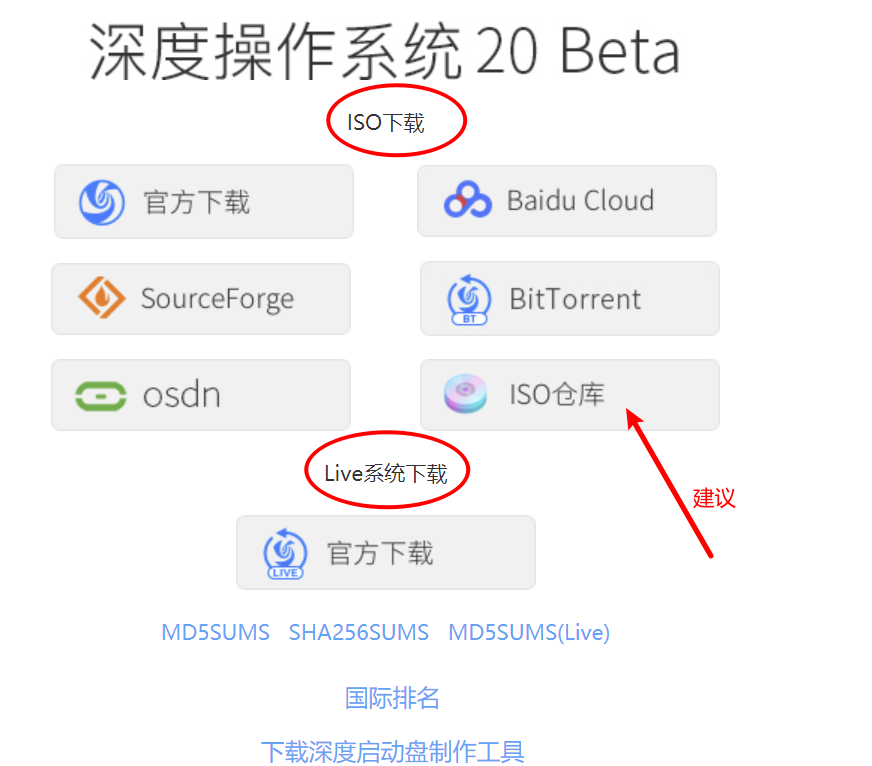
已经制作好U启动,并且也能找到启动项,但是只有live amd64和live amd64 failsele选择。我两个选项都试了都只能安装U盘体验版,也就是说只能安装在U盘里。我的win10什么都没有安装
Reply Favorite View the author
All Replies
avatar
忘记、过去
deepin
2020-05-31 20:14
#1
说明你下载错景象了......估计你下载的是live cd。
Reply View the author
avatar
lesath
deepin
2020-05-31 20:17
#2
https://bbs.deepin.org/post/195322
说明你下载错景象了......估计你下载的是live cd。

我下载的是deepin-live-system-2.0-amd64.iso
Reply View the author
avatar
忘记、过去
deepin
2020-05-31 20:19
#3
https://bbs.deepin.org/post/195322
我下载的是deepin-live-system-2.0-amd64.iso

......live-system,这个是类似于WinPE。请下载完整系统镜像......
Reply View the author
avatar
lesath
deepin
2020-05-31 20:19
#4
https://bbs.deepin.org/post/195322
说明你下载错景象了......估计你下载的是live cd。

我下载的是deepin-live-system-2.0-amd64.iso
Reply View the author
avatar
残念
deepin
2020-05-31 20:53
#5
Reply View the author
avatar
lesath
deepin
2020-05-31 23:05
#6
https://bbs.deepin.org/post/195322
......live-system,这个是类似于WinPE。请下载完整系统镜像......

谢谢你,确实是我下错了
Reply View the author
avatar
lesath
deepin
2020-05-31 23:06
#7

是我太蠢了没看清楚
Reply View the author
avatar
Jekyll361
deepin
2020-06-01 03:41
#8
别扯了,我现在正在用XPS 9350给你回帖呢,一次成功,没有任何磕磕碰碰
Reply View the author
avatar
心平气和
deepin
2020-06-01 04:08
#9
黑苹果不香么
Reply View the author
avatar
lesath
deepin
2020-06-03 01:49
#10
https://bbs.deepin.org/post/195322
别扯了,我现在正在用XPS 9350给你回帖呢,一次成功,没有任何磕磕碰碰

除了下载镜像有问题,在安装还遇到了其它问题比如安装发现不了分区一片空白。当然在网上各种搜索各种复杂的操作都试了。唯有在社区一位友一句话解决改为archi
Reply View the author
avatar
lesath
deepin
2020-06-03 01:50
#11

主要用来做开发的黑苹果懒得折腾,主要途方便
Reply View the author
avatar
lesath
deepin
2020-06-03 01:54
#12
【已解决】安装deepin,选择硬盘时列表内没有任何硬盘。https://bbs.deepin.org/post/146266
Reply View the author
avatar
心平气和
deepin
2020-06-03 06:13
#13
xps 黑苹果不用折腾的,有很多人维护的efi 的
Reply View the author