请问有没有一些linux护眼模式的应用
Tofloor
poster avatar
liujy126
deepin
2020-05-24 00:38
Author
如题,好用的护眼模式的
Reply Favorite View the author
All Replies
avatar
nolocus
deepin
2020-05-24 00:53
#1
自带的啊.控制中心-显示-亮度  里面 把自动调节色温开起来.. 徬晚开始 就会慢慢减少蓝光了.
Reply View the author
avatar
棒棒糖
deepin
2020-05-24 01:02
#2
redshift,红移
Reply View the author
avatar
liujy126
deepin
2020-05-24 02:21
#3
https://bbs.deepin.org/post/194939
自带的啊.控制中心-显示-亮度  里面 把自动调节色温开起来.. 徬晚开始 就会慢慢减少蓝光了.  ...

哦,它是傍晚才开始调,我是想直接调成暖色的,惨白惨白的太凄凉。
Reply View the author
avatar
pillar_stone
deepin
2020-05-24 04:44
#4
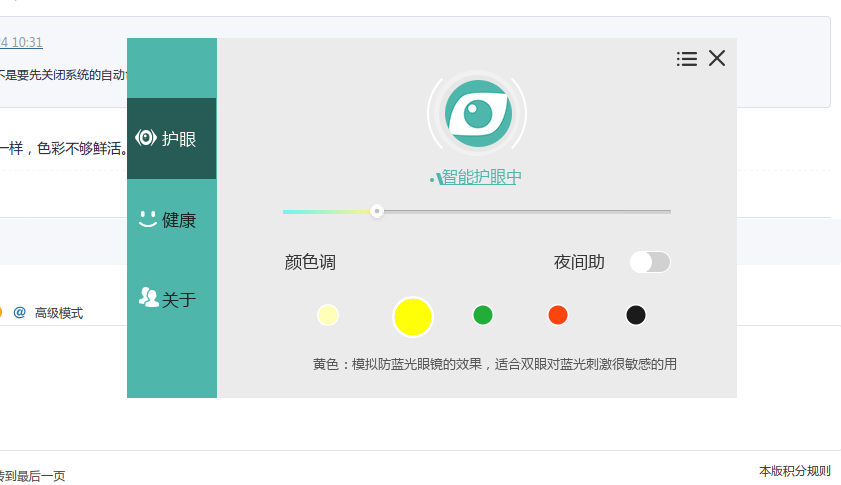
wine 安装 护眼宝,正在用。红移那玩意不行
Reply View the author
avatar
enforcee
deepin
2020-05-24 05:57
#5
redshift很好用 他是命令的不要直接在桌面运行
Reply View the author
avatar
pillar_stone
deepin
2020-05-24 06:15
#6
https://bbs.deepin.org/post/194939
redshift很好用 他是命令的不要直接在桌面运行

redshift 看着不舒服,比较灰暗。我是用wine 安装的 护眼宝,护眼宝有5种模式,颜色相对舒服
Reply View the author
avatar
liujy126
deepin
2020-05-24 18:31
#7
https://bbs.deepin.org/post/194939
redshift很好用 他是命令的不要直接在桌面运行

那要怎样使用?使用它是不是要先关闭系统的自动色温调节?
Reply View the author
avatar
pillar_stone
deepin
2020-05-24 19:28
#8
https://bbs.deepin.org/post/194939
那要怎样使用?使用它是不是要先关闭系统的自动色温调节?

那玩意和系统自带的效果一样,色彩不够鲜活。linux就没有好用的护眼软件. 好用的win有, 用wine 安装护眼宝,真香
Reply View the author
avatar
pillar_stone
deepin
2020-05-24 19:31
#9

Reply View the author
avatar
qiphon
deepin
2020-05-24 19:54
#10
你们打护眼宝是怎么装上的,为啥我的装不上
Reply View the author
avatar
pillar_stone
deepin
2020-05-24 19:58
#11
https://bbs.deepin.org/post/194939
你们打护眼宝是怎么装上的,为啥我的装不上

我的这么干的:

先安装wine,4.0就够用了。sudo apt install wine

护眼宝下载:https://sm.myapp.com/original/System/huyanbao_last_v3.1.exe

安装护眼宝: wine huyanbao_last_v3.1.exe

开始菜单右键设置下开机启动。
Reply View the author
avatar
enforcee
deepin
2020-05-24 20:14
#12
https://bbs.deepin.org/post/194939
那要怎样使用?使用它是不是要先关闭系统的自动色温调节?

控制台输入
redshift -h
或者
man redshift
就能查看用法

我喜欢的用法是
redshift -O 色温K
色温就是黑体发光的颜色 6500K是中性 高发蓝 低发红
你要是喜欢绿色的可以用
redshift -g 0.8:1:0.5 -O 6500K
虽然一点都没护眼
想移除效果就
redshift -x

凡是大家能稍微狠心学五分钟 就不用问这么多没啥必要的问题
Reply View the author
avatar
qiphon
deepin
2020-05-24 21:04
#13
https://bbs.deepin.org/post/194939
我的这么干的:

先安装wine,4.0就够用了。sudo apt install wine

能用啦,感谢
Reply View the author
avatar
pillar_stone
deepin
2020-05-24 21:17
#14

不客气,能用就好
Reply View the author
avatar
s***7@gmail.com
deepin
2020-05-24 21:24
#15
iris mini,Linux原生,免费,我记得以前商店有,不知道现在有没有。。。

官网:
https://iristech.co/iris-mini/
Reply View the author
avatar
liujy126
deepin
2020-05-25 22:37
#16
本帖最后由 liujy126 于 2020-5-25 14:50 编辑
https://bbs.deepin.org/post/194939
iris mini,Linux原生,免费,我记得以前商店有,不知道现在有没有。。。

官网:

多谢,我在win下面就用的是iris pro,非常舒服
但是,怎么安装呢?下载来的是“iris-mini-0.3.8-linux-64bit.tar.gz”,tar.gz格式的文件
Reply View the author
avatar
s***7@gmail.com
deepin
2020-07-18 11:05
#17
https://bbs.deepin.org/post/194939
多谢,我在win下面就用的是iris pro,非常舒服
但是,怎么安装呢?下载来的是“iris-mini-0.3.8-linux-64b ...

这是个压缩包,刚下载解压看了看,解压出来是AppImage格式的单个文件,应该是直接能双击运行的
Reply View the author