WIN10&深度双系统,安装失败,求助
Tofloor
poster avatar
lyc2h5oh
deepin
2020-05-19 21:42
Author
翻出一台老机器,尝试安装WIN10&深度双系统。使用官方工具只做启动盘,BIOS设定完毕,选择进入引导,黑屏,左上方有光标,无法进入引导,求助。Linux小白,请尽量详细说明,谢谢!!!!说明图片如下:
机器型号:Acer SW312-31


硬盘

系统选项

进入系统失败

Reply Favorite View the author
All Replies
avatar
jjcui8595
deepin
2020-05-19 21:56
#1
1、使用Deepin官方工具制作启动盘
2、关闭Bios中的安全引导
Reply View the author
avatar
lipzbob
deepin
2020-05-19 22:56
#2
多系统可以选用refind,可以直接引导内核.
Reply View the author
avatar
deepin-zx
deepin
2020-05-20 00:50
#3
deepin 与 Windows 双系统硬盘安装方法总结:https://bbs.deepin.org/post/182429
Reply View the author
avatar
Vimvi2233
deepin
2020-05-20 02:27
#4
It has been deleted!
avatar
lyc2h5oh
deepin
2020-05-20 02:48
#5
https://bbs.deepin.org/post/194674
deepin 与 Windows 双系统硬盘安装方法总结:https://bbs.deepin.org/post/182429 ...
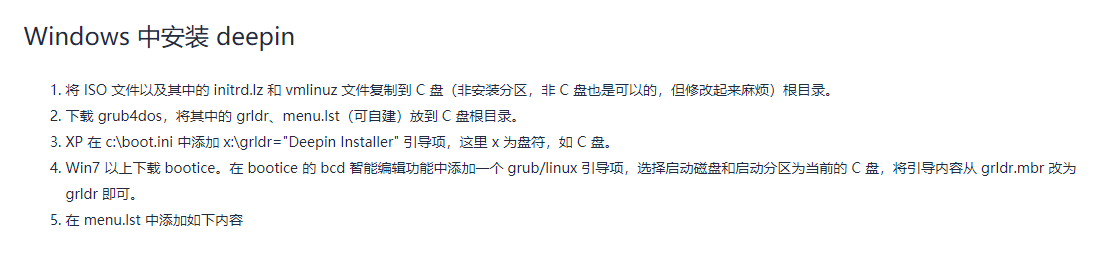
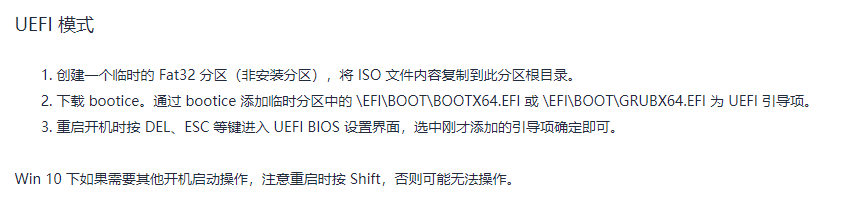
是先操作
再操作

这样吗?
Reply View the author
avatar
lyc2h5oh
deepin
2020-05-20 04:12
#6
https://bbs.deepin.org/post/194674
建议使用rufus进行光盘刻录,刻录时选择dd模式,目标系统选择你bios设置的类型;

如果还是出现问题,建议换 ...

没有光驱了
Reply View the author
avatar
SamLukeYes
deepin
2020-05-20 04:48
#7

就是刻U盘的意思,不过我建议做启动盘用ventoy。其实像你这样的情况按照3楼的方案可能会比较好,refind至少能解决deepin不能启动的燃眉之急,后续优化引导菜单还可以再调整。
Reply View the author
avatar
Vimvi2233
deepin
2020-05-20 06:55
#8
It has been deleted!