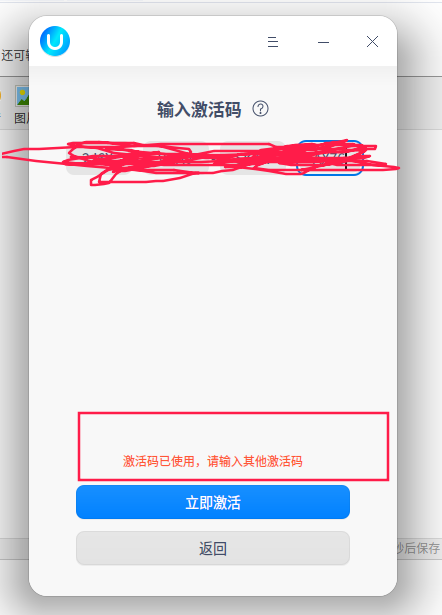
UOS个人版重启后,激活失效~
Tofloor
poster avatar
早起的虫儿有鸟吃
deepin
2020-05-17 01:44
Author
如题,重启后激活失效,重新输入激活码也不行。有什么解决的办法吗?


Reply Favorite View the author
All Replies
avatar
shaoming
deepin
2020-05-17 01:57
#1
是不是更新过?如果是那就跟我的情况差不多,看我的帖子有解决方法 https://bbs.deepin.org/post/194446
Reply View the author
avatar
MeowVing
deepin
2020-05-17 02:01
#2
就目前来看,激活后打开开发者模式极大概率触发重启后激活失效。。。
Reply View the author
avatar
早起的虫儿有鸟吃
deepin
2020-05-17 02:15
#3
https://bbs.deepin.org/post/194442
是不是更新过?如果是那就跟我的情况差不多,看我的帖子有解决方法 https://bbs.deepin.org/forum.php?mod= ...

我是打开了开发者模式。
Reply View the author
avatar
shaoming
deepin
2020-05-17 02:17
#4
https://bbs.deepin.org/post/194442
我是打开了开发者模式。

就是这样的,差不多,我也开了root
Reply View the author
avatar
早起的虫儿有鸟吃
deepin
2020-05-17 02:28
#5
https://bbs.deepin.org/post/194442
就是这样的,差不多,我也开了root

linux系统不开root怎么玩?生气ing
Reply View the author
avatar
nero28
deepin
2020-05-17 02:30
#6
https://bbs.deepin.org/post/194442
linux系统不开root怎么玩?生气ing

你们激活码拿到了?我系统安装好了,就等激活码了,现在只能点点看看。。。
Reply View the author
avatar
jie1018
deepin
2020-05-17 05:25
#7
我觉得deepin很难,让大家用命令,说操作起来麻烦,适合小众,uos不让用了,又觉得没有玩颈
Reply View the author
avatar
张耘赫
deepin
2020-05-17 05:38
#8
更新系统修复
Reply View the author
avatar
昨夜的星辰
deepin
2020-05-17 06:28
#9
我也是开了开发者模式,现在是未激活了,sudo  apt update提示500错误,不知道是没权限还是服务器真有问题
Reply View the author
avatar
昨夜的星辰
deepin
2020-05-17 06:57
#10
https://bbs.deepin.org/post/194442
我也是开了开发者模式,现在是未激活了,sudo  apt update提示500错误,不知道是没权限还是服务器真有问题 ...

一顿试了不行之后只能试试系统重启了,没想到重启之后直接是激活状态了
Reply View the author
avatar
kirin2018
deepin
2020-05-17 06:59
#11
原来激活了就不要贪心root,哈哈哈。
Reply View the author
avatar
昨夜的星辰
deepin
2020-05-17 06:59
#12
把五笔输入法也搞上了,用起来是真的舒服,拼音搞不定,打起字来太别扭了
五笔输入法一直用fcitx-table-wbpy这个,五笔拼音,毕竟可能有时候会遇到个别字打不出来
sudo apt install fcitx-table-wbpy
Reply View the author
avatar
dee123
deepin
2020-05-17 07:07
#13
panpanpdj 发表于 2020-5-16 22:59
把五笔输入法也搞上了,用起来是真的舒服,拼音搞不定,打起字来太别扭了
五笔输入法一直用fcitx-table-wbp ...

五笔输入法,求资源。
Reply View the author
avatar
昨夜的星辰
deepin
2020-05-17 07:58
#14
https://bbs.deepin.org/post/194442
五笔输入法,求资源。

如果你能用apt install那就直接用那条命令安装wbpy,然后桌面右下角输入法右键,设置,把五笔拼音装上就可以
如果没有root权限,可以商店里安装讯飞,里面也有五笔的,我在deepin里试过,也不错,只是wbpy用习惯了也就懒得改了
Reply View the author
Comments
mcaoser
2020-05-17 09:07
不激活也很容易获得root权限,可安装DEB包,但运行不了,程序不能通过系统安全验证