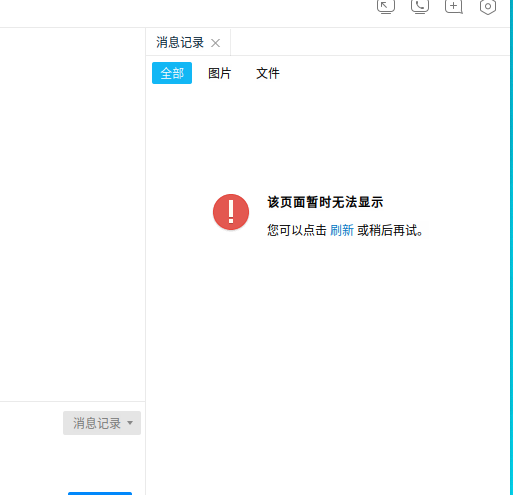
QQ,TIM消息记录无法显示
Tofloor
poster avatar
solothink
deepin
2020-05-16 18:34
Author
管理员好! 最近一周发现QQ或者TIM消息记录点开后,页面无法显示,麻烦看一下,是什么地方出问题。
Reply Favorite View the author
All Replies
avatar
cdxyh
deepin
2020-06-09 18:55
#1
我的也出现同样问题,删除deepin-QQ目录,重装都没有用!官方有没有发现什么原因和解决方案?
Reply View the author
avatar
solothink
deepin
2020-06-09 23:36
#2
https://bbs.deepin.org/post/194396
我的也出现同样问题,删除deepin-QQ目录,重装都没有用!官方有没有发现什么原因和解决方案? ...

据说是wine的问题,按照一些帖子做啦,不理想。等补丁啦
Reply View the author
avatar
cdxyh
deepin
2020-06-10 02:40
#3
我记得以前是可以的,不知道是不是升级成20的原因!
Reply View the author
avatar
solothink
deepin
2020-06-10 02:59
#4
https://bbs.deepin.org/post/194396
我记得以前是可以的,不知道是不是升级成20的原因!

嗯,我还有一台15.11,我试一下
Reply View the author
avatar
solothink
deepin
2020-06-10 04:06
#5
https://bbs.deepin.org/post/194396
我记得以前是可以的,不知道是不是升级成20的原因!

其他的deepin20还不行,但是我有一台deepin20是可以了,应该是按照论坛里对帖子,敲了几个命令。好像是把IP6关掉吧。
Reply View the author
avatar
cdxyh
deepin
2020-06-10 04:09
#6
本帖最后由 cdxyh 于 2020-6-9 21:03 编辑

我先试一下!
net.ipv6.conf.all.disable_ipv6 = 1
net.ipv6.conf.default.disable_ipv6 = 1
net.ipv6.conf.lo.disable_ipv6 = 1
还是不行

Reply View the author
avatar
coldlook
deepin
2020-06-15 17:23
#7
同样的问题
Reply View the author
avatar
deepin-mq
deepin
2020-06-15 17:44
#8
添加内核参数彻底禁用IPv6:sudo dedit /etc/default/grub
在此行添加参数:GRUB_CMDLINE_LINUX="ipv6.disable=1" 
保存退出后执行:sudo update-grub 执行完命令之后,需要重新启动系统

试试看是否能恢复
Reply View the author
avatar
solothink
deepin
2020-06-15 18:13
#9
https://bbs.deepin.org/post/194396
添加内核参数彻底禁用IPv6:sudo dedit /etc/default/grub
在此行添加参数:GRUB_CMDLINE_LINUX="ipv6.dis ...

谢谢啦,好的,我试一下
Reply View the author
avatar
solothink
deepin
2020-06-15 18:30
#10
https://bbs.deepin.org/post/194396
添加内核参数彻底禁用IPv6:sudo dedit /etc/default/grub
在此行添加参数:GRUB_CMDLINE_LINUX="ipv6.dis ...

居然解决了不能连接共享打印机的问题。。。。。太感谢了,QQ图片也好了。deepin加油,我们公司现在3台deepin20,一台15.11,实在不能解决的用虚拟机装win7解决。。。
Reply View the author
avatar
solothink
deepin
2020-06-15 19:11
#11
https://bbs.deepin.org/post/194396
添加内核参数彻底禁用IPv6:sudo dedit /etc/default/grub
在此行添加参数:GRUB_CMDLINE_LINUX="ipv6.dis ...

       
7#
solothink 发表于 14 分钟前 | 只看该作者
本帖最后由 solothink 于 2020-6-15 11:06 编辑


现在有个新问题,用您告诉我的关闭ipv6的方法也解决了连接共享打印机的问题,但是,一台deepin20客户端点打印测试页时能跳出输入账户命令的对话框,另外一台deepin20不行,是不是哪个组件有问题了。在输入sudo dedit /etc/default/grub命令时,好像显示也和其他两台deepin20不同:
QStandardPaths: XDG_RUNTIME_DIR not set, defaulting to '/tmp/runtime-root'
2020-06-15, 10:59:55.574 [Debug  ] [                                                         0] Windows size:  0
2020-06-15, 10:59:55.645 [Debug  ] [qsettingbackend.cpp  Dtk::Core:SettingBackend:SettingBackend 54] create config "/root/.config/deepin/deepin-editor/config.conf"
2020-06-15, 10:59:55.888 [Debug  ] [                                                         0] Open  "/etc/default/grub"  with new window
2020-06-15, 10:59:55.953 [Debug  ] [                                                         0] detect mime type:  "/etc/default/grub" "text/plain"
No appenders assotiated with category org.kde.ksyntaxhighlighting
[Error  ] <> Repository got deleted while a highlighter is still active!
No appenders assotiated with category org.kde.ksyntaxhighlighting
[Error  ] <> Repository got deleted while a highlighter is still active!
No appenders assotiated with category org.kde.ksyntaxhighlighting
[Error  ] <> Repository got deleted while a highlighter is still active!
No appenders assotiated with category org.kde.ksyntaxhighlighting
[Error  ] <> Repository got deleted while a highlighter is still active!
2020-06-15, 10:59:56.007 [Debug  ] [                                                         0] load finished:  "/etc/default/grub" ,  "UTF-8" endOfLine:  0
No appenders assotiated with category org.kde.ksyntaxhighlighting
[Error  ] <> Repository got deleted while a highlighter is still active!
No appenders assotiated with category org.kde.ksyntaxhighlighting
[Error  ] <> Repository got deleted while a highlighter is still active!
No appenders assotiated with category org.kde.ksyntaxhighlighting
[Error  ] <> Repository got deleted while a highlighter is still active!
No appenders assotiated with category org.kde.ksyntaxhighlighting
[Error  ] <> Repository got deleted while a highlighter is still active!
No appenders assotiated with category org.kde.ksyntaxhighlighting
[Error  ] <> Repository got deleted while a highlighter is still active!
No appenders assotiated with category org.kde.ksyntaxhighlighting
[Error  ] <> Repository got deleted while a highlighter is still active!
No appenders assotiated with category org.kde.ksyntaxhighlighting
[Error  ] <> Repository got deleted while a highlighter is still active!
No appenders assotiated with category org.kde.ksyntaxhighlighting
[Error  ] <> Repository got deleted while a highlighter is still active!
No appenders assotiated with category org.kde.ksyntaxhighlighting
[Error  ] <> Repository got deleted while a highlighter is still active!
No appenders assotiated with category org.kde.ksyntaxhighlighting
[Error  ] <> Repository got deleted while a highlighter is still active!
No appenders assotiated with category org.kde.ksyntaxhighlighting
[Error  ] <> Repository got deleted while a highlighter is still active!
No appenders assotiated with category org.kde.ksyntaxhighlighting
[Error  ] <> Repository got deleted while a highlighter is still active!
No appenders assotiated with category org.kde.ksyntaxhighlighting
[Error  ] <> Repository got deleted while a highlighter is still active!
2020-06-15, 10:59:56.028 [Debug  ] [                                                         0] Enter function [ checkBlockShutdown ].
2020-06-15, 10:59:56.029 [Debug  ] [                                                         0] m_tabbar->textAt(i): "grub"
2020-06-15, 10:59:56.029 [Debug  ] [                                                         0] Nublock shutdown.
2020-06-15, 10:59:56.029 [Debug  ] [                                                         0] Enter function [ checkBlockShutdown ].
2020-06-15, 10:59:56.030 [Debug  ] [                                                         0] m_tabbar->textAt(i): "grub"
2020-06-15, 10:59:56.030 [Debug  ] [                                                         0] Nublock shutdown.
2020-06-15, 10:59:56.030 [Debug  ] [                                                         0] Enter function [ checkBlockShutdown ].
2020-06-15, 10:59:56.030 [Debug  ] [                                                         0] m_tabbar->textAt(i): "grub"
2020-06-15, 10:59:56.030 [Debug  ] [                                                         0] Nublock shutdown.
2020-06-15, 11:00:11.734 [Debug  ] [                                                         0] Enter function [ checkBlockShutdown ].
2020-06-15, 11:00:11.735 [Debug  ] [                                                         0] m_tabbar->textAt(i): "grub"
2020-06-15, 11:00:11.735 [Debug  ] [                                                         0] Nublock shutdown.
2020-06-15, 11:00:27.726 [Debug  ] [                                                         0] Enter function [ checkBlockShutdown ].
2020-06-15, 11:00:27.727 [Debug  ] [                                                         0] m_tabbar->textAt(i): "grub"
2020-06-15, 11:00:27.728 [Debug  ] [                                                         0] Nublock shutdown.
2020-06-15, 11:00:38.124 [Debug  ] [                                                         0] Enter function [ checkBlockShutdown ].
2020-06-15, 11:00:38.125 [Debug  ] [                                                         0] m_tabbar->textAt(i): "grub"
2020-06-15, 11:00:38.125 [Debug  ] [                                                         0] Nublock shutdown.
Reply View the author
avatar
cdxyh
deepin
2020-06-18 14:52
#12
恢复到15.11,正常了
Reply View the author
avatar
solothink
deepin
2020-06-18 15:15
#13
https://bbs.deepin.org/post/194396
恢复到15.11,正常了

好啊!如果要联网办公,还是15.11目前方便点。
Reply View the author
avatar
SamLukeYes
deepin
2020-06-18 16:53
#14
tim3.0没问题
Reply View the author
avatar
solothink
deepin
2020-06-18 17:55
#15

应用市场里是2.几,怎么安装3.0啊
Reply View the author
avatar
SamLukeYes
deepin
2020-06-18 18:19
#16
https://bbs.deepin.org/post/194396
应用市场里是2.几,怎么安装3.0啊

先下载安装包,然后
  1. WINEPREFIX=~/.deepinwine/Deepin-TIM deepin-wine <安装包路径>
Copy the Code
Reply View the author
avatar
solothink
deepin
2020-06-18 18:36
#17
https://bbs.deepin.org/post/194396
先下载安装包,然后

有点明白了。
Reply View the author
avatar
Stoney
deepin
2020-06-18 19:26
#18
https://bbs.deepin.org/post/194396
先下载安装包,然后

点开消息管理就卡死了???
Reply View the author
avatar
SamLukeYes
deepin
2020-06-18 19:58
#19
本帖最后由 samlukeyes123 于 2020-6-18 12:05 编辑
https://bbs.deepin.org/post/194396
点开消息管理就卡死了???

我这边可以哦,是不是环境的问题
Reply View the author