能不能增加对于关机定时的方案?
Tofloor
poster avatar
mahuan
deepin
2020-05-13 16:33
Author
能不能增加对于关机定时的方案?电源管理最多只能设置一个小时时间待机!如果能自由定义时间,或者干脆来个定时关机,那该多好啊!在某些特定情况下,会需要这个功能!
Reply Favorite View the author
All Replies
avatar
残念
deepin
2020-05-13 16:53
#1
shutdown命令可以设置定时关机,其他的不太清楚
Reply View the author
avatar
fxbszj
deepin
2020-05-13 17:43
#2
shutdown -h 12:00  设定12:00关机
shutdown -c  取消定时关机计划
Reply View the author
avatar
mahuan
deepin
2020-05-13 18:55
#3
https://bbs.deepin.org/post/194164
shutdown命令可以设置定时关机,其他的不太清楚

谢谢,涨知识了!
Reply View the author
avatar
mahuan
deepin
2020-05-13 18:56
#4
https://bbs.deepin.org/post/194164
shutdown -h 12:00  设定12:00关机
shutdown -c  取消定时关机计划

谢谢,又学会了一个命令
Reply View the author
avatar
drchen
deepin
2020-05-13 19:03
#5
那如何设置每天12点关机?就像WINDOWS关机计划。
Reply View the author
avatar
fxbszj
deepin
2020-05-13 19:51
#6
本帖最后由 fxbszj 于 2020-5-14 11:05 编辑
https://bbs.deepin.org/post/194164
那如何设置每天12点关机?就像WINDOWS关机计划。

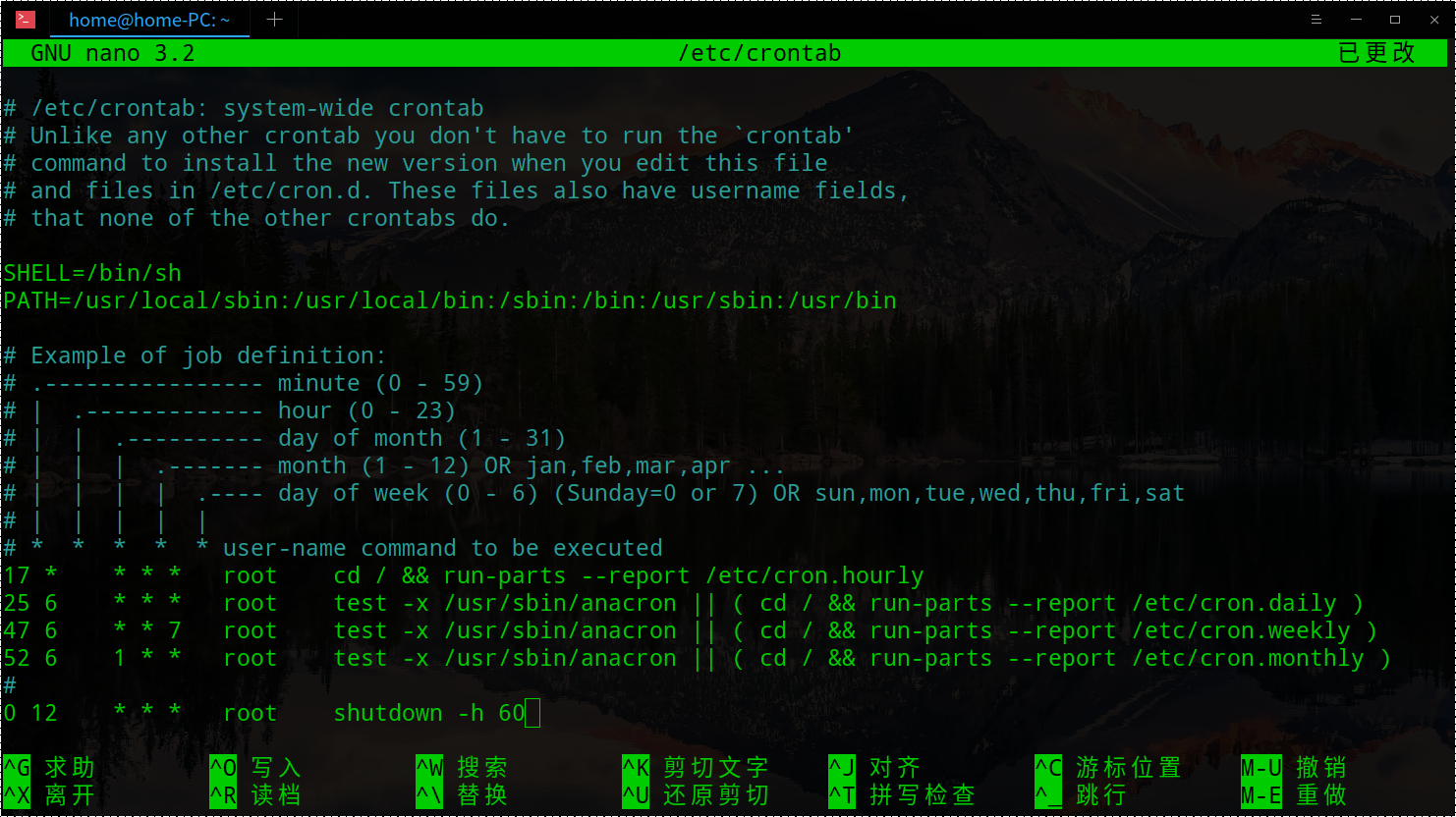
编辑/etc/crontab,添加以下内容
0 12  *  *  * root    shutdown -h now  
大致是这样,很久没用了,不知道对不对了。可以设置对应的分/时/天/月/周的定时任务,就是前面的几个*或者数字, root是运行任务的用户, 后面是具体的操作指令.补充下,这个需要启动crond (systemctl start crond)
Reply View the author
Comments
deepinwangzhen
2020-05-14 18:47
哥们,你这个表达式有问题,目前是每分钟都执行..应该这样: 0 12 * * * root /sbin/shutdown -h now
avatar
drchen
deepin
2020-05-14 18:04
#7
https://bbs.deepin.org/post/194164
编辑/etc/crontab,添加以下内容
* 12  *  *  * root    shutdown -h now  
大致是这样,很久没用了,不知 ...

不明白。我是linux盲
Reply View the author
avatar
icedragon
deepin
2020-05-14 18:11
#8
https://bbs.deepin.org/post/194164
不明白。我是linux盲

crontab 就是 Linux 上的定时任务,详细可以搜索一下,不像 Windows 上有可视化的界面。
Reply View the author
avatar
fxbszj
deepin
2020-05-14 19:07
#9
Reply View the author
avatar
luzhishen
deepin
2020-05-14 19:32
#10
也许可以用crontab命令实现呢
Reply View the author
avatar
176******49
deepin
2020-05-14 19:37
#11
本帖最后由 windnbike 于 2020-5-14 11:49 编辑

如果是倒计时关机,这样操作
1. 打开终端
2. 输入命令 sudo shutdown -h 120 回车
倒计时以分钟为单位,上面是倒计时2小时关机。

如果是每天指定时间关机,这样操作
1. 打开终端,输入 sudo nano /etc/crontab
2. 在最底下一行,顶头输入自己的关机计划,例如:
0 12 * * * root shutdown -h now
3. 按 Crtl+X 退出编辑器,按Y保存,按回车确认文件名。
4. 关闭终端

计划任务的格式为:
分 时 几号 几月 周几 用户名 执行命令
shutdown 关机不会有任何提前的提示,关机时瞬间黑屏,记得提前保存好文件。

修改:原来深度的shutdown倒计时不在桌面提示啊
Reply View the author
avatar
mahuan
deepin
2020-05-14 20:56
#12
windnbike 发表于 2020-5-14 11:37
如果是倒计时关机,这样操作
1. 打开终端
2. 输入命令 sudo shutdown -h 120 回车

如果是设置每天,那下面的方案几号几月应该怎么填?默认?我只需要每天下午4:30关机,能给个范本吗?
Reply View the author
avatar
176******49
deepin
2020-05-14 23:06
#13
https://bbs.deepin.org/post/194164
如果是设置每天,那下面的方案几号几月应该怎么填?默认?我只需要每天下午4:30关机,能给个范本吗? ...

每天都需要,就填*;特定日期需要就填日期
30 16  * * * root shutdown -h now
其它例子:
每周3
30 16 * * 3
每月12号
30 16 12 * *
10月的每一天
30 16 * 10 *
Reply View the author
avatar
deepin157
deepin
2020-05-15 00:10
#14
向日葵远程控制软件+小米智能插座或向日葵开机插座或开机棒,远程控制和定时开关机功能都有了,已经本人验证,好使!
Reply View the author
avatar
mahuan
deepin
2020-05-15 01:01
#15
https://bbs.deepin.org/post/194164
向日葵远程控制软件+小米智能插座或向日葵开机插座或开机棒,远程控制和定时开关机功能都有了,已经本人验 ...

玩linux,不要玩硬件
Reply View the author
avatar
mahuan
deepin
2020-05-15 04:07
#16
mahuan 发表于 2020-5-14 12:56
如果是设置每天,那下面的方案几号几月应该怎么填?默认?我只需要每天下午4:30关机,能给个范本吗? ...

我把这个命令的文本改错乱了,怎么重置?
Reply View the author
avatar
neko
deepin
Ecological co-builder
Q&A Team
2020-05-15 14:13
#17
https://bbs.deepin.org/post/194164
我把这个命令的文本改错乱了,怎么重置?

比较偷懒的方法:
echo 'shutdown -h 16:30' >> ~/.bashrc
Reply View the author