在线升级V20
Tofloor
poster avatar
atlands
deepin
2020-01-11 22:14
Author
https://deepinos.org/d/62-method-of-upgrading-deepin-to-uos/4
Reply Favorite View the author
All Replies
3 / 5
To page
avatar
tzho
deepin
2020-01-13 04:32
#41
https://bbs.deepin.org/post/187873
第一步换源没成功

那换源没成功,怎么办?
Reply View the author
avatar
tzho
deepin
2020-01-13 04:36
#42
https://bbs.deepin.org/post/187873
源没改
是不是没保存?

如何保存?
Reply View the author
avatar
jianguo922
deepin
2020-01-13 04:48
#43
越来越多的linux社区交流,很不错
Reply View the author
avatar
lyhdzxf
deepin
2020-01-13 05:12
#44
台式机,升级完成,交互过程选择不安装grub,出现任务栏消失的症状;笔记本,交互过程安装了grub,任务栏依然没有,囧囧
Reply View the author
avatar
tzho
deepin
2020-01-13 05:37
#45
https://bbs.deepin.org/post/187873
1.sudo dedit /etc/apt/sources.list

## Generated by deepin-installer
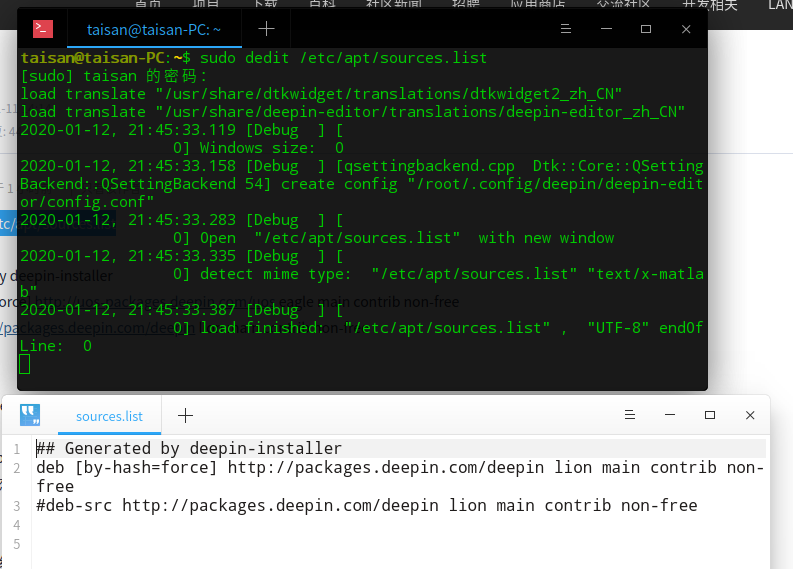
请问你是如何保存的?
Reply View the author
avatar
tzho
deepin
2020-01-13 05:44
#46
https://bbs.deepin.org/post/187873
1.sudo dedit /etc/apt/sources.list

## Generated by deepin-installer

请教,
1,进入终端
2,输入:sudo dedit /etc/apt/sources.list
3,输入:保存(这个我不知道如何做?)
4,输入:sudo apt update
5,输入:sudo apt full-upgrade
6,一直点Y
7,最后重启
请教,是不是这样做?
Reply View the author
avatar
tzho
deepin
2020-01-13 05:49
#47
https://bbs.deepin.org/post/187873
1.sudo dedit /etc/apt/sources.list

## Generated by deepin-installer

请教,我的到了这个画面,显示2个窗口,应如何?
Reply View the author
avatar
lyhdzxf
deepin
2020-01-13 05:51
#48
在白色窗口编辑,完成后按ctrl+s保存
Reply View the author
avatar
tzho
deepin
2020-01-13 06:00
#49
https://bbs.deepin.org/post/187873
在白色窗口编辑,完成后按ctrl+s保存

编辑什么?是不是就保存白色的窗口的内容就可以了?
Reply View the author
Comments
lyhdzxf
2020-01-13 06:10
按照41楼的内容修改
avatar
WangZhongyun
deepin
2020-01-13 06:24
#50
我的UOS修改源更新后能安装应用商店里的Wine软件使用了。不过源里软件还比较少,所以还是保留deepin15.11不升级。
Reply View the author
avatar
aa5231238
deepin
2020-01-13 06:42
#51
本帖最后由 aa5231238 于 2020-1-12 22:47 编辑

正在读取包列表。。。多恩

建立依赖树

正在读取状态信息。。。多恩

您可能需要运行“apt--fix breaked install”来更正这些错误。

以下包具有未满足的依赖项:

libc bin:取决于:libc6(<2.25)但安装了2.28-10

建议:手册页,但未安装

libc dev bin:取决于:libc6(<2.25)但安装了2.28-10

建议:手册页,但未安装

建议:manpages dev但未安装

libc6 dev:取决于:libc6(=2.24-11+deb9u3),但安装了2.28-10

地区:取决于:libc bin(>2.28)

E: 未满足的依赖关系。尝试“apt--fix breaked install”,但不使用任何软件包(或指定解决方案)。
Reply View the author
avatar
关中π
deepin
2020-01-13 06:58
#52
可以更新,更新后,卡成狗了。显卡还是有毛病
Reply View the author
avatar
关中π
deepin
2020-01-13 07:10
#53
这么升级能一路升级成正式版不?
Reply View the author
avatar
tzho
deepin
2020-01-13 07:10
#54
https://bbs.deepin.org/post/187873
编辑什么?是不是就保存白色的窗口的内容就可以了?

谢谢大家的帮助
终于升级了,整个流程应是
1,进入终端
2,输入:sudo dedit /etc/apt/sources.list
3,输入:本机的密码
4,编辑:
## Generated by deepin-installer
deb [by-hash=force] http://uos-packages.deepin.com/uos eagle main contrib non-free
#deb-src http://packages.deepin.com/deepin lion main contrib non-free
5,保存成:sources.list
6,输入:sudo apt update
7,输入:sudo apt full-upgrade
8,一直点Y
9,最后重启
请教,是不是这样做?
Reply View the author
avatar
atlands
deepin
2020-01-13 07:28
#55
https://bbs.deepin.org/post/187873
谢谢大家的帮助
终于升级了,整个流程应是
1,进入终端

是的,重启完应该还是15.11,并且显示可能会有问题。
点击设置-系统更新,再次更新系统重启即可
Reply View the author
avatar
关中π
deepin
2020-01-13 09:17
#56

你是应用到生产环境了吗?

这个版本可以直接升级到正式版吗?
Reply View the author
avatar
关中π
deepin
2020-01-13 09:24
#57
https://bbs.deepin.org/post/187873
我直升上来发现没有UOS浏览器,应用商店也搜索不到
并且应用商店查看云端应用、评论,显示网络错误。
不 ...

我RC升级,之后也是商店登陆没用。登陆后也是没登陆。
Reply View the author
avatar
彩虹工作室
deepin
2020-01-13 14:37
#58
https://bbs.deepin.org/post/187873
你是应用到生产环境了吗?

这个版本可以直接升级到正式版吗?

自己的mi pro笔记本,用来开发的,差不多就是生产环境了吧。
至于能否升级到正式版,需要需要官方回复,
目前升级后,除了内核低一点外,其他还好
Reply View the author
avatar
蒙笛
deepin
2020-01-13 15:53
#59
虚拟机按照41楼方法,把之前泄露版升级了,到目前一切正常。
Reply View the author
avatar
heham
deepin
2020-01-13 16:23
#60
启动感觉变慢不少
Reply View the author
3 / 5
To page