怎么分区
Tofloor
poster avatar
lwq
deepin
2019-12-10 21:14
Author
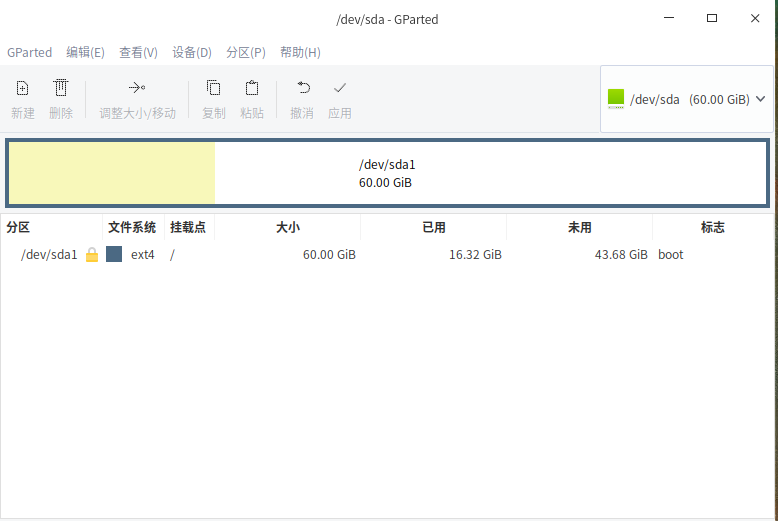
怎么把这一个区分成两个
Reply Favorite View the author
All Replies
avatar
ghostry
deepin
2019-12-10 21:32
#1
进live系统,打开gparted,右键要调整的分区,调整大小.

调小后,在空出来的地方建立新的分区.

操作过程中注意不要出现断电等意外情况导致中断,会丢数据.

建议先备份数据后.

用无重要数据磁盘操作

确保你操作的磁盘如果丢失,你能承受后果.
Reply View the author
avatar
lwq
deepin
2019-12-10 22:08
#2
ghostry 发表于 2019-12-10 13:32
进live系统,打开gparted,右键要调整的分区,调整大小.

调小后,在空出来的地方建立新的分区.

根本无法分区,调整了分区大小mib后自动跳动的原始的mib,无法调整。
Reply View the author
avatar
lwq
deepin
2019-12-10 22:10
#3
scfy 发表于 2019-12-10 14:00
危险性很大的,这么点空间还是别折腾了

使用不惜折腾不止。无法调整,怎么办?
Reply View the author
avatar
lwq
deepin
2019-12-10 22:11
#4
ghostry 发表于 2019-12-10 13:32
进live系统,打开gparted,右键要调整的分区,调整大小.

调小后,在空出来的地方建立新的分区.

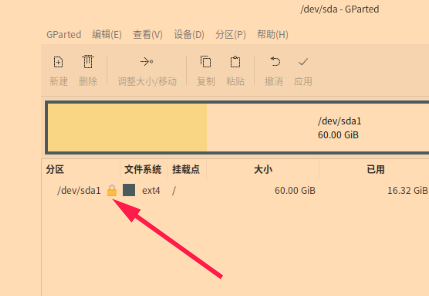
这图能不能看清?
Reply View the author
avatar
ghostry
deepin
2019-12-10 22:12
#5
https://bbs.deepin.org/post/186589
根本无法分区,调整了分区大小mib后自动跳动的原始的mib,无法调整。

你没认真看我回复啊,

第一句就说了,

进live系统.
Reply View the author
avatar
lwq
deepin
2019-12-10 22:14
#6
ghostry 发表于 2019-12-10 14:12
你没认真看我回复啊,

第一句就说了,

进了。可是还不行(▼皿▼#)
Reply View the author
avatar
ghostry
deepin
2019-12-10 22:16
#7
https://bbs.deepin.org/post/186589
进了。可是还不行(▼皿▼#)

不能吧,分区卸载后随便调的.


ext4也不是什么稀罕格式.
Reply View the author
avatar
ghostry
deepin
2019-12-10 22:18
#8


这个锁没了就能调了.

Reply View the author
avatar
lwq
deepin
2019-12-10 22:18
#9
ghostry 发表于 2019-12-10 14:16
不能吧,分区卸载后随便调的.


无法卸载,,,,,,,
Reply View the author
avatar
lwq
deepin
2019-12-10 22:19
#10
ghostry 发表于 2019-12-10 14:18
这个锁没了就能调了.

那个锁怎么解开取消?
Reply View the author
avatar
ghostry
deepin
2019-12-10 22:21
#11
https://bbs.deepin.org/post/186589
无法卸载,,,,,,,

你电脑只有这一个磁盘吗
Reply View the author
avatar
lwq
deepin
2019-12-10 22:22
#12
ghostry 发表于 2019-12-10 14:21
你电脑只有这一个磁盘吗

我就是用虚拟机看看怎么分区
Reply View the author
avatar
lbygljq
deepin
2019-12-10 22:23
#13
https://bbs.deepin.org/post/186589
那个锁怎么解开取消?

右键选择卸载
Reply View the author
avatar
ghostry
deepin
2019-12-10 22:26
#14
https://bbs.deepin.org/post/186589
我就是用虚拟机看看怎么分区

前提,我们不能调整mount的分区,也不可能umount根分区。

调整磁盘容易的方法就是使用live CD或U盘启动后使用Gparted工具

大概就是这样,想办法满足条件就能调整了.
Reply View the author
avatar
lwq
deepin
2019-12-10 22:27
#15
lbygljq 发表于 2019-12-10 14:23
右键选择卸载

无法卸载,请看图
Reply View the author
avatar
lwq
deepin
2019-12-10 22:29
#16
ghostry 发表于 2019-12-10 14:26
前提,我们不能调整mount的分区,也不可能umount根分区。

调整磁盘容易的方法就是使用live CD或U盘启动后 ...

不能在系统里面分区吗?像WINDOWS一样。
Reply View the author
avatar
ghostry
deepin
2019-12-10 23:12
#17
https://bbs.deepin.org/post/186589
不能在系统里面分区吗?像WINDOWS一样。

Windows也调不了c盘吧.
Reply View the author
avatar
Feng Yu
deepin
2019-12-10 23:29
#18
See: https://askubuntu.com/questions/ ... artition-at-runtime

ext4不支持在线伸缩,底层是lvm倒是可以。其他如btrfs或zfs是支持在线伸缩的
Reply View the author
avatar
lwq
deepin
2019-12-11 00:45
#19
ghostry 发表于 2019-12-10 15:12
Windows也调不了c盘吧.

WINDOWS是可以的
Reply View the author
avatar
lwq
deepin
2019-12-11 00:45
#20
ghostry 发表于 2019-12-10 15:12
Windows也调不了c盘吧.

WINDOWS是可以的。。。
Reply View the author