最新的deepin商店软件使用,和更新系统的方法
Tofloor
poster avatar
深圳市耀影科技有限公司
deepin
2019-11-28 02:33
Author
本帖最后由 yaoying 于 2019-11-28 23:47 编辑

第一步,打开终端添加华为源:会 /etc/apt/sources.list.d/ 创建一个名为 deepin.list 的文件并打开编辑

  1. sudo dedit /etc/apt/sources.list.d/winehq.list
Copy the Code
添加如下内容:

  1. ### 华为 源:
  2. deb [trusted=yes] https://mirrors.huaweicloud.com/deepin stable main contrib non-free
  3. #deb-src deb https://mirrors.huaweicloud.com/deepin stable main
Copy the Code


关闭文本文件保存退出。


输入以下命令回车更新
  1. sudo apt update
Copy the Code
结束后退出,就可以打开应用商店和安装软件了,以及更新系统


Reply Favorite View the author
All Replies
2 / 3
To page
avatar
海鸥
deepin
2019-11-28 23:18
#21
好分享要支持。不过还是等正版来吧。
Reply View the author
avatar
gzhunter
deepin
2019-11-29 00:39
#22
按以上操作,失败了。
Reply View the author
avatar
lyhdzxf
deepin
2019-11-29 04:19
#23
用15.11的文件替换20的,可以用商店,可以升级,但是原壁纸小册子
Reply View the author
avatar
jianguo922
deepin
2019-11-29 06:14
#24
E: 软件源列表 /etc/apt/sources.list 第 1 行中的类别 “ E: 在源列表 /etc/apt/sources.list.d/winehq.list 中第 1 行有误 (类型)
E: 无法读取源列表。
我搞完后出现了这个问题,求救
Reply View the author
avatar
深圳市耀影科技有限公司
deepin
2019-11-29 08:11
#25
已经更正 请查看
Reply View the author
avatar
130******27
deepin
2019-11-29 18:46
#26
直接复制了你的命令,怎么提示错误,帮忙看看,谢谢
Reply View the author
avatar
ghostry
deepin
2019-11-29 19:03
#27
官方啥时候出公测版啊.
Reply View the author
avatar
130******27
deepin
2019-11-29 19:11
#28
https://bbs.deepin.org/post/185932
### 华为 源:
deb [trusted=yes] https://mirrors.huaweicloud.com/deepin stable main contrib non-free
...

楼主坑啊,大家复制这个代码去就能行了,(那些碰到错误的)
Reply View the author
avatar
wang95802
deepin
2019-11-29 20:27
#29
https://bbs.deepin.org/post/185932
按照提示,更新后出现错误。

你再次打开文件就知道为什么了,那几个中文乱码了,我的也是不知道如何解决
Reply View the author
avatar
152******50
deepin
2019-11-29 21:56
#30

这个怎么解决呢?
Reply View the author
avatar
东海大愚
deepin
2019-11-30 00:34
#31
https://bbs.deepin.org/post/185932
把原来15.11 /etc/apt/文件夹下面sources.list 和sources.list~ 这两个文件拷贝到v20 相同目录下,重启系 ...

我又装一次,没替换文件时先换了张系统的壁纸,再更换文件,更新后,系统自带壁纸还在,没替换掉。
Reply View the author
avatar
csj3379
deepin
2019-12-01 01:28
#32
https://bbs.deepin.org/post/185932
我不是内侧人员啊,论坛有人放出来ISO 包。我装的折腾的

在哪?给个链接 呗
Reply View the author
avatar
1个人去看海
deepin
2019-12-01 03:26
#33
https://bbs.deepin.org/post/185932
这个怎么解决呢?

兄弟解决了吗?
Reply View the author
avatar
yanyang0916
deepin
2019-12-01 05:33
#34
https://bbs.deepin.org/post/185932
按照提示,更新后出现错误。
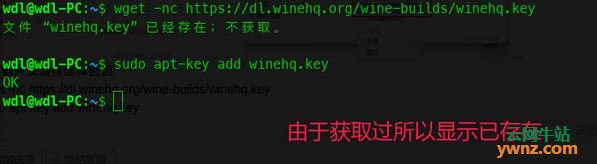
下载并安装存储库密钥

运行以下两段命令:

wget -nc https://dl.winehq.org/wine-builds/winehq.key

sudo apt-key add winehq.key

更新系统

运行以下命令:

sudo apt update
Reply View the author
avatar
qq8645
deepin
2019-12-01 06:04
#35
不做研究的,没有必要起哄。
windows系列,xp一样用。
绝大多数使用者只用系统很少的功能。

Reply View the author
avatar
煮酒燃烟
deepin
2019-12-02 21:46
#36
https://bbs.deepin.org/post/185932
下载并安装存储库密钥

运行以下两段命令:

谢谢,暂时回到15.11了。等以后在使用。
Reply View the author
avatar
byx8848320105
deepin
2019-12-03 03:22
#37
暂时回到15.11了。等以后在使用。
Reply View the author
avatar
东海大愚
deepin
2019-12-03 03:39
#38
其实deepin15.11已经很好用了,越更新,机子配置要求越高。
Reply View the author
avatar
拽个气球飞上天
deepin
2019-12-03 04:14
#39
https://bbs.deepin.org/post/185932
就是正常的更新源,别折腾了,搞不好系统就挂了,不过如果是虚拟机做好备份随便,物理机装的还是小心。这两 ...

我的也是,v20壁纸没了
Reply View the author
avatar
152******50
deepin
2019-12-03 21:13
#40
wine无法安装 有没有办法解决?
Reply View the author
2 / 3
To page