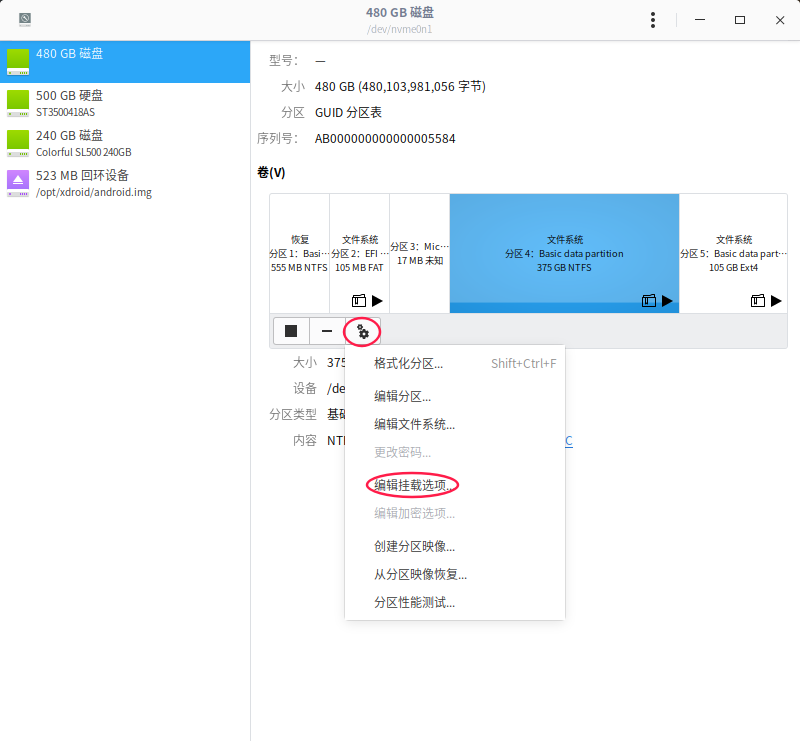
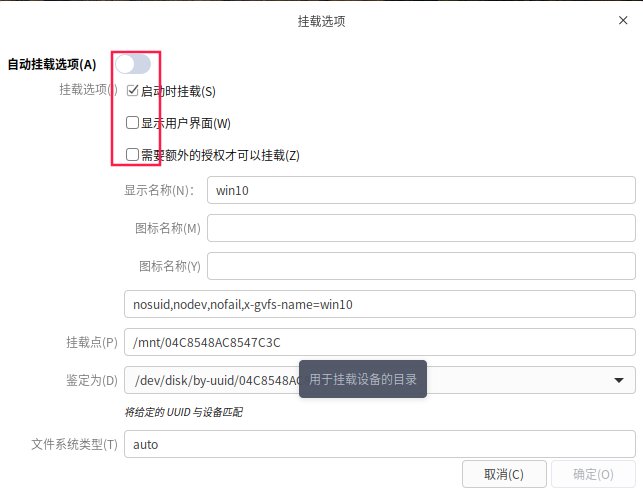
如何隐藏Windows10的磁盘呢
Tofloor
poster avatar
yuanlichun
deepin
2019-11-28 01:01
Author
双系统,情况如下:

HDD0  一共3个分区   第一分区Windows10     第二分区 深度LINUX 系统盘,第三分区挂载home    采用CLOVER引导。
HDD1  一共3个分区  第一分区Windows10 软件安装  第二分区Windows10 文件存放  第三分区Windows10 和Linux 公共资料盘。

现在问题是在Windows10下,看不到linux的系统盘和home盘,这个是我要的效果。
但是在linux下面Windows10的使用盘都出现了,如何隐藏掉Windows10的系统盘,又不影响系统的正常启动呢?
Reply Favorite View the author
All Replies
avatar
走钢丝
deepin
2019-11-28 01:22
#1
修改 /etc/fstab,开机挂载到某个目录下就看不到了。。。比如在主目录或根目录下建一个文件夹。。
Reply View the author
avatar
ghostry
deepin
2019-11-28 01:28
#2
二楼说的对
Reply View the author
avatar
yuanlichun
deepin
2019-11-28 16:47
#3
https://bbs.deepin.org/post/185927
修改 /etc/fstab,开机挂载到某个目录下就看不到了。。。比如在主目录或根目录下建一个文件夹。。 ...

# /dev/sda3 LABEL=Basic\040data\040partition
UUID=b59c6590-3272-4223-b152-098d69e0ed21        /                 ext4              rw,relatime,data=ordered        0 1

# /dev/sda4 LABEL=Basic\040data\040partition
UUID=eef6b1c9-fff1-4ad2-9e2c-1d13f9d8d041        /home             ext4              rw,relatime,data=ordered        0 2

# /dev/sda1 LABEL=EFI\040system\040partition
UUID=09C1-B27D              /boot/efi         vfat              rw,relatime,fmask=0022,dmask=0022,codepage=437,iocharset=iso8859-1,shortname=mixed,errors=remount-ro        0 2


具体是哪一段呢
Reply View the author
avatar
走钢丝
deepin
2019-11-28 16:56
#4
https://bbs.deepin.org/post/185927
# /dev/sda3 LABEL=Basic\040data\040partition
UUID=b59c6590-3272-4223-b152-098d69e0ed21        /                  ...

终端输入 df -h 看看那个分区的设备名称是啥,比如 /dev/sda5。然后在 /etc/fstab 中添加一行
/dev/sda5               /xxxx           ntfs            defaults        0 2
/dev/sda5 是设备名,/xxxx 是挂载的位置,ntfs 是分区格式。。。
Reply View the author
avatar
dongfangshuwen
deepin
2019-11-28 22:27
#5

Reply View the author
avatar
走钢丝
deepin
2019-11-28 22:39
#6

不错不错,这个方便。
Reply View the author
avatar
yuanlichun
deepin
2019-12-02 00:55
#7

非常感谢,我去舞弄一下。
Reply View the author