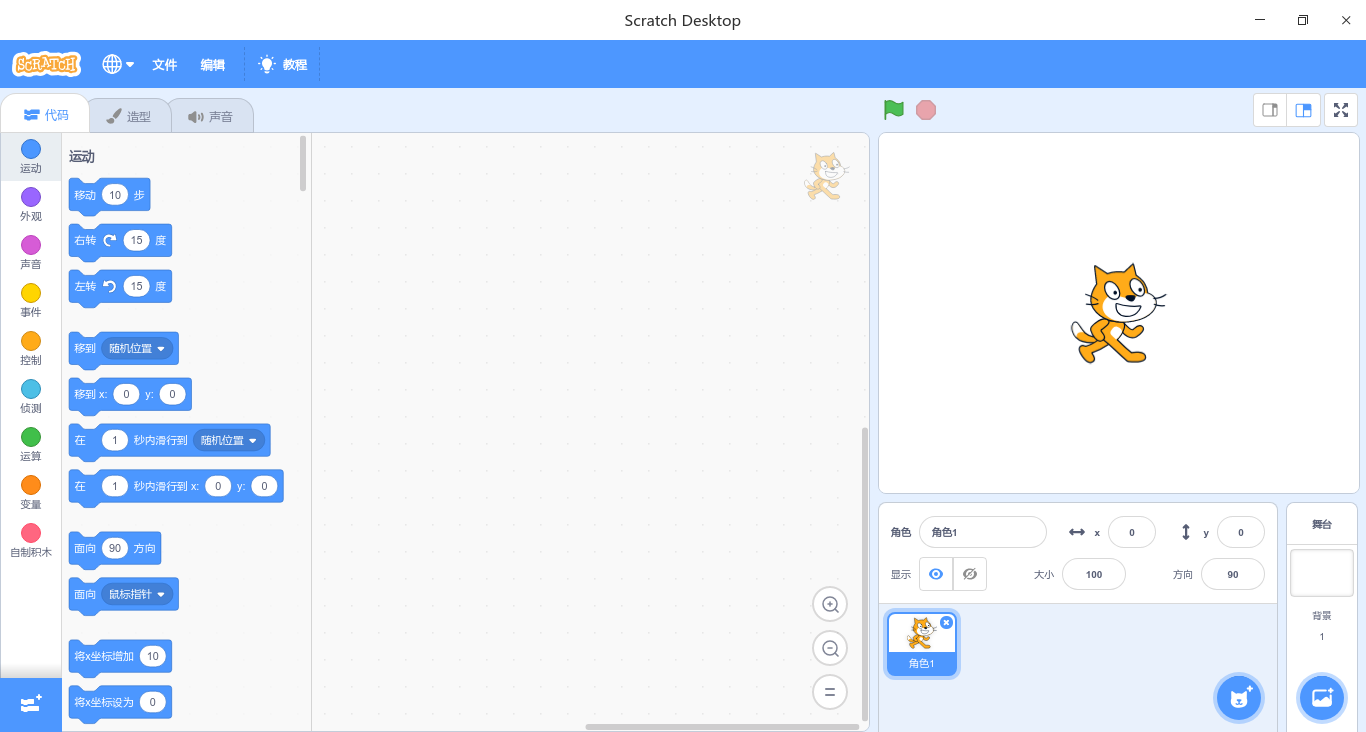
Deepin15.11安装最新的Scratch-3.2.1版(flatpak包)
Tofloor
poster avatar
lbygljq
deepin
2019-11-19 14:18
Author
1.安装flatpack包管理器:
    $sudo apt-get update
    $sudo apt install flatpak
2. 从Flatpakflathub仓库安装:
    $flatpak remote-add --if-not-exists flathub https://flathub.org/repo/flathub.flatpakrepo
    $flatpak install flathub edu.mit.Scratch
3. 查看软件信息:
$flatpak info edu.mit.Scratch
返回信息:
  1. Scratch - Create stories, games, and animations, share with others around the
  2. world

  3.           ID: edu.mit.Scratch
  4.          Ref: app/edu.mit.Scratch/x86_64/stable
  5.         Arch: x86_64
  6.       Branch: stable
  7.      Version: 3.2.1
  8.      License: BSD-3-Clause
  9.       Origin: flathub
  10.   Collection: org.flathub.Stable
  11. Installation: system
  12.    Installed: 416.8 MB
  13.      Runtime: org.freedesktop.Platform/x86_64/18.08
  14.          Sdk: org.freedesktop.Sdk/x86_64/18.08

  15.       Commit: 00e29e72b5f2fce621c87c79a1d1479a2240d314bee204afd1ed2b287a7c9fee
  16.      Subject: Add flathub.json to only build on x64 (5c2e1cfd)
  17.         Date: 2019-05-30 13:11:42 +0000
Copy the Code
4.OK
5.运行程序:
方法1:启动器→所有分类→编程开发→Scratch
方法2:终端执行命令  flatpak run edu.mit.Scratch

6.应用程序界面预览:


Reply Favorite View the author
All Replies
avatar
webtide
deepin
2019-11-19 20:51
#1
本帖最后由 webtide 于 2019-11-20 15:55 编辑

我在15.11里用flatpak的版本无法输入中文,只能粘贴进去。老的15.10可以,没找到具体的解决办法,后来在我的笔记本上装了kde neon用这个flatpak的版本也是中文有问题,把输入法从fcitx改成ibus就可以,不过后来我从别的地方搞到一个 deb的安装版,版本号还是3.6的。这个安装后,中文正常。

链接: https://pan.baidu.com/s/1Fp4f9RwL-mx40iFx0WnE2g 提取码: xvbn ,这个7天有效期,这个是基于deb包ubuntu系列都为问题,但是debian和deepin不知道之否正常,有deepin的朋友测试过后可以上来说一下,我现在用的系统是 KDE Neon,我在等deepin的 V20,所以暂时不可能换系统。
Reply View the author
avatar
lbygljq
deepin
2019-11-19 22:27
#2
https://bbs.deepin.org/post/185393
我在15.11里用flatpak的版本无法输入中文,只能粘贴进去。老的15.10可以,没找到具体的解决办法,后来在我 ...

确实存在中文输入问题,显示正常。你的3.6版本在哪儿弄到的?官网都找不到Linux版本啊
Reply View the author
avatar
蒙笛
deepin
2019-11-20 01:02
#3
https://bbs.deepin.org/post/185393
我在15.11里用flatpak的版本无法输入中文,只能粘贴进去。老的15.10可以,没找到具体的解决办法,后来在我 ...

同求deb,能共享一下的deb下载地址吗?@https://bbs.deepin.org/user/111606
Reply View the author
avatar
webtide
deepin
2019-11-21 00:01
#4
我刚才已经重新编辑,并且把deb上传的网盘里分享给大家了。deepin测试后如果无问题,到时deepin V20官方商店里也可以放上去。Scratch 3 是小众软件,MIT 官方也没有提供LInux版的下载,我现在用windows比较少,但是我还用Scrtch 教女儿编程,所以就研究并且四处寻找安装包。
Reply View the author
avatar
lbygljq
deepin
2019-11-22 01:54
#5
https://bbs.deepin.org/post/185393
我刚才已经重新编辑,并且把deb上传的网盘里分享给大家了。deepin测试后如果无问题,到时deepin V20官方商 ...

下载安装了,这个版本确实可以输入中文了。
Reply View the author
avatar
Interliuxing
deepin
2019-11-22 03:09
#6
https://bbs.deepin.org/post/185393
我在15.11里用flatpak的版本无法输入中文,只能粘贴进去。老的15.10可以,没找到具体的解决办法,后来在我 ...

安装没有问题,双击安装没有反应,只有使用sudo dpkg -i  scratch-desktop_3.6.0_amd64 安装。
Reply View the author
avatar
Interliuxing
deepin
2019-11-22 03:36
#7
https://bbs.deepin.org/post/185393
安装没有问题,双击安装没有反应,只有使用sudo dpkg -i  scratch-desktop_3.6.0_amd64 安装。
...

搜狗输入法,中文输入没有问题!
Reply View the author
avatar
webtide
deepin
2019-11-23 00:12
#8
感谢反馈!看来这个可以上deepin 商店了。官方看到更新下商店里的Scratch。https://bbs.deepin.org/user/101846
Reply View the author
avatar
zwq133
deepin
2019-11-23 05:03
#9
搞不明白官方以前都有Linux版本下载,现在反倒不给链接了~~~
Reply View the author
avatar
webtide
deepin
2019-11-24 22:03
#10
官方以前有也只是1.4。后来2.0的linux版本,官方也没直接提供。
Reply View the author
avatar
sxzhlan
deepin
2019-11-29 22:43
#11
https://bbs.deepin.org/post/185393
我在15.11里用flatpak的版本无法输入中文,只能粘贴进去。老的15.10可以,没找到具体的解决办法,后来在我 ...

分享时间太短了,我刚看到,就没了!!求大神多分享一段时间好吗!!??
Reply View the author
avatar
sxzhlan
deepin
2019-11-30 02:10
#12
  1. Found in remote flathub, do you want to install it? [y/n]: y
  2. Installing: org.freedesktop.Platform/x86_64/18.08 from flathub

  3. Receiving delta parts: 4/8 144.0 kB/s 116.2 MB/251.7 MB 15 minutes 40 seconds remainingaining
  4. error: While pulling runtime/org.freedesktop.Platform/x86_64/18.08 from remote flathub: Socket I/O timed out
Copy the Code


已经是N次了,这次下载的最多,还是断了!!唉!!!
Reply View the author
avatar
webtide
deepin
2019-12-01 07:39
#13
https://bbs.deepin.org/post/185393
已经是N次了,这次下载的最多,还是断了!!唉!!!

没想到有这么多人用,我新发了个帖子,这里有永久下载链接。
https://bbs.deepin.org/post/186091
Reply View the author