原文引用地址
https://www.crx4chrome.com/how-to-download-and-install-arc-welder/ 网址内容 1. Prepare Google Chrome to run an Android app
Enable Native Client > This will support Native Client for all web applications, even those that were not installed from the Chrome Web Store. Open the chrome://flags page, and click the 'Enable' link in the Native Client section.
Check WebGL status > Open the chrome://gpu page in Google Chrome to check the WebGL status. You should find such information: WebGL: Hardware accelerated.
If the status of WebGL is unavailable, you must enable WebGL acceleration by checking on the 'Use hardware acceleration when available' in the chrome://settings/ page:
Enable Developer mode of extension > Open the chrome://extensions page and check on the 'Developer mode':
If you have done these settings, restart your Google Chrome.
2. Download and install App Runtime for Chrome (Beta)
You need the crx file of App Runtime for Chrome, because ARC Welder requires it. Now download the App Runtime for Chrome crx file from Crx4Chrome.
After you get the offline crx file of App Runtime for Chrome (app-runtime-for-chrome.crx), drag-and-drop the crx file to Chrome's extensions page to install it:
And you'll find App Runtime for Chrome is installed successfully:
3. Download ARC Welder crx file
Now let's get the offline crx file of the ARC Welder app. You could download the offline ARC Welder crx file from Crx4Chrome.
4. Install ARC Welder crx file to Google Chrome
It's not allowed to install ARC Welder directly by drag-and-drop crx file to the extension page (You'll get such a notice: This can only be added from the Chrome Web Store), we need to install it as unpacked extension.
Rename the .crx file of ARC Welder to .zip file:
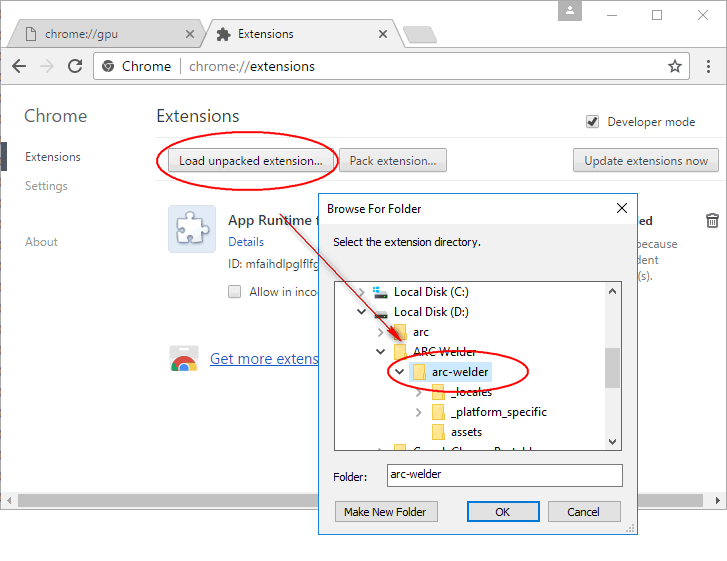
Now go to Chrome extension page chrome://extensions, click on the Load unpacked extension button, and browse to the previous unzip path of the ARC Welder source files. Then click on the 'OK' button and then you'll find ARC Welder is loaded by Google Chrome as an extension.
5. Get an apk file of Android app
If you do not have an apk file, you could go to APK4Fun to download apk file of an Android app. Let us test the AIDA64 apk file as an example.
6. Use ARC Welder to convert the apk to a Chrome extension
Launch ARC Welder by clicking on the Launch link to open it:
Choose a directory that ARC Welder can read and write:
Now add the apk file by clicking on the Add your APK button and wait for a while for ARC Welder to parse the apk file:
After the apk file is loaded successfully, click on the DOWNLOAD ZIP button, this will start the apk to chrome extension conversation and finally a zip file is generated:
This zip file is the chrome extension edition of the Android app. Save the zip file to a path and unzip it also:
7. Load the newly created extension into Chrome
Back into the chrome extension page (chrome://extensions), click on the Load unpacked extension button, and browse to the path of the newly unzip path of the app to load it into Google Chrome:
And now click on the 'Launch' link of the new extension to test it:
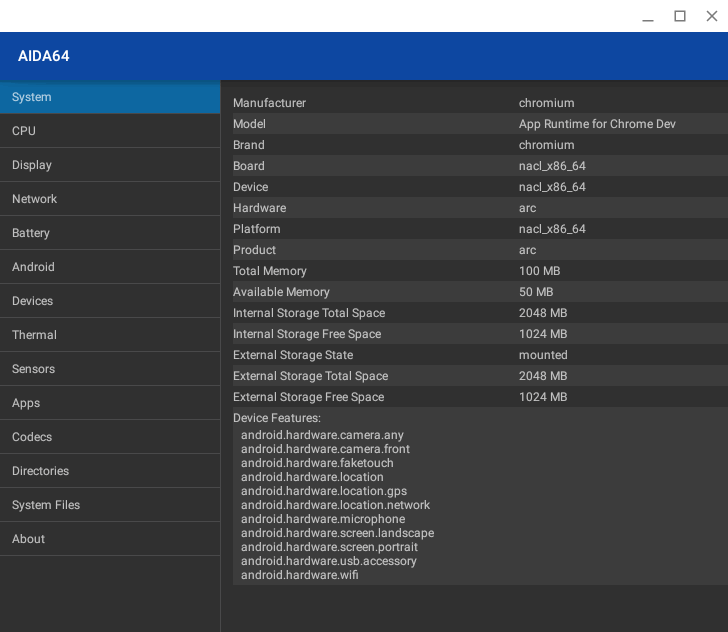
Now we successfully run the Android app AIDA64 in Google Chrome with the help of ARC Welder:
Other important notes
Many Android apps or games may be NOT compitable with ARC Welder, you may just get a blank page.
Check ARC Welder on Chrome Web Store
Developer guide: Getting Started with ARC
Chrome will be removing support for Chrome Apps on Windows, Mac, and Linux: From Chrome Apps to the Web
Google Chromebooks now support the Google Play Store and Android apps: An updated version of ARC


 中文
中文 


 UOS AI Hardware Diagnostics


原文引用地址
https://www.crx4chrome.com/how-to-download-and-install-arc-welder/
网址内容
1. Prepare Google Chrome to run an Android app
If the status of WebGL is unavailable, you must enable WebGL acceleration by checking on the 'Use hardware acceleration when available' in the chrome://settings/ page:
If you have done these settings, restart your Google Chrome.
2. Download and install App Runtime for Chrome (Beta)You need the crx file of App Runtime for Chrome, because ARC Welder requires it. Now download the App Runtime for Chrome crx file from Crx4Chrome.
After you get the offline crx file of App Runtime for Chrome (app-runtime-for-chrome.crx), drag-and-drop the crx file to Chrome's extensions page to install it:
And you'll find App Runtime for Chrome is installed successfully:

3. Download ARC Welder crx fileNow let's get the offline crx file of the ARC Welder app. You could download the offline ARC Welder crx file from Crx4Chrome.
4. Install ARC Welder crx file to Google ChromeIt's not allowed to install ARC Welder directly by drag-and-drop crx file to the extension page (You'll get such a notice: This can only be added from the Chrome Web Store), we need to install it as unpacked extension.
Rename the .crx file of ARC Welder to .zip file:
Now go to Chrome extension page chrome://extensions, click on the Load unpacked extension button, and browse to the previous unzip path of the ARC Welder source files. Then click on the 'OK' button and then you'll find ARC Welder is loaded by Google Chrome as an extension.
5. Get an apk file of Android appIf you do not have an apk file, you could go to APK4Fun to download apk file of an Android app. Let us test the AIDA64 apk file as an example.
6. Use ARC Welder to convert the apk to a Chrome extensionLaunch ARC Welder by clicking on the Launch link to open it:
Choose a directory that ARC Welder can read and write:
Now add the apk file by clicking on the Add your APK button and wait for a while for ARC Welder to parse the apk file:
After the apk file is loaded successfully, click on the DOWNLOAD ZIP button, this will start the apk to chrome extension conversation and finally a zip file is generated:
This zip file is the chrome extension edition of the Android app. Save the zip file to a path and unzip it also:

7. Load the newly created extension into ChromeBack into the chrome extension page (chrome://extensions), click on the Load unpacked extension button, and browse to the path of the newly unzip path of the app to load it into Google Chrome:
And now click on the 'Launch' link of the new extension to test it:
Now we successfully run the Android app AIDA64 in Google Chrome with the help of ARC Welder:
Other important notes