怎么往51单片机里烧写程序啊
Tofloor
poster avatar
pai1234
deepin
2019-10-06 22:22
Author
这学期在51学单片机,在深度下找到了把C51转换为hex文件的方法。学习网上烧写程序的方法遇到了问题(没记录这个问题是怎样的了)。所以想问有什么办法可以在深度环境下烧写C51程序的。希望尽量简单点,脑瓜子不好使
Reply Favorite View the author
All Replies
avatar
pai1234
deepin
2019-10-06 22:24
#1
我现在用的51单片机型号是STC89C52、STC89C52RC、AT89S52,开发板是普中的
Reply View the author
avatar
残念
deepin
2019-10-06 23:23
#2
stcflash
https://github.com/laborer/stcflash
Reply View the author
avatar
pai1234
deepin
2019-10-07 05:05
#3
https://bbs.deepin.org/post/183483
stcflash
https://github.com/laborer/stcflash

不行啊,在这个网站下载了一个压缩包,然后要怎么安装?我现在只会在商店里下载、安装软件
Reply View the author
avatar
springzfx
deepin
2019-10-07 05:20
#4
我的建议是别折腾这个,人家单片机官方软件只支持windows,就用直接windows好了。
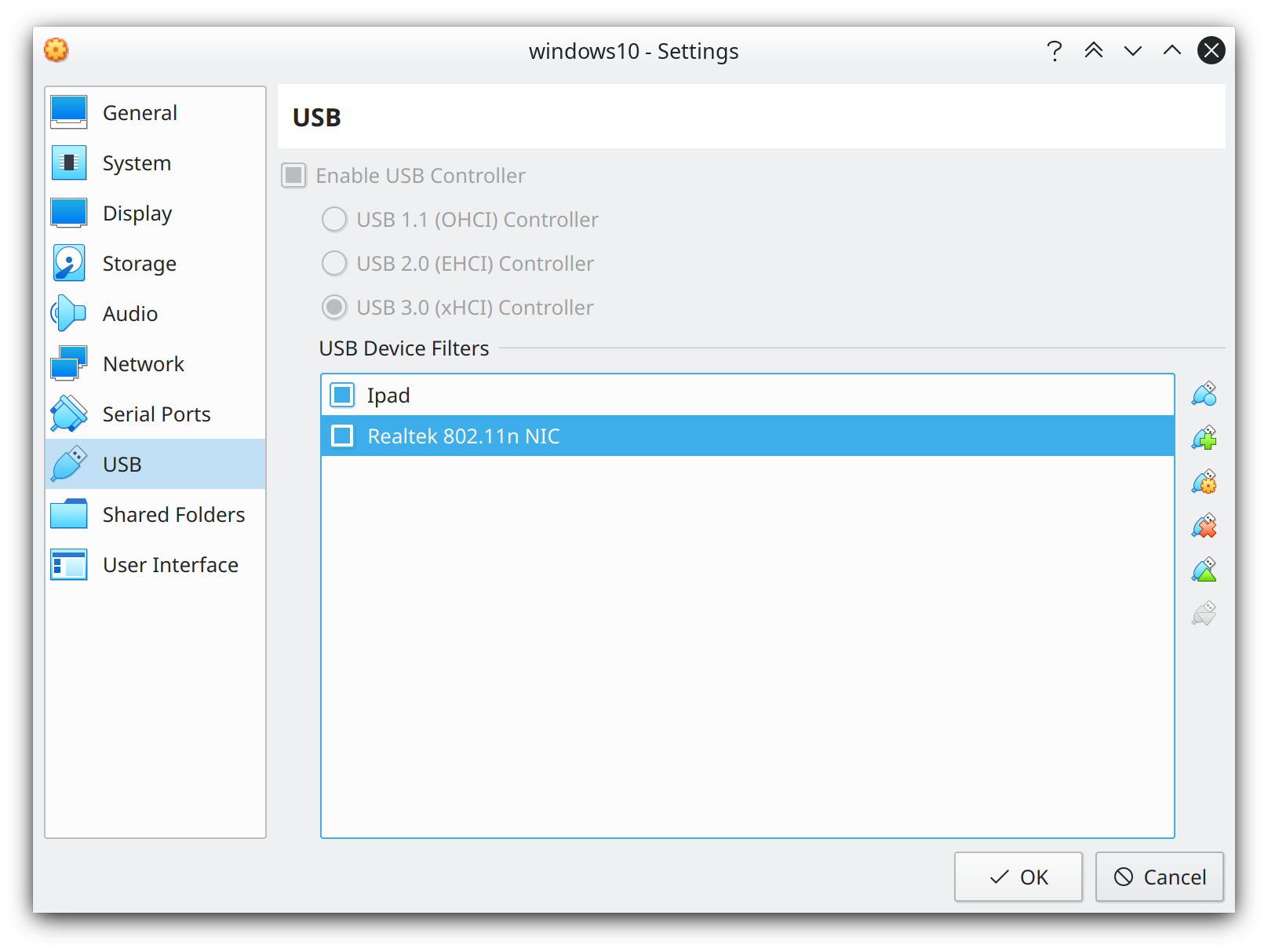
如果非要在deepin的话,建议装个windows虚拟机,设置virtualbox,可以直接接管特定的usb连接,剩下就和在windows中操作一模一样。
比如我买的无线usb网卡,linux驱动支持不够,那就win10虚拟机接管,一切如常。
Reply View the author
avatar
springzfx
deepin
2019-10-07 05:25
#5
我来给个图吧,这是virtuablbox的usb设置截图
Reply View the author
avatar
pai1234
deepin
2019-10-07 05:54
#6
springzfx 发表于 2019-10-6 21:20
我的建议是别折腾这个,人家单片机官方软件只支持windows,就用直接windows好了。
如果非要在deepin的话, ...

如果这样玩,我何必用linux?直接完全使用win得了
Reply View the author
avatar
残念
deepin
2019-10-07 06:00
#7
https://bbs.deepin.org/post/183483
不行啊,在这个网站下载了一个压缩包,然后要怎么安装?我现在只会在商店里下载、安装软件 ...

readme里有说明的。。。
温馨提示:如果嫌麻烦还是安装一个win虚拟机吧,就不要往下看了
1、解压压缩包,会用README.md说明文档,stcflash.py 这个python脚本
2、打开终端安装python模块pySerial,(针对python2)命令为:sudo apt install python-serial
(python3需安装python3-serial)
3、每次烧写都要执行命令:python stcflash.py xxx.hex(或xxx.bin)


PS:deepin-wine可安装keil


Reply View the author
avatar
springzfx
deepin
2019-10-07 09:34
#8
https://bbs.deepin.org/post/183483
如果这样玩,我何必用linux?直接完全使用win得了

你仍然可以使用linux,看看linux入门之类的,要知道发挥linux优势,回避目前的劣势。否则浪费时间还不讨好
Reply View the author
avatar
186******05
deepin
2019-10-07 19:56
#9
https://bbs.deepin.org/post/183483
我现在用的51单片机型号是STC89C52、STC89C52RC、AT89S52,开发板是普中的

十几年过去了,atmel都被收购了,还在用89S5X 的单片机啊,真长寿啊,,,,
Reply View the author
avatar
186******05
deepin
2019-10-07 19:57
#10
效率第一,用win和linux只是工具,很多互联网开发用linux方便,单片机还是win下配套多些,
Reply View the author
avatar
pai1234
deepin
2019-10-08 03:21
#11
peterzhang1234 发表于 2019-10-6 22:00
readme里有说明的。。。
温馨提示:如果嫌麻烦还是安装一个win虚拟机吧,就不要往下看了
1、解压压 ...

谢谢,终于可以了。之前一直卡在“烧写”这一步,后来换成STC89C52RC就可以了
Reply View the author