Home
Categories
WIKI
Topic
User
LANGUAGE:
中文
English
微星U盘安装15.4出现问题
Experiences and Insight
852
views ·
5
replies ·
To
floor
Go
tiantian
deepin
2017-08-20 19:01
Author
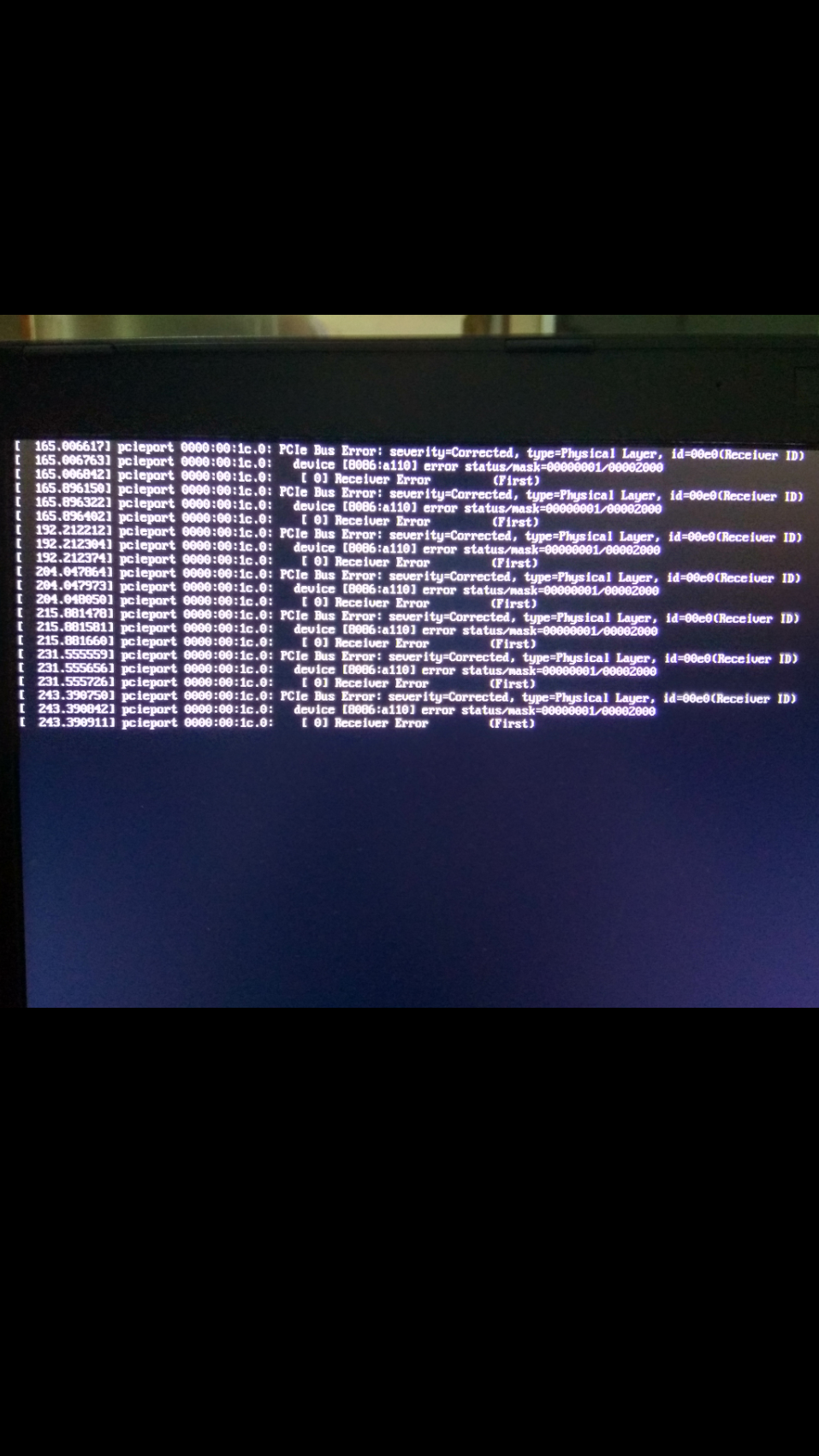
设置完分区以后点继续安装,安装界面闪一下没了,然后出现这个界面
Reply
Like 0
Favorite
View the author
All Replies
jingle
deepin
2017-08-21 17:28
#1
体验安装吗 ?
Reply
Like 0
View the author
Island
deepin
2017-08-21 17:58
#2
刻盘使用的什么工具? 能具体描述下安装过程及硬件信息吗?
Reply
Like 0
View the author
tiantian
deepin
2017-08-21 18:19
#3
本帖最后由 tiantian 于 2017-8-21 10:24 编辑
用的深度的U盘启动器制作工具,用uefi模式安装,安装的时候加了nomodeset,然后F10,到安装界面,分区完了继续安装的时候安装界面一闪没了,然后是上面的界面。
电脑型号 微星 GE62 6QC 笔记本电脑
操作系统 Windows 10 Enterprise 64位 ( DirectX 12 )
处理器 英特尔 Core i5-6300HQ @ 2.30GHz 四核
主板 微星 MS-16J5 ( 英特尔 PCI 标准主机 CPU 桥 - 100 Series/C230 Series 芯片组 Family - A14E )
内存 8 GB ( 三星 DDR4 2133MHz )
主硬盘 东芝 THNSNJ128G8NY ( 128 GB / 固态硬盘 )
显卡 Nvidia GeForce GTX 960M ( 2 GB / 微星 )
显示器 LG LGD046F ( 15.3 英寸 )
光驱 日立-LG DVDRAM GUD0N DVD刻录机
声卡 瑞昱 ALC899 @ 英特尔 High Definition Audio 控制器
网卡 英特尔 Dual Band Wireless-AC 3165
Reply
Like 0
View the author
187******46
deepin
2017-08-21 19:27
#4
本帖最后由 caicai 于 2017-8-21 11:35 编辑
在grub的cmdline里面增加 pcie_aspm=off ,关掉pci的电源管理模块,估计有硬件设备bios状态的残留,可以先关掉启动试试。
Reply
Like 0
View the author
187******46
deepin
2017-08-21 19:38
#5
本帖最后由 caicai 于 2017-8-21 15:53 编辑
或参考 https://forum.openmediavault.org/index.php/Thread/13613-Kernel-4-4-Error-AER-Corrected-error-received-id-00e0/
Reply
Like 0
View the author
Please
sign
in first
Featured Collection
Change
Nuntia - Modern IMAP/SMTP mail client for Deepin (Beta tester wanted!)
[Tutorial] deepin25 WSL Offline Installation Guide
UOS AI 2.8 Released! Three New Intelligent Agents & Major Evolution
Solid Q&A | deepin 25 Common Questions – The Immutable System Edition
New Thread
Popular Ranking
Change
Four agent skills for laptop power, sleep, and honest bug reports
Popular Events
More


 中文

 deepin deepin
 deepin
 deepin

 deepin deepin

 deepin deepin


 Four agent skills for laptop power, sleep, and honest bug reports