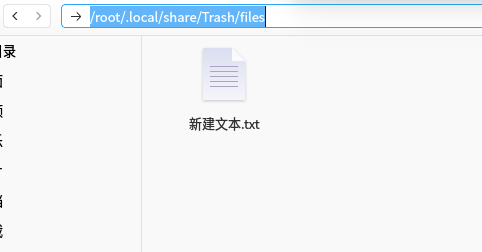
回收站有个文件清除不了
Tofloor
poster avatar
bainian
deepin
2017-08-10 00:10
Author
如题,回收站里有个文件一直删除不了,好长时间 了.不知道什么原因.
Reply Favorite View the author
All Replies
1 / 2
To page
avatar
jingle
deepin
2017-08-10 00:16
#1
这个是root 权限吧
Reply View the author
avatar
bainian
deepin
2017-08-10 00:19
#2
https://bbs.deepin.org/post/143951
这个是root 权限吧

应该 不是吧,这个文件一般就在文档放的被删除的,如果用root权限 的话命令咋删除呢,
Reply View the author
Comments
lanceadd
2017-08-10 00:45
可能只是卡了,你去清空回收站,然后点一下其他的文件夹再点到回收站就能看到他消失了
avatar
deepin--
deepin
2017-08-10 00:33
#3
~/.local/share/Trash/files
手动sudo rm -rf吧

Reply View the author
avatar
2***6@qq.com
deepin
2017-08-10 05:38
#4
https://bbs.deepin.org/post/143951
~/.local/share/Trash/files
手动sudo rm -rf吧

没有用,莫名其妙的。。。无论怎么折腾就是无法删除。。。楼主的问题我也遇到了。。。
Reply View the author
avatar
海天鹰
deepin
2017-08-10 07:04
#5
我也有一个。
Reply View the author
avatar
feiying
deepin
2017-08-10 16:39
#6
我也遇到过几次,后来我把它从回收站还原,然后在原位置直接shift+del删除解决的。
Reply View the author
avatar
zk_wannng
deepin
2017-08-10 17:18
#7
我也遇到过,
进入 ~/.local/share/Trash/files 目录,手动删除吧
Reply View the author
avatar
liuwen
deepin
2017-08-10 17:27
#8
打开鹦鹉螺,从鹦鹉螺回收站删除试试
Reply View the author
avatar
bainian
deepin
2017-08-11 17:52
#9
https://bbs.deepin.org/post/143951
~/.local/share/Trash/files
手动sudo rm -rf吧

用这方法删除 了.
Reply View the author
avatar
zda
deepin
2017-08-16 21:15
#10
~/.local/share/Trash/files
手动sudo rm -rf    不错
Reply View the author
avatar
yaowfeng
deepin
2017-08-20 02:48
#11
进入~/.local/share/Trash/files
右键 以管理员身份打开  然后把你要删除的文件丢到回收站就删掉了!
Reply View the author
avatar
macaiyun0629
deepin
2017-08-20 04:30
#12
https://bbs.deepin.org/post/143951
进入~/.local/share/Trash/files
右键 以管理员身份打开  然后把你要删除的文件丢到回收站就删掉了! ...

你这样做确定不会把文件给已到/root/.local/share/Trash/files目录下?
Reply View the author
avatar
yaowfeng
deepin
2017-08-20 08:33
#13
https://bbs.deepin.org/post/143951
你这样做确定不会把文件给已到/root/.local/share/Trash/files目录下?

不会,我试过了!
Reply View the author
avatar
sysop
deepin
2017-08-20 17:01
#14
用root权限图形界面删除的文件 在root的回收站里 看不到
我隔段时间就看下清空。。。


    神奇的小尾巴:Mozilla/5.0 (X11; Linux i686) AppleWebKit/537.36 (KHTML, like Gecko) Chrome/48.0.2564.109 Safari/537.36  (zh-CN)
    ——2017/8/20 上午9:01:44
             
    Reply View the author
    avatar
    sysop
    deepin
    2017-08-20 17:04
    #15
    深度登录root图形界面挺简单的
    我记得以前Ubuntu很麻烦的\(^o^)/~


      神奇的小尾巴:Mozilla/5.0 (X11; Linux i686) AppleWebKit/537.36 (KHTML, like Gecko) Chrome/48.0.2564.109 Safari/537.36  (zh-CN)
      ——2017/8/20 上午9:04:12
               
      Reply View the author
      avatar
      胡豆
      deepin
      2017-10-07 03:19
      #16
      启动深度终端后,输入:
      cd .local/share/Trash/files
      sudo rm -fr 文件名
      Reply View the author
      avatar
      fjbai901124
      deepin
      2017-10-07 04:13
      #17
      https://bbs.deepin.org/post/143951
      没有用,莫名其妙的。。。无论怎么折腾就是无法删除。。。楼主的问题我也遇到了。。。 ...

      sudo rm -fr ~/.local/share/Trash/files/*
      能解决
      Reply View the author
      avatar
      s3040608090
      deepin
      2017-10-07 06:50
      #18
      对于深度文件管理器莫名其妙无法删除的文件(我确信权限没问题),用gnome的鹦鹉螺都能删除。
      Reply View the author
      avatar
      152******14
      deepin
      2017-10-07 06:57
      #19
      我也 出现过这个现象,前天。
      Reply View the author
      avatar
      152******14
      deepin
      2017-10-07 16:43
      #20
      https://bbs.deepin.org/post/143951
      sudo rm -fr ~/.local/share/Trash/files/*
      能解决

      最佳答案
      Reply View the author
      1 / 2
      To page