
搜寻不到想要的WIFI
Tofloor
poster avatar
星愿
deepin
2017-08-09 19:36
Author
本帖最后由 shuangxueya 于 2017-8-9 20:34 编辑

使用手机,其他的电脑,windows系统的,都可以搜索到那个WIFI!就只是deepin搜不到!
有没有大神能给出方法?
Reply Favorite View the author
All Replies
avatar
星愿
deepin
2017-08-09 19:37
#1
可以搜寻到,其他WIFI,就是想要的那个,找不到
Reply View the author
avatar
jingle
deepin
2017-08-09 20:08
#2
https://bbs.deepin.org/post/143932
可以搜寻到,其他WIFI,就是想要的那个,找不到

信道干扰?
Reply View the author
avatar
星愿
deepin
2017-08-09 23:25
#3

不清楚原因是什么!有没有如何操作的方法?
路由器是TP-LINK的
Reply View the author
avatar
jingle
deepin
2017-08-09 23:36
#4
https://bbs.deepin.org/post/143932
不清楚原因是什么!有没有如何操作的方法?
路由器是TP-LINK的

sudo deepin-feedback-cli命令反馈下日志上来吧(tar,gz)
Reply View the author
avatar
星愿
deepin
2017-08-10 02:57
#5
https://bbs.deepin.org/post/143932
sudo deepin-feedback-cli命令反馈下日志上来吧(tar,gz)

wsh@wsh-PC:~$ sudo deepin-feedback-cli

我们信任您已经从系统管理员那里了解了日常注意事项。
总结起来无外乎这三点:

    #1) 尊重别人的隐私。
    #2) 输入前要先考虑(后果和风险)。
    #3) 权力越大,责任越大。

[sudo] wsh 的密码:
==> Collecting system information and this will take several seconds...
==> Preparing temporary folder /tmp/deepin-feedback-cli-Deepin-15.4.1-all-20170809-185115...
==> Execute rules of category 'all'...
  -> collect_file: ignore /var/cache/deepin/grub2.json
  -> collect_file: ignore /home/wsh/.config/deepin_monitors.json
  -> collect_file: ignore /var/log/apt/history.log.1.gz
  -> collect_file: ignore /var/log/apt/term.log.1.gz
  -> collect_file: ignore /var/log/pacman.log
  -> collect_file: ignore /home/wsh/.cache/deepin/dde-offline-upgrader/dde-offline-upgrader.log
  -> collect_file: ignore /var/cache/deepin/grub2.json
  -> collect_file: ignore /home/wsh/.config/deepin_monitors.json
  -> collect_file: ignore /var/log/apt/history.log.1.gz
  -> collect_file: ignore /var/log/apt/term.log.1.gz
  -> collect_file: ignore /var/log/pacman.log
  -> collect_file: ignore /home/wsh/.cache/deepin/deepin-boot-maker/deepin-boot-maker.log
  -> collect_file: ignore /root/.cache/deepin/deepin-boot-maker-service/deepin-boot-maker-service.log
  -> collect_file: ignore /home/wsh/.cache/deepin/deepin-cloud-scan-config-helper/deepin-cloud-scan-config-helper.log
  -> collect_file: ignore /home/wsh/.cache/deepin/deepin-cloud-scan-drs/deepin-cloud-scan-drs.log
  -> collect_file: ignore /home/wsh/.cache/deepin/deepin-image-viewer/deepin-image-viewer.log
  -> collect_file: ignore /home/wsh/.cache/deepin/deepin-music/deepin-music.log
  -> collect_file: ignore /home/wsh/.cache/deepin/deepin-remote-assistance/deepin-remote-assistance.log
  -> collect_file: ignore /home/wsh/.config/deepin-screenshot/config.ini
  -> collect_file: ignore /var/log/apt/history.log.1.gz
  -> collect_file: ignore /var/log/apt/term.log.1.gz
  -> collect_file: ignore /var/log/pacman.log
  -> collect_file: ignore /home/wsh/.config/deepin/deepin-terminal/server-config.conf
  -> collect_file: ignore /home/wsh/.config/deepin-translator/config.ini
  -> collect_file: ignore /var/cache/deepin/grub2.json
  -> collect_file: ignore /home/wsh/.config/deepin_monitors.json
  -> collect_file: ignore /var/log/apt/history.log.1.gz
  -> collect_file: ignore /var/log/apt/term.log.1.gz
  -> collect_file: ignore /var/log/pacman.log
  -> executing sliceinfo_basic...
  -> executing sliceinfo_disk...
  -> executing sliceinfo_bootmgr...
  -> executing sliceinfo_syslog...
  -> executing sliceinfo_video...
xxd: device/edid: No such file or directory
  -> executing sliceinfo_bluetooth...
  -> executing sliceinfo_kernel...
  -> executing sliceinfo_driver...
  -> executing sliceinfo_network...
  -> executing sliceinfo_package...
  -> executing sliceinfo_device...
  -> executing sliceinfo_fonts...
  -> executing sliceinfo_gsettings...
  -> executing sliceinfo_service...
  -> executing sliceinfo_audio...
==> Archive files...
bluetooth/
bluetooth/~/
bluetooth/~/.config/
bluetooth/~/.config/deepin/
bluetooth/~/.config/deepin/bluetooth.json
bootmgr/
bootmgr/etc/
bootmgr/etc/default/
bootmgr/etc/default/grub
bootmgr/boot/
bootmgr/boot/grub/
bootmgr/boot/grub/grub.cfg
bootmgr.md
dde_control_center/
dde_control_center/~/
dde_control_center/~/.cache/
dde_control_center/~/.cache/deepin/
dde_control_center/~/.cache/deepin/dde-control-center/
dde_control_center/~/.cache/deepin/dde-control-center/dde-control-center.log
dde_file_manager/
dde_file_manager/~/
dde_file_manager/~/.cache/
dde_file_manager/~/.cache/deepin/
dde_file_manager/~/.cache/deepin/dde-file-manager/
dde_file_manager/~/.cache/deepin/dde-file-manager/dde-file-manager.log
deepin_cloud_print/
deepin_cloud_print/var/
deepin_cloud_print/var/log/
deepin_cloud_print/var/log/cups/
deepin_cloud_print/var/log/cups/page_log
deepin_cloud_print/var/log/cups/access_log
deepin_cloud_print/var/log/cups/dcp_log
deepin_cloud_print/var/log/cups/error_log
deepin_installer/
deepin_installer/var/
deepin_installer/var/log/
deepin_installer/var/log/deepin-installer.log
deepin_movie/
deepin_movie/~/
deepin_movie/~/.config/
deepin_movie/~/.config/deepin-movie/
deepin_movie/~/.config/deepin-movie/config.ini
deepin_store/
deepin_store/var/
deepin_store/var/lib/
deepin_store/var/lib/lastore/
deepin_store/var/lib/lastore/repository_info.json
deepin_store/var/lib/lastore/scripts/ deepin_store/var/lib/lastore/desktop_package.json
deepin_store/var/lib/lastore/categories.json
deepin_store/var/lib/lastore/config.json
deepin_store/var/lib/lastore/pacakge_installedTime.json
deepin_store/var/lib/lastore/update_infos.json
deepin_store/var/lib/lastore/package_icon.json
deepin_store/var/lib/lastore/applications.json
deepin_store/var/lib/lastore/apt.conf
deepin_store/var/lib/lastore/mirrors.json
deepin_store/var/lib/lastore/xcategories.json
deepin_store/var/lib/lastore/package_exec.json
deepin_store/var/log/
deepin_store/var/log/lastore/
deepin_store/var/log/lastore/daemon.log
deepin_store/etc/
deepin_store/etc/apt/
deepin_store/etc/apt/preferences
deepin_store/etc/apt/trusted.gpg~
deepin_store/etc/apt/sources.list.d/
deepin_store/etc/apt/sources.list~
deepin_store/etc/apt/apt.conf.d/
deepin_store/etc/apt/apt.conf.d/20dbus
deepin_store/etc/apt/apt.conf.d/01autoremove-kernels
deepin_store/etc/apt/apt.conf.d/01autoremove
deepin_store/etc/apt/apt.conf.d/99translations
deepin_store/etc/apt/apt.conf.d/99lastore.conf
deepin_store/etc/apt/apt.conf.d/99mirrors.conf
deepin_store/etc/apt/apt.conf.d/70debconf
deepin_store/etc/apt/trusted.gpg.d/
deepin_store/etc/apt/trusted.gpg.d/debian-archive-jessie-automatic.gpg
deepin_store/etc/apt/trusted.gpg.d/deepin-archive-keyring.gpg
deepin_store/etc/apt/trusted.gpg.d/debian-archive-wheezy-automatic.gpg
deepin_store/etc/apt/trusted.gpg.d/debian-archive-wheezy-stable.gpg
deepin_store/etc/apt/trusted.gpg.d/deepin-pools-keyring.gpg
deepin_store/etc/apt/trusted.gpg.d/debian-archive-jessie-security-automatic.gpg
deepin_store/etc/apt/trusted.gpg.d/debian-archive-jessie-stable.gpg
deepin_store/etc/apt/trusted.gpg.d/debian-archive-squeeze-stable.gpg
deepin_store/etc/apt/trusted.gpg.d/debian-archive-squeeze-automatic.gpg
deepin_store/etc/apt/preferences.d/
deepin_store/etc/apt/sources.list
deepin_store/etc/apt/trusted.gpg
deepin_terminal/
deepin_terminal/~/
deepin_terminal/~/.config/
deepin_terminal/~/.config/deepin/
deepin_terminal/~/.config/deepin/deepin-terminal/
deepin_terminal/~/.config/deepin/deepin-terminal/config.conf
deepin_terminal/~/.cache/
deepin_terminal/~/.cache/deepin/
deepin_terminal/~/.cache/deepin/deepin-terminal/
deepin_terminal/~/.cache/deepin/deepin-terminal/deepin-terminal.log
desktop/
desktop/~/
desktop/~/.cache/
desktop/~/.cache/deepin/
desktop/~/.cache/deepin/dde-desktop/
desktop/~/.cache/deepin/dde-desktop/dde-desktop.log
devices.md
dmesg
dock/
dock/~/
dock/~/.cache/
dock/~/.cache/deepin/
dock/~/.cache/deepin/dde-dock/
dock/~/.cache/deepin/dde-dock/dde-dock.log
drivers.md
fonts
gsettings.md
launcher/
launcher/~/
launcher/~/.cache/
launcher/~/.cache/deepin/
launcher/~/.cache/deepin/dde-launcher/
launcher/~/.cache/deepin/dde-launcher/dde-launcher.log
login/
login/var/
login/var/log/
login/var/log/lightdm/
login/var/log/lightdm/seat0-greeter.log.old
login/var/log/lightdm/x-0.log.old
login/var/log/lightdm/lightdm.log.old
login/var/log/lightdm/lightdm.log
login/var/log/lightdm/x-0.log
login/var/log/lightdm/seat0-greeter.log
login/var/log/Xorg.0.log.old
login/var/log/Xorg.0.log
login/etc/
login/etc/lightdm/
login/etc/lightdm/lightdm.conf
login/~/
login/~/.xsession-errors
network/
network/~/
network/~/.config/
network/~/.config/deepin/
network/~/.config/deepin/network.json
packages.md
pkglog/
pkglog/var/
pkglog/var/log/
pkglog/var/log/apt/
pkglog/var/log/apt/history.log
pkglog/var/log/apt/term.log
services.md
sysinfo.md
syslog
==> Finished, please report a bug to Deepin team with deepin-feedback-cli-Deepin-15.4.1-all-20170809-185115.tar.gz in current folder as an attachment:
  -> http://feedback.deepin.org/feedback
Reply View the author
avatar
jingle
deepin
2017-08-10 05:11
#6
shuangxueya 发表于 2017-8-9 18:57
wsh@wsh-PC:~$ sudo deepin-feedback-cli

我们信任您已经从系统管理员那里了解了日常注意事项。

我5楼不是说了吗?tar.gz 包发上来。你命令最后有提示
Reply View the author
avatar
yanbowen
deepin
Community Developer
2017-08-10 18:21
#7
你的WIFI频段是5G的吗?
Reply View the author
avatar
星愿
deepin
2017-08-11 04:19
#8
https://bbs.deepin.org/post/143932
你的WIFI频段是5G的吗?

说的是路由器吗?
是1.75G双频千兆无线路由器
Reply View the author
avatar
yanbowen
deepin
Community Developer
2017-08-11 17:41
#9
额,看下你的路由器设置,WIFI 启用的频段是 2.4G 还是 5G,另外是否为隐藏?
Reply View the author
avatar
星愿
deepin
2017-08-12 03:56
#10
路由器是公司的,没有隐藏,用其他设备都可以搜到的
公司的路由器,不敢动啊!
不深究了,已经找别人要了,能搜到的WIFI的密码!
暂时就这样了。
Reply View the author
avatar
billy123456
deepin
2017-08-12 06:46
#11
sudo apt install lxde 用lxde的wifi工具连上去
我家的wifi以前也是只能用lxde连,默认的不行,不过现在换了个路由器就好了
Reply View the author
avatar
星愿
deepin
2017-08-17 17:20
#12
https://bbs.deepin.org/post/143932
sudo apt install lxde 用lxde的wifi工具连上去
我家的wifi以前也是只能用lxde连,默认的不行,不过现在换 ...
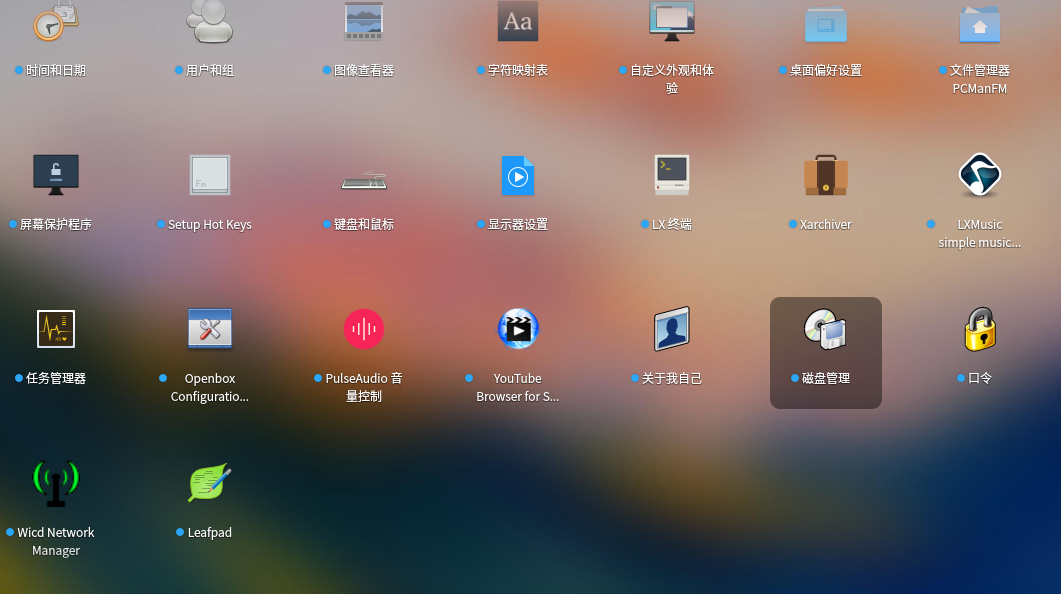

sudo apt install lxde一次性安装了这么多东西??
Reply View the author
avatar
星愿
deepin
2017-08-17 17:21
#13
https://bbs.deepin.org/post/143932
sudo apt install lxde 用lxde的wifi工具连上去
我家的wifi以前也是只能用lxde连,默认的不行,不过现在换 ...

还是要谢谢你啊!我去试试效果
Reply View the author
avatar
星愿
deepin
2017-08-17 17:22
#14
https://bbs.deepin.org/post/143932
sudo apt install lxde 用lxde的wifi工具连上去
我家的wifi以前也是只能用lxde连,默认的不行,不过现在换 ...

还是没有效果,找不到
Reply View the author
avatar
billy123456
deepin
2017-08-17 17:24
#15
https://bbs.deepin.org/post/143932
sudo apt install lxde一次性安装了这么多东西??

因为我不清楚具体是那个包,所以我让你把lxde全家桶装了
Reply View the author
avatar
billy123456
deepin
2017-08-17 17:26
#16
https://bbs.deepin.org/post/143932
还是没有效果,找不到

那你可以sudo apt autoremove lxde
会删掉lxde全家桶
Reply View the author
avatar
billy123456
deepin
2017-08-17 17:28
#17
https://bbs.deepin.org/post/143932
还是没有效果,找不到

要在登录的时候右下角选lxde
Reply View the author
avatar
billy123456
deepin
2017-08-17 17:29
#18
https://bbs.deepin.org/post/143932
要在登录的时候右下角选lxde

然后再打开wifi菜单
Reply View the author
avatar
星愿
deepin
2017-08-18 04:42
#19
https://bbs.deepin.org/post/143932
然后再打开wifi菜单

恩恩,谢谢
Reply View the author
