从windows转到深度linux,工作中遇到的问题
Tofloor
poster avatar
zhengxiaochuang
deepin
2017-08-05 06:36
Author
1。没有类似xshell的软件来做代理。由于在家里需要连公司跳板机才能连到公司服务器,以前都是通过xshell+proxifier代理,xftp就可以连公司的服务器,也可以连公司内部网站。Linux下暂时没有发现这样的东东,之前装了个shadowsocket不起作用,就给干掉了。公司很多系统都是只能内网访问的,需要连上跳板机做代理(麻烦知道的大牛教一下小弟怎么弄)
2. 连接无线网有问题。无线网经常掉,有时候掉了就连不上了,一直自动连,连不上。插上网线没啥问题,不管在哪里都要插网线才能上网,很不方便。

现在用习惯了Linux,实在不想重启切到Windows才能去完成工作的内容,如果有人知道怎么破,请教教小弟,感激不尽!!!

Reply Favorite View the author
All Replies
avatar
duanyao
deepin
2017-08-05 07:06
#1
xshell 是个终端程序,与代理无关吧,linux下对应的是深度终端等。公司跳板机是什么样的?socks 代理可以试试 tsocks:http://www.oschina.net/p/tsocks
Reply View the author
avatar
DebuggerX
deepin
2017-08-05 08:15
#2
超级简单,完全没必要借助任何第三方程序就能实现你的要求啊……
第一步,打开终端,输入下面的命令,利用ssh建立socket连接绑定本机的1080端口到跳板机上:
  1. ssh -N -f -D 127.0.0.1:1080 root@<跳板机ip>
Copy the Code

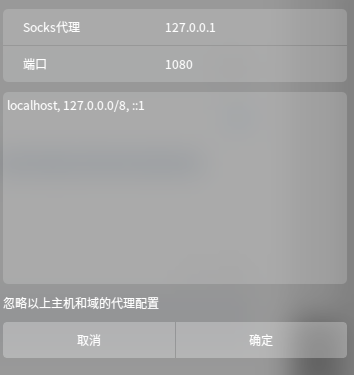
第二步,网络设置里启用手动代理,只要设置socket代理的IP为127.0.0.1,端口为1080,确定:


ok,现在你已经可以正常访问公司内网其他机器所提供的服务了

Reply View the author
avatar
DebuggerX
deepin
2017-08-05 08:23
#3
https://bbs.deepin.org/post/143740
超级简单,完全没必要借助任何第三方程序就能实现你的要求啊……
第一步,打开终端,输入下面的命令,利用s ...

另外,如果是想要继续利用跳板机登录公司内网的其他机器,或者使用sftp传输文件,那么你可能还需要proxychains这个终端软件,具体方式记得论坛里也有,搜索下看看吧
Reply View the author
avatar
s***1@gmail.com
deepin
2017-08-05 21:02
#4
所谓难者不会,会者不难
Reply View the author
avatar
zhengxiaochuang
deepin
2017-08-05 21:05
#5
debuggerx 发表于 2017-8-5 00:23
另外,如果是想要继续利用跳板机登录公司内网的其他机器,或者使用sftp传输文件,那么你可能还需要proxyc ...

proxychins在用了 那个终端绑定的确实不知道 感谢大神 我等会试试
Reply View the author
avatar
zhengxiaochuang
deepin
2017-08-05 21:18
#6
siyucn 发表于 2017-8-5 13:02
所谓难者不会,会者不难

是啊 路太长了 入坑没多久还
Reply View the author
avatar
gaoxiang7552
deepin
2017-08-06 20:41
#7
代理可以用qt5, ftp传文件可以用filezilla,使用体验上感觉还要优于xshell
Reply View the author
avatar
zhengxiaochuang
deepin
2017-08-07 16:33
#8
https://bbs.deepin.org/post/143740
代理可以用qt5, ftp传文件可以用filezilla,使用体验上感觉还要优于xshell ...

目前是用的fire ftp 感觉还行  qt5还没试过 等会试试
Reply View the author
avatar
aliens_rt
deepin
2017-08-07 22:27
#9

  1. $ sudo pip install genpac
Copy the Code

  1. $ pip install --upgrade genpac
Copy the Code


生成pac文件

  1. $ genpac -p "SOCKS5 127.0.0.1:1080" --gfwlist-proxy="SOCKS5 127.0.0.1:1080" --gfwlist-url=https://raw.githubusercontent.com/gfwlist/gfwlist/master/gfwlist.txt --output="autoproxy.pac"
Copy the Code


设置 网络 代理 自动 file:///home/leo/Software/autoproxy.pac
链接生成的pac文件
Reply View the author
avatar
zhengxiaochuang
deepin
2017-08-08 05:43
#10
怎么让浏览器走终端代理! firefox好像不管用 不管是设置系统代理还是浏览器代理 访问公司内网的应用总是连不上 。用proxychins启动Google浏览器又报超时 。。
Reply View the author