
shell 脚本
Tofloor
poster avatar
pandora
deepin
2017-08-01 00:32
Author
写好的脚本放在deepin的哪个文件夹下面,开机会自动执行
Reply Favorite View the author
All Replies
1 / 2
To page
avatar
jingle
deepin
2017-08-01 01:33
#1
Reply View the author
avatar
pandora
deepin
2017-08-01 02:21
#2
https://bbs.deepin.org/post/143522
https://bbs.deepin.org/post/134872#%E8%87%AA%E5%8A%A8%E6%89%A7%E8% ...

找不到~/.local/autostart这个路径
Reply View the author
avatar
deepinwang
deepin
2017-08-02 01:23
#3
https://bbs.deepin.org/post/143522
找不到~/.local/autostart这个路径

那个帖子可能写错了。
试试~/.config/autostart/
Reply View the author
avatar
pandora
deepin
2017-08-02 01:48
#4
https://bbs.deepin.org/post/143522
那个帖子可能写错了。
试试~/.config/autostart/

在里边写了一个.desktop执行可是还是没效果
Reply View the author
avatar
deepinwang
deepin
2017-08-02 03:19
#5
不知道你写的内容是什么,给你一个最简单的例子:

  1. [Desktop Entry]
  2. Exec=xmessage hello!
Copy the Code

保存到~/.config/autostart/test.desktop,注销后再登录看看有没有出现对话框。
Reply View the author
avatar
pandora
deepin
2017-08-02 05:00
#6
https://bbs.deepin.org/post/143522
不知道你写的内容是什么,给你一个最简单的例子:

保存到~/.config/autostart/test.desktop,注销后再登录 ...
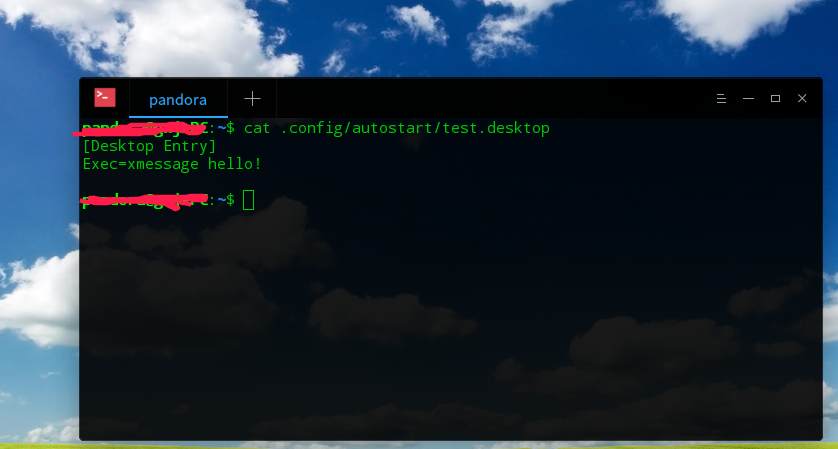

没有任何效果

Reply View the author
avatar
A·S·M·X·T 😏😜
deepin
2017-08-02 07:44
#7
本帖最后由 liululin 于 2017-8-1 23:45 编辑

https://bbs.deepin.org/post/141107
当然你会写systemd服务也非常ok。
Reply View the author
avatar
pandora
deepin
2017-08-02 14:26
#8
https://bbs.deepin.org/post/143522
https://bbs.deepin.org/post/141107#342463&fromuid=51492
当 ...

前两个试过了,不行。
第三个找不到.profile
我在bash.bashrc里面直接写可以执行,但每次打开终端好像都会运行一下
Reply View the author
avatar
pandora
deepin
2017-08-02 21:15
#9
rc.local里有的命令可以执行,有点不可以
Reply View the author
avatar
A·S·M·X·T 😏😜
deepin
2017-08-02 21:20
#10
本帖最后由 liululin 于 2017-8-2 13:35 编辑
https://bbs.deepin.org/post/143522
前两个试过了,不行。
第三个找不到.profile
我在bash.bashrc里面直接写可以执行,但每次打开终端好像都 ...

/etc/bash.bashrc 和~/.bashrc是每次打开终端生效
/etc/profile和~/.profile是登录生效

在~/.profile加命令为了避免卡登录屏幕可以后台(末尾加“&”)并延迟(前加“sleep 秒 &&”)执行!比如:
  1. sleep 3 && xmessage hello! &
Copy the Code

那三个方法我都测试过ok的,你在确认命令/脚本没问题,并检查一下日志执行没有。 或者命令后加个重定向到某个地方检查一下

Reply View the author
avatar
pandora
deepin
2017-08-03 05:34
#11
https://bbs.deepin.org/post/143522
/etc/bash.bashrc 和~/.bashrc是每次打开终端生效
/etc/profile和~/.profile是登录生效

很感谢你的回复,在这些文件里使用简单的命令是可以自动执行的,但是复杂的就不可以了,我加上命令的绝对路径也不执行。
要是deepin有ubuntu下面的那个启动应用管理软件就好了,它里面就可以设置命令,自动执行。
Reply View the author
avatar
pandora
deepin
2017-08-03 05:45
#12
https://bbs.deepin.org/post/143522
/etc/bash.bashrc 和~/.bashrc是每次打开终端生效
/etc/profile和~/.profile是登录生效

命令放在终端里运行没问题,但是用.local  .profile   .desktop 不执行
Reply View the author
avatar
dreco
deepin
2017-08-03 05:50
#13
本帖最后由 dreco 于 2017-8-2 21:52 编辑

deepin用的是systemd, 在/etc/systemd/system/里新建个example.service文件, 编辑.
比如这样

[Unit]
Description=disable acpi event

[Service]
Type=oneshot
ExecStart=/usr/local/bin/wakeup_device_disable_several.sh

[Install]
WantedBy=multi-user.target

ExecStart的参数改成自己的脚本的路径(哪里都可以,只要有执行权限)
然后systemctl enable example.service
即可
Reply View the author
Comments
liululin
2017-08-03 06:16
有的依赖图形环境的用systemd简直坑爹,用户登陆后加载的systemd我写不了 :-(  ,能教我两手吗?
liululin
2017-08-03 06:12
systemd我有时搞不定依赖(或者说启动顺序),有点晕,放弃治疗了 :-(
avatar
A·S·M·X·T 😏😜
deepin
2017-08-03 06:10
#14
本帖最后由 liululin 于 2017-8-2 22:18 编辑
https://bbs.deepin.org/post/143522
命令放在终端里运行没问题,但是用.local  .profile   .desktop 不执行

能说的具体点是什么命令/软件或者脚本吗?

我现在主要用于 登录自动: 开DLNA投射播放器、开ssr/v2ray、更新hosts、更新pac 。没什么问题
Reply View the author
avatar
pandora
deepin
2017-08-03 06:20
#15
https://bbs.deepin.org/post/143522
能说的具体点是什么命令/软件或者脚本吗?

我现在主要用于 登录自动: 开DLNA投射播放器、开ssr/v2ray、 ...

Xmessage 放在.desktop里的exec后面都不执行
Reply View the author
avatar
pandora
deepin
2017-08-03 06:37
#16
https://bbs.deepin.org/post/143522
deepin用的是systemd, 在/etc/systemd/system/里新建个example.service文件, 编辑.
比如这样

谢谢你的回复,试了一下,没效果。
Reply View the author
Comments
liululin
2017-08-03 07:02
有的依赖图形环境的命令这样写systemd注定坑
avatar
A·S·M·X·T 😏😜
deepin
2017-08-03 07:00
#17
本帖最后由 liululin 于 2017-8-2 23:03 编辑
https://bbs.deepin.org/post/143522
Xmessage 放在.desktop里的exec后面都不执行
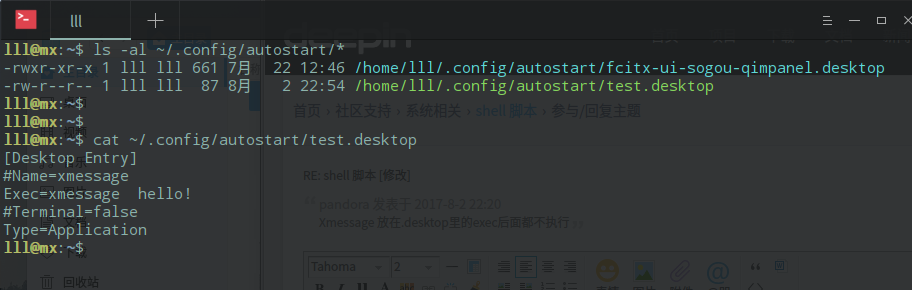
我尝试了下.desktop中不写Type类型就不会执行!!!!你遇到这种应该去看看其他.desktop的实例、或者权限rwx、或者依赖什么?

Reply View the author
avatar
pandora
deepin
2017-08-03 15:22
#18
https://bbs.deepin.org/post/143522
我尝试了下.desktop中不写Type类型就不会执行!!!!你遇到这种应该去看看其他.desktop的实例、或者权限r ...
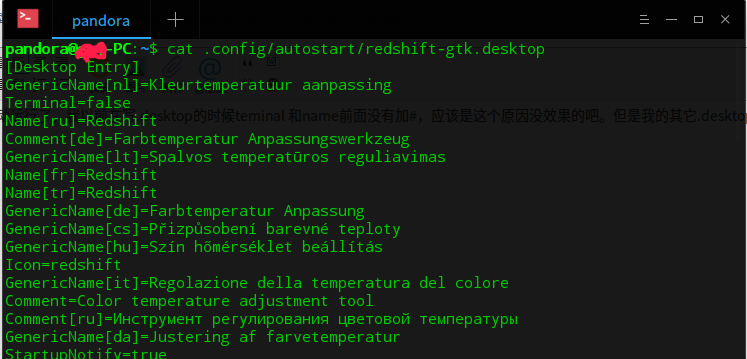
感谢回复,这个方法开机可以自动运行了,经过那么多实验终于成功了。我以前在写.desktop的时候teminal 和name前面没有加#,应该是这个原因没效果的吧。但是我的其它.desktop就没有这个#
Reply View the author
avatar
deepinwang
deepin
2017-08-03 16:41
#19
https://bbs.deepin.org/post/143522
感谢回复,这个方法开机可以自动运行了,经过那么多实验终于成功了。我以前在写.desktop的时候teminal 和 ...

“#”后面的内容是被注释掉的,不写也可。
看来不同桌面对.desktop的处理方式也不一样啊,有兴趣的话您可以再看看“OnlyShowIn”和“NotShowIn”这两个选项,应该也对启动有影响。
Reply View the author
avatar
A·S·M·X·T 😏😜
deepin
2017-08-03 17:31
#20
https://bbs.deepin.org/post/143522
感谢回复,这个方法开机可以自动运行了,经过那么多实验终于成功了。我以前在写.desktop的时候teminal 和 ...

加#的两行是我尝试谁是必要参数写上去的,要不要这两行没什么影响,一样启动。
Reply View the author
1 / 2
To page

