deepin如何修改鼠标滚轮速度?
Tofloor
poster avatar
45******10@qq.com
deepin
2017-07-28 20:18
Author
如题,哪位大虾,知道如何修改鼠标滚轮速度的?求指教,现在浏览网页滚动感觉有点慢,想调快一点。
Reply Favorite View the author
All Replies
avatar
jingle
deepin
2017-07-28 21:14
#1
Reply View the author
avatar
HualetWang
deepin
2017-07-28 22:45
#2
Reply View the author
avatar
alchemy
deepin
2017-08-04 09:25
#3
控制面板上可以设置的吧?
Reply View the author
avatar
la******ng@outlook.com
deepin
2017-08-04 09:47
#4
https://bbs.deepin.org/post/143338
控制面板上可以设置的吧?

当然...不行
Reply View the author
avatar
yanbowen
deepin
Community Developer
2017-08-04 17:25
#5
在使用了 'xserver-xorg-input-libinput' 作为驱动后,已不能调节滚轮速度了,可以试着安装 'xserver-xorg-input-mouse',然后重启,接着按照下面的步骤设置:
先安装 'xinput' 调节滚轮速度:
先用 xinput 命令找到你鼠标的 id,然后再用 xinput --set-prop  你鼠标的id   "Evdev Scrolling Distance"  值  值
如更改一个id为12的鼠标的滚动距离为30的话就用如下命令:  xinput --set-prop  12   "Evdev Scrolling Distance"  30  30
xinput 命令没有的话就安装 sudo apt-get install xinput
Reply View the author
avatar
DebuggerX
deepin
2017-08-04 18:31
#6
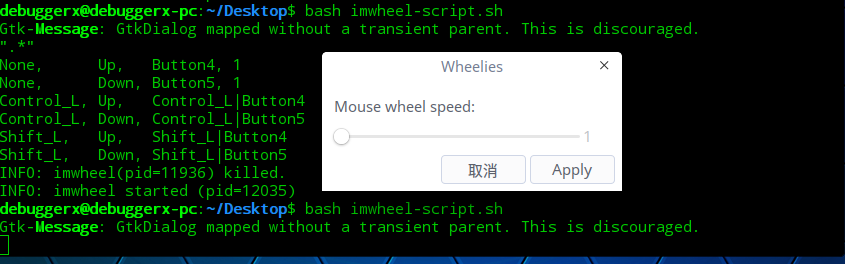
先安装imwheel:
  1. sudo apt-get install imwheel
Copy the Code

然后运行附件里的脚本。
Reply View the author
Comments
tz198849
2018-06-04 18:36
非常的棒,测试可行!
avatar
45******10@qq.com
deepin
2017-08-04 21:53
#7
https://bbs.deepin.org/post/143338
先安装imwheel:

然后运行附件里的脚本。

真的可行,谢谢。
Reply View the author
avatar
h***k@qq.com
deepin
2017-11-12 19:24
#8
https://bbs.deepin.org/post/143338
先安装imwheel:

然后运行附件里的脚本。

thx a lt ............
Reply View the author
avatar
shantong
deepin
2018-06-01 22:43
#9
https://bbs.deepin.org/post/143338
先安装imwheel:

然后运行附件里的脚本。

真的可行,调到3就挺快了,感谢
Reply View the author
avatar
WENWEN
deepin
2018-06-01 23:01
#10
shantong 发表于 2018-6-1 14:43
真的可行,调到3就挺快了,感谢

据说15.6beta有了这个功能了
Reply View the author