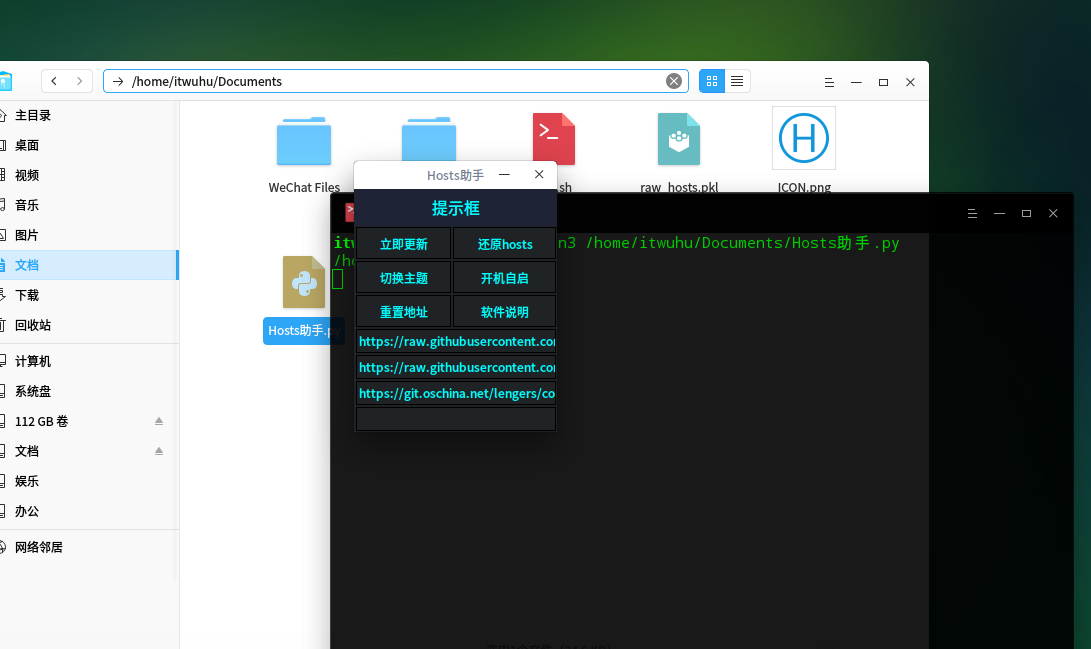
我的第二个作品,Hosts助手,自动/手动更新Hosts文件
Tofloor
poster avatar
Dream
deepin
2017-07-14 19:17
Author


用linux差不多2个月了,发现更新hosts还是挺麻烦的,虽然网上有一些自动更新的脚本,但是我还是喜欢用带界面的软件,所以自己花了几天时间写了这个hosts助手,可以手动更新,也可以自动更新。
用tkinter写的界面,为了达到美观实用的效果还是挺磨人的,一直在网上找资料,对linux的认识又增进了不少。皇天不负有心人,终于做出了自己比较满意的成品,特地献给各位。
附件:Hosts助手.py.tar.gz
步骤:1、首先获得hosts文件的读写权限,命令:sudo chmod 777 /etc/hosts
2、需要安装python3的tkinter模块,命令: sudo apt-get install python3-tk
3、将附件文件解压出来,打开终端,在终端中输入命令:python3  绝对路径/Hosts助手.py    注意!一定要是绝对路径
4、成功,以后可以从启动器打开

Reply Favorite View the author
All Replies
3 / 4
To page
avatar
itwuhu
deepin
2017-07-15 23:29
#41
https://bbs.deepin.org/post/142516
这些文件夹下面都能放

成功了;谢谢楼主教会小白!!

Reply View the author
avatar
kylin0519
deepin
2017-07-17 06:40
#42
Traceback (most recent call last):
  File "Hosts助手.py", line 295, in
    HOSTS().start()
  File "Hosts助手.py", line 287, in start
    self.get_config()
  File "Hosts助手.py", line 134, in get_config
    with open(os.path.dirname(__file__) + '/ICON.png', 'wb') as f:
PermissionError: [Errno 13] Permission denied: '/ICON.png'
Reply View the author
avatar
Dream
deepin
2017-07-17 17:18
#43
https://bbs.deepin.org/post/142516
Traceback (most recent call last):
  File "Hosts助手.py", line 295, in
    HOSTS().start()

看上面
Reply View the author
avatar
kylin0519
deepin
2017-07-17 18:43
#44

我就是在下载里啊
Reply View the author
avatar
Dream
deepin
2017-07-17 19:03
#45
https://bbs.deepin.org/post/142516
我就是在下载里啊

你运行的时候是不是输入的绝对路径啊?
Reply View the author
avatar
路由器(router)
deepin
2017-07-18 16:12
#46
好用楼主点个赞
Reply View the author
avatar
kfnx1981
deepin
2017-07-20 04:09
#47
我的是移动,删了另外两慢地址,用china那个 飞速看youtu视频、安浏览器插件,感谢楼主。xxnet访问更多 但速度不如裸奔
Reply View the author
avatar
FZFZ
deepin
2017-07-20 05:56
#48
好东西啊,收藏了
Reply View the author
avatar
zhqh100
deepin
2017-07-20 16:38
#49
更新了,可还是打不开 Google 啊
Reply View the author
avatar
Dream
deepin
2017-07-20 17:42
#50
https://bbs.deepin.org/post/142516
更新了,可还是打不开 Google 啊

试试重启浏览器或者电脑,或者先断网再重连
Reply View the author
avatar
zhqh100
deepin
2017-07-20 21:05
#51
https://bbs.deepin.org/post/142516
试试重启浏览器或者电脑,或者先断网再重连

重启了,还是上不了Google
Reply View the author
avatar
Dream
deepin
2017-07-20 21:18
#52
https://bbs.deepin.org/post/142516
重启了,还是上不了Google

把那个最快的网址删掉,试试那2个慢的
Reply View the author
avatar
zhqh100
deepin
2017-07-20 22:12
#53
https://bbs.deepin.org/post/142516
把那个最快的网址删掉,试试那2个慢的

https://raw.githubusercontent.com/racaljk/hosts/master/hosts
这个是可以的
Reply View the author
avatar
eumeniders
deepin
2017-07-21 00:05
#54
很厉害,特意注册了个账号支持你一下!加油
Reply View the author
avatar
Dream
deepin
2017-07-21 01:13
#55
https://bbs.deepin.org/post/142516
很厉害,特意注册了个账号支持你一下!加油

哈哈,多谢了
Reply View the author
avatar
zhlk1001
deepin
2017-07-21 01:33
#56
中间网站的那个host已经不能用了,最底下的那个还可以
Reply View the author
avatar
Dream
deepin
2017-07-21 01:45
#57
https://bbs.deepin.org/post/142516
中间网站的那个host已经不能用了,最底下的那个还可以

这就是有备选网址的原因
Reply View the author
avatar
Dream
deepin
2017-07-21 01:56
#58
https://bbs.deepin.org/post/142516
中间网站的那个host已经不能用了,最底下的那个还可以

我试了下,是可以的啊,可能各个人的网络环境不一样吧
Reply View the author
avatar
BG7ZAG
deepin
2017-07-31 19:40
#59
如果更新失败,那个窗口则关闭不了,得关闭进程才能关闭那个窗口
Reply View the author
avatar
A·S·M·X·T 😏😜
deepin
2017-07-31 21:09
#60
在.profile写入
  1. sleep 5 && wget -O /tmp/hosts https://raw.githubusercontent.com/racaljk/hosts/master/hosts &&gksu 'cp -f /tmp/hosts /etc/hosts' &
Copy the Code

登陆后5秒钟弹出授权,输入后更新hosts。
Reply View the author
3 / 4
To page