我的第二个作品,Hosts助手,自动/手动更新Hosts文件
Tofloor
poster avatar
Dream
deepin
2017-07-14 19:17
Author


用linux差不多2个月了,发现更新hosts还是挺麻烦的,虽然网上有一些自动更新的脚本,但是我还是喜欢用带界面的软件,所以自己花了几天时间写了这个hosts助手,可以手动更新,也可以自动更新。
用tkinter写的界面,为了达到美观实用的效果还是挺磨人的,一直在网上找资料,对linux的认识又增进了不少。皇天不负有心人,终于做出了自己比较满意的成品,特地献给各位。
附件:Hosts助手.py.tar.gz
步骤:1、首先获得hosts文件的读写权限,命令:sudo chmod 777 /etc/hosts
2、需要安装python3的tkinter模块,命令: sudo apt-get install python3-tk
3、将附件文件解压出来,打开终端,在终端中输入命令:python3  绝对路径/Hosts助手.py    注意!一定要是绝对路径
4、成功,以后可以从启动器打开

Reply Favorite View the author
All Replies
1 / 4
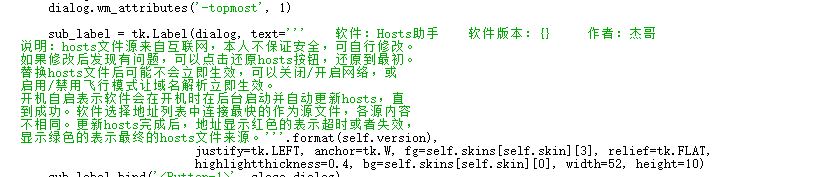
To page
avatar
cbfjw
deepin
2017-07-14 19:27
#1
手机非root改host可以吗?
Reply View the author
avatar
Dream
deepin
2017-07-14 19:29
#2
https://bbs.deepin.org/post/142516
手机非root改host可以吗?

好像不行
Reply View the author
avatar
lyxlgr
deepin
2017-07-14 20:50
#3
这个可以有   
Reply View the author
avatar
jingle
deepin
2017-07-14 21:26
#4
https://github.com/huhamhire/huhamhire-hosts 试试这个
Reply View the author
Comments
zhqh100
2017-07-20 16:37
2015年就没更新过了,已经无法使用了
xiaoyangerbani
2017-07-15 18:59
贴地址的时候,能否讲网址和文字之间换个行,点击链接,直接就可以跳转
avatar
sinux
deepin
2017-07-14 21:41
#5
sudo chmod 777 /etc/hosts
这个有点厉害了
Reply View the author
Comments
yexiaorain
2017-07-17 21:14
这楼 1 这用户习惯就是被777又777的带坏的
avatar
Dream
deepin
2017-07-14 22:00
#6
https://bbs.deepin.org/post/142516
https://github.com/huhamhire/huhamhire-hosts 试试这个

这个好久都没更新了,还全是英文,不喜欢
Reply View the author
avatar
Dream
deepin
2017-07-14 22:01
#7
https://bbs.deepin.org/post/142516
sudo chmod 777 /etc/hosts
这个有点厉害了

不懂为什么厉害?
Reply View the author
avatar
jingle
deepin
2017-07-14 22:10
#8
https://bbs.deepin.org/post/142516
这个好久都没更新了,还全是英文,不喜欢

但是运行是中文的,不过服务器连不上了 https://github.com/wzyy2/hoststool-cpp 这个呢
Reply View the author
avatar
sinux
deepin
2017-07-14 22:16
#9
https://bbs.deepin.org/post/142516
不懂为什么厉害?

hosts文件你给了个777,那就是谁都能动了
Reply View the author
avatar
Dream
deepin
2017-07-14 22:49
#10
https://bbs.deepin.org/post/142516
hosts文件你给了个777,那就是谁都能动了

我们一般用deepin都是个人电脑吧,难道你的电脑会给别人用?考虑到论坛里还有很多超级小白,我只是给了一个最简单的获取权限的方法,就只获取一个文件的权限而已。我也不想把账号提升到很高权限,否则很容易出问题。
Reply View the author
Comments
liululin
2017-07-31 21:12
在.profile写入
sleep 5 && wget -O /tmp/hosts https://raw.githubusercontent.com/racaljk/hosts/master/hosts &&gksu 'cp -f /tmp/hosts /etc/hosts' &
登陆5秒授权更新。
avatar
Dream
deepin
2017-07-14 23:16
#11
https://bbs.deepin.org/post/142516
但是运行是中文的,不过服务器连不上了 https://github.com/wzyy2/hoststool-cpp 这个呢 ...

这个以后试试,手机还没root
Reply View the author
avatar
sinux
deepin
2017-07-14 23:20
#12
https://bbs.deepin.org/post/142516
我们一般用deepin都是个人电脑吧,难道你的电脑会给别人用?考虑到论坛里还有很多超级小白,我只是给了一 ...

点击那个更新按钮的时候调用gksu,弹出个框,让用户输入口令,或者简单粗暴一点,直接启动你这个程序的时候就直接要求输入口令
Reply View the author
avatar
雪域一线天
deepin
2017-07-14 23:24
#13
给楼主点赞。
Reply View the author
avatar
‌量子巡游者
Moderator
2017-07-14 23:51
#14
你的第一个作品呢?给你点赞!!!
Reply View the author
avatar
Dream
deepin
2017-07-15 00:01
#15
https://bbs.deepin.org/post/142516
点击那个更新按钮的时候调用gksu,弹出个框,让用户输入口令,或者简单粗暴一点,直接启动你这个程序的时 ...

每次更新要输密码不觉得麻烦吗?写这个本来就是为了方便,再说这个软件还有后台自动更新的选项,后台怎么输密码?
Reply View the author
avatar
Dream
deepin
2017-07-15 00:02
#16
https://bbs.deepin.org/post/142516
你的第一个作品呢?给你点赞!!!

多谢捧场 https://bbs.deepin.org/post/141303#
Reply View the author
avatar
RedPanda
deepin
2017-07-15 02:29
#17

粗犷的排版(无恶意,感谢作者的工具)

Reply View the author
avatar
arlen
deepin
2017-07-15 02:54
#18
https://bbs.deepin.org/post/142516
https://github.com/huhamhire/huhamhire-hosts 试试这个

这个进去看懵逼了啊。
Reply View the author
avatar
Dream
deepin
2017-07-15 04:12
#19
https://bbs.deepin.org/post/142516
粗犷的排版(无恶意,感谢作者的工具)

不是我不想排好,我也有强迫症,可是你把它们对齐了之后,最终的界面可不是对齐的,你可以试试
Reply View the author
avatar
Dream
deepin
2017-07-15 04:21
#20
https://bbs.deepin.org/post/142516
粗犷的排版(无恶意,感谢作者的工具)

好吧,其实可以把那一大段放到外面的,看来不仅软件界面要美化,代码也要美化,毕竟这社区里大神多
Reply View the author
1 / 4
To page