nvidia显卡驱动没有装上
Tofloor
poster avatar
marsruc
deepin
2017-07-11 06:07
Author
VGA compatible controller: NVIDIA Corporation G72M [Quadro NVS 110M/GeForce Go 7300] (rev a1)

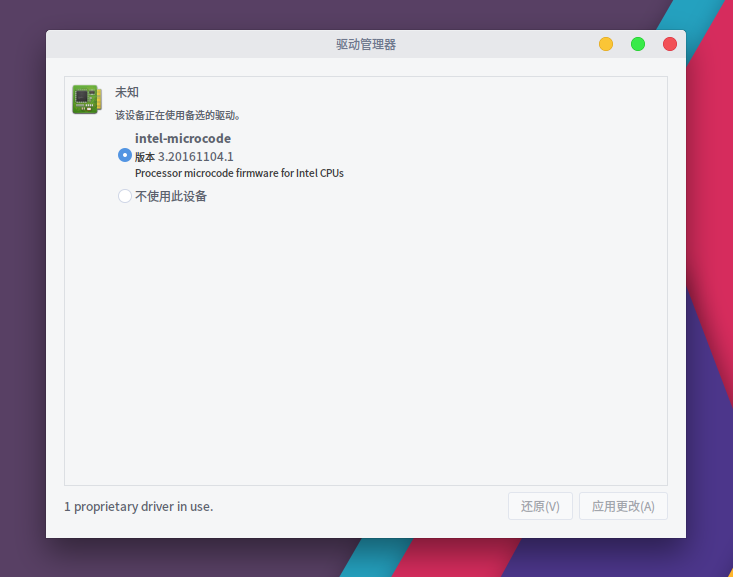
然而驱动控制里面没有这个显卡的驱动

想知道咋个装上呢

谢谢了
Reply Favorite View the author
All Replies
avatar
liuguangjingshang
deepin
2017-07-11 15:58
#1
本帖最后由 liuguangjingshang 于 2017-7-11 08:22 编辑

https://wiki.deepin.org/index.php?title=%E6%98%BE%E5%8D%A1
Reply View the author
avatar
RedPanda
deepin
2017-07-11 16:16
#2
每次论坛里出现nvidia的问题我都想放这张图
Reply View the author
avatar
liuguangjingshang
deepin
2017-07-11 16:16
#3
本帖最后由 liuguangjingshang 于 2017-7-11 08:18 编辑

你是Nvidia显卡的话,应该的能在驱动管理器里面找到你的显卡,选上应用一下就可以了驱动管理器是默认安装软件,在启动器里面


Reply View the author
avatar
liuguangjingshang
deepin
2017-07-11 16:22
#4
https://bbs.deepin.org/post/142315
每次论坛里出现nvidia的问题我都想放这张图

你下面的signature是怎么弄得,我没找到sign在哪?
Reply View the author
avatar
RedPanda
deepin
2017-07-11 16:31
#5
https://bbs.deepin.org/post/142315
你下面的signature是怎么弄得,我没找到sign在哪?

在论坛设置里,网页可以带签名,手机端带不了。我这个签名是用fetchscreen自己改的
Reply View the author
avatar
BRS5672023
deepin
2017-07-11 21:30
#6
https://bbs.deepin.org/post/142315
每次论坛里出现nvidia的问题我都想放这张图

hhh
Reply View the author
avatar
marsruc
deepin
2017-07-12 02:32
#7
https://bbs.deepin.org/post/142315
你是Nvidia显卡的话,应该的能在驱动管理器里面找到你的显卡,选上应用一下就可以了驱动管理器是默认安装软 ...

我的这个地方没有nv的驱动程序可选
Reply View the author
avatar
marsruc
deepin
2017-07-12 03:22
#8
参考附件里面没有驱动可选
Reply View the author
avatar
marsruc
deepin
2017-07-12 03:26
#9
这也没有找到显卡驱动
Reply View the author
avatar
marsruc
deepin
2017-07-12 03:28
#10
mars@m9j:~$ lspci | grep -i 'VGA'
06:00.0 VGA compatible controller: NVIDIA Corporation G72M [Quadro NVS 110M/GeForce Go 7300] (rev a1)

mars@m9j:~$ sudo dmesg | grep -i 'VGA'
[sudo] mars 的密码:
[    0.000000] Console: colour VGA+ 80x25
[    0.228924] vgaarb: setting as boot device: PCI:0000:06:00.0
[    0.228924] vgaarb: device added: PCI:0000:06:00.0,decodes=io+mem,owns=io+mem,locks=none
[    0.228924] vgaarb: loaded
[    0.228924] vgaarb: bridge control possible 0000:06:00.0
[    2.258805] ACPI: Video Device [VGA] (multi-head: yes  rom: no  post: no)
[    2.446183] nouveau 0000:06:00.0: DRM: Saving VGA fonts
[   11.641895] bbswitch: Found discrete VGA device 0000:06:00.0: \_SB_.PCI0.P0P1.VGA_
[   11.641923] bbswitch: failed to evaluate \_SB_.PCI0.P0P1.VGA_._DSM {0xF8,0xD8,0x86,0xA4,0xDA,0x0B,0x1B,0x47,0xA7,0x2B,0x60,0x42,0xA6,0xB5,0xBE,0xE0} 0x100 0x0 {0x00,0x00,0x00,0x00}: AE_NOT_FOUND
[   11.641935] bbswitch: failed to evaluate \_SB_.PCI0.P0P1.VGA_._DSM {0xA0,0xA0,0x95,0x9D,0x60,0x00,0x48,0x4D,0xB3,0x4D,0x7E,0x5F,0xEA,0x12,0x9F,0xD4} 0x102 0x0 {0x00,0x00,0x00,0x00}: AE_NOT_FOUND
Reply View the author
avatar
marsruc
deepin
2017-07-12 06:07
#11
https://bbs.deepin.org/post/142315
https://wiki.deepin.org/index.php?title=%E6%98%BE%E5%8D%A1

按照wiki的方法,无法安装。

NVIDIA的安装程序提示,依然没有警用noveau的驱动,虽然已经按照wiki加了blacklist

同时ctrl+al+f1也无法进入控制台 ctrl+alt+f2可以,f1的话,就一直闪烁

Reply View the author
avatar
marsruc
deepin
2017-07-12 06:07
#12
在nv官方也找到32bit对应的驱动了
Reply View the author
avatar
marsruc
deepin
2017-07-12 06:28
#13
怎么算是显卡驱动装好呢?

sudo lshw -c video
[sudo] mars 的密码:
  *-display UNCLAIMED      
       description: VGA compatible controller
       product: G72M [Quadro NVS 110M/GeForce Go 7300]
       vendor: NVIDIA Corporation
       physical id: 0
       bus info: pci@0000:06:00.0
       version: a1
       width: 64 bits
       clock: 33MHz
       capabilities: pm msi pciexpress vga_controller bus_master cap_list
       configuration: latency=0
       resources: memory:fb000000-fbffffff memory:d0000000-dfffffff memory:fa000000-faffffff memory:c0000-dffff
Reply View the author
avatar
marsruc
deepin
2017-07-12 06:39
#14
sudo nvidia-xconfig
[sudo] mars 的密码:

WARNING: Unable to locate/open X configuration file.

Package xorg-server was not found in the pkg-config search path.
Perhaps you should add the directory containing `xorg-server.pc'
to the PKG_CONFIG_PATH environment variable
No package 'xorg-server' found
New X configuration file written to '/etc/X11/xorg.conf'
Reply View the author
avatar
liuguangjingshang
deepin
2017-07-12 16:11
#15
https://bbs.deepin.org/post/142315
按照wiki的方法,无法安装。

NVIDIA的安装程序提示,依然没有警用noveau的驱动,虽然已经按照wiki加了bl ...

f1进不了应该是正常的,我f1也进不了,f2可以进
Reply View the author
avatar
liuguangjingshang
deepin
2017-07-12 16:13
#16
https://bbs.deepin.org/post/142315
在nv官方也找到32bit对应的驱动了

现在deepin应该都是64位了
Reply View the author
avatar
liuguangjingshang
deepin
2017-07-12 16:17
#17
https://bbs.deepin.org/post/142315
怎么算是显卡驱动装好呢?

sudo lshw -c video

应该是没装好,看下这个帖子吧
https://bbs.deepin.org/post/141747#
Reply View the author
avatar
liuguangjingshang
deepin
2017-07-12 16:18
#18
https://bbs.deepin.org/post/142315
怎么算是显卡驱动装好呢?

sudo lshw -c video

Reply View the author
avatar
liuguangjingshang
deepin
2017-07-12 16:27
#19
https://bbs.deepin.org/post/142315
sudo nvidia-xconfig
[sudo] mars 的密码:

Nvidia显卡安装成功的话启动器了应该会多一个X  server configuration,至少现在900系列往上都会有,老显卡应该也会有吧
Reply View the author
avatar
qq707194403
deepin
2017-08-02 19:58
#20
驱动文件放在哪里,怎么装?
Reply View the author