

 中文

lsc deepin
2017-12-03 17:59 deepin 第七步怎么做???
Reply Like 0 View the author
deepin 
 deepin deepin

 deepin

 deepin
 deepin
https://bbs.deepin.org/post/142049
楼主什么时候把安装打包共享出来,新版的修改貌似不行
deepin drepr 发表于 2018-6-3 18:28
Install sunlogin client to your system?(Y/n)y
./scripts/common.sh: 第 72 行:[: !=: 需要一元表达式
./ ...

 deepin deepin deepin deepin deepin

 deepin deepin
https://bbs.deepin.org/post/142049
控制端安装使用并不复杂
Popular Events
More


 Four agent skills for laptop power, sleep, and honest bug reports
看到好多人都在说向日葵的事情,我也是向日葵爱好者啊,一直想在这个电脑上安装,可是一直装不上去,今天突然脑洞大开,发现了问题所在!
其实官网的教程很详细了,我的教程是安装版的,还是从头到尾啰嗦一下吧
第一步,从官网下载Linux版向日葵,然后解压,根据自己的喜好放到文件夹里,这里我是在主目录下新建了程序的文件夹,向日葵就放在里面
第二步,进入向日葵文件夹下的scripts文件夹,在这里打开终端,
第三部,按照官方教程,运行安装程序,在终端里运行:./install.sh
第四步,这里呢,出现了一个错误,很直观,翻译过来就是在第69行需要一个一元表达式,错误是不识别的操作系统
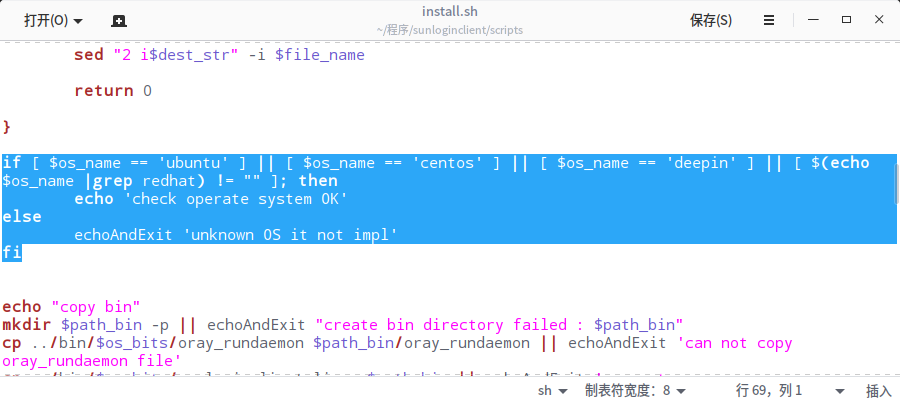
这里就是重点了,用文本编辑器打开install.sh,找到第69行,发现代码:
if [ $os_name == 'ubuntu' ] || [ $os_name == 'centos' ] || [ $(echo $os_name |grep redhat) != "" ]; then
echo 'check operate system OK'
else
echoAndExit 'unknown OS it not impl'
fi
阅读代码,发现向日葵官方识别的Linux操作系统仅为Ubuntu、centos和redhat,如果不是这三个,就返回代码
Error:unknown OS it not impl
发现问题所在,那么解决也就很简单了,在代码中加上deepin就可以了哇,以下是修改后的代码:
if [ $os_name == 'ubuntu' ] || [ $os_name == 'centos' ] || [ $os_name == 'deepin' ] || [ $(echo $os_name |grep redhat) != "" ]; then
echo 'check operate system OK'
else
echoAndExit 'unknown OS it not impl'
fi
保存继续
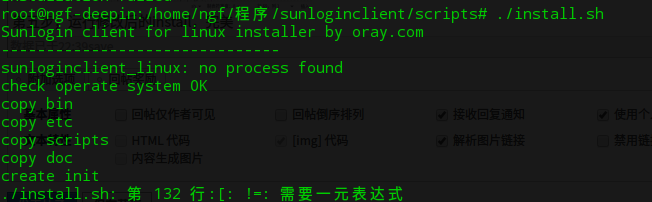
第五步,运行修改后的install,哎呀不好,怎么还不行?
详细一看,呀,错误一样,打开看代码,果然,同样的问题,加上deepin的代码
elif [ "$os_name" == "centos" ] || [ $os_name == 'deepin' ] || [ $(echo $os_name |grep redhat) != "" ] ; then
gdm_init_create
if [ $os_version_int -lt 7 ]; then
cp init_runsunloginclient /etc/init.d/runsunloginclient || echoAndExit 'can not copy init file init_runsunloginclient'
chmod +x /etc/init.d/runsunloginclient

第六步,继续运行,完美了!第七步,安装完成,运行程序:./start.sh
这时候也会遇到上面的问题,解决方案一样的,
第八步,完美运行了,只是缺少了本机IP,自己在浏览器里输入就好了
第九步,在浏览器打开的页面里,设置访问密码,
第十步,图中的位置选择Sunlogin Account Login,输入自己的向日葵账号密码,就可以在客户端访问自己的电脑了!
下面是我在其他电脑远程的画面,完美perfect!
本来想隐藏下,混个回复,结果找不到哪里隐藏,作罢咯