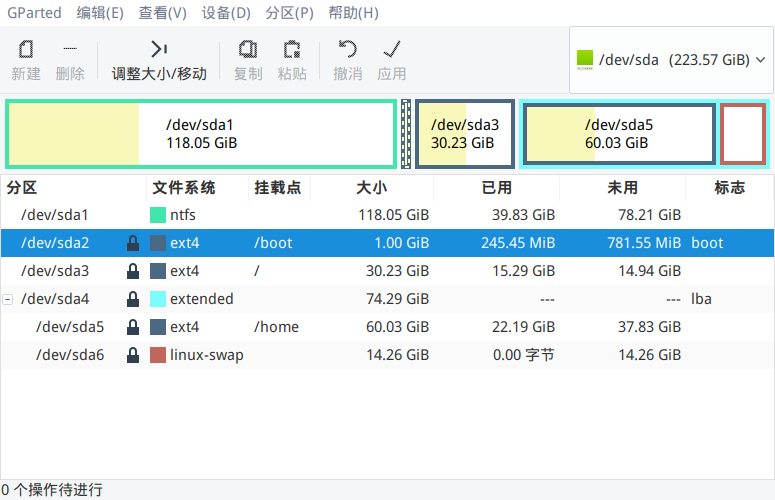
双硬盘双系统(win7+deepin)出现无引导问题
Tofloor
poster avatar
lyj19960106
deepin
2017-07-05 04:42
Author
按照如图所示,从逻辑分区的HD压缩出来一块空间用来安装Deepin,安装好以后点“立即体验”重启,进入win7系统。然后用easybcd对"/boot"分区所在空间添加新条目“grub2”,然后确定重启。在开机启动的时候win7下面多了一条“Neosmart Linux”选项,选择此项后便进入了grub4dos。此时,我一脸懵逼...
(求各位大佬指教)

Reply Favorite View the author
All Replies
avatar
lyj19960106
deepin
2017-07-05 05:08
#1
难道这个社区没人吗?
Reply View the author
avatar
kingskill
deepin
2017-07-05 05:29
#2
我也是一脸懵逼。。。你的/boot里面怎么什么都没有?
而且/boot分了9个g也是醉了。。。我才1g,还觉得有点浪费。。。


Reply View the author
avatar
comzhong
deepin
2017-07-05 06:36
#3
https://bbs.deepin.org/post/133725#no
Reply View the author
avatar
dannycat
deepin
2017-07-05 07:03
#4
是不是把deepin的引导记录装到第二硬盘上了,可以试试直接使用第二块硬盘引导系统能不能进deepin。不过,楼主是怎么做到能在“扩展分区”里面分出来三个“主分区”的?
Reply View the author
avatar
lyj19960106
deepin
2017-07-05 07:42
#5
https://bbs.deepin.org/post/142042
是不是把deepin的引导记录装到第二硬盘上了,可以试试直接使用第二块硬盘引导系统能不能进deepin。不过,楼 ...

我是压缩分卷 然后将分卷在安装deepin的高级模式下 分别分3个 /boot  /  /home。不知道为什么成了三个主分区了。
Reply View the author
avatar
lyj19960106
deepin
2017-07-05 07:43
#6
https://bbs.deepin.org/post/142042
https://bbs.deepin.org/post/133725#no

谢谢
您这个方法是先安装好deepin再在Win7下进行引导程序安装吗?
Reply View the author
avatar
comzhong
deepin
2017-07-05 08:16
#7
https://bbs.deepin.org/post/142042
谢谢
您这个方法是先安装好deepin再在Win7下进行引导程序安装吗?

在win下添加deepin引导
Reply View the author