深度文件管理器查看系统盘属性不准
Tofloor
poster avatar
Dream
deepin
2017-07-04 04:19
Author
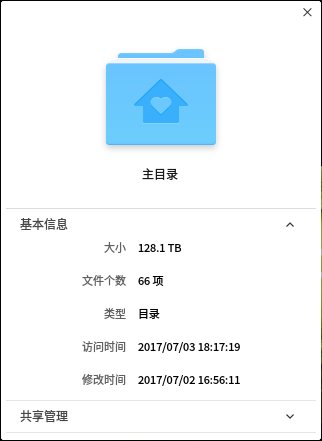
如图,我查看系统盘,包括里面的文件夹的时候,文件夹大小一直涨,直到128TB
Reply Favorite View the author
All Replies
avatar
duanyao
deepin
2017-07-04 05:13
#1
运行 du 命令的结果是什么?会不会有很大的稀疏文件?
Reply View the author
avatar
nevershow
deepin
2017-07-04 06:31
#2
最新的系统使用了avfs实现压缩包预览,home目录会无限挂载,我把avfs卸载了就可以了
Reply View the author
avatar
cuixiaofei
deepin
2017-07-04 07:03
#3
我的天哪,你的硬盘是外星人留下的哈哈哈
Reply View the author
avatar
cbfjw
deepin
2017-07-04 08:20
#4
已知bug
Reply View the author
avatar
herdde
deepin
2017-07-04 14:30
#5
https://bbs.deepin.org/post/141980
最新的系统使用了avfs实现压缩包预览,home目录会无限挂载,我把avfs卸载了就可以了 ...

压缩包预览速度很慢
Reply View the author
avatar
Dream
deepin
2017-07-04 17:00
#6
https://bbs.deepin.org/post/141980
最新的系统使用了avfs实现压缩包预览,home目录会无限挂载,我把avfs卸载了就可以了 ...

我du了一下,的确都是avfs下的文件
Reply View the author
avatar
Dream
deepin
2017-07-04 17:02
#7
https://bbs.deepin.org/post/141980
运行 du 命令的结果是什么?会不会有很大的稀疏文件?

du了,页面一直跑,好像都是avfs里的文件
Reply View the author
avatar
nevershow
deepin
2017-07-04 19:09
#8
https://bbs.deepin.org/post/141980
du了,页面一直跑,好像都是avfs里的文件

因为无限挂载,所以死循环了,导致文件夹大小属性错误,不过不影响使用,也可以使用umountavfs 取消/home下的挂载,sudo umountavfs 取消/root下的挂载
Reply View the author