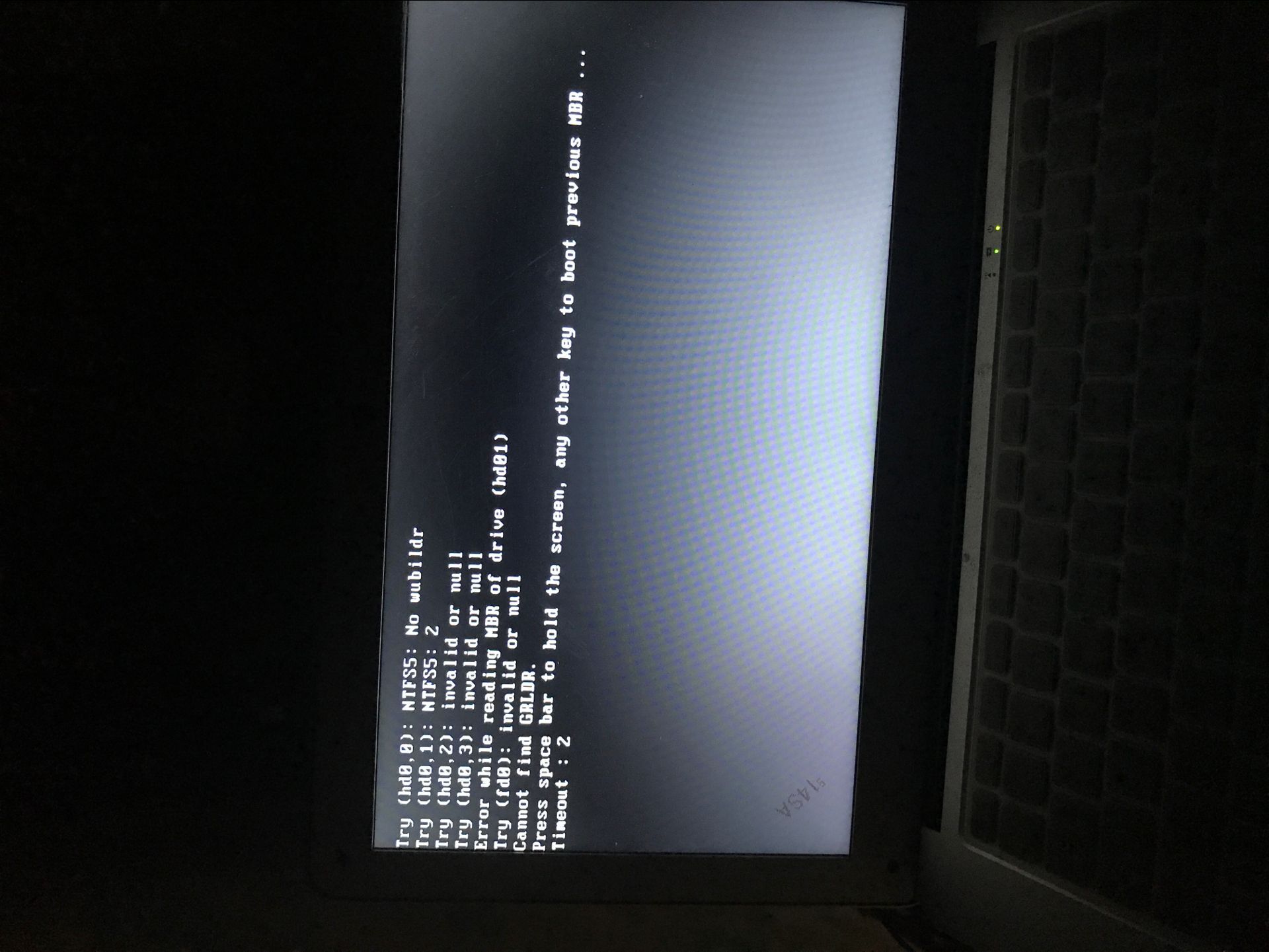
deepin系统启动
Tofloor
poster avatar
yoyuee
deepin
2017-07-01 19:44
Author
这种问题怎么解决,谢谢大家了
Reply Favorite View the author
All Replies
avatar
pikachuhy
deepin
2017-07-01 19:48
#1
请问你是怎么安装的?我猜你是不是在启动win
Reply View the author
avatar
yoyuee
deepin
2017-07-01 19:50
#2
https://bbs.deepin.org/post/141860
请问你是怎么安装的?我猜你是不是在启动win

u盘安装和安装器安装都是这样呢
Reply View the author
avatar
pikachuhy
deepin
2017-07-01 19:59
#3
有几个硬盘?
Reply View the author
avatar
yoyuee
deepin
2017-07-01 19:59
#4

一个固态硬盘128g
Reply View the author
avatar
pikachuhy
deepin
2017-07-01 20:01
#5
就一个吗?有机械键盘吗?
Reply View the author
avatar
yoyuee
deepin
2017-07-01 20:02
#6
https://bbs.deepin.org/post/141860
就一个吗?有机械键盘吗?

就一个 我的是笔记本电脑 没有外置键盘
Reply View the author
avatar
pikachuhy
deepin
2017-07-01 20:09
#7
安装前格式化过ssd吗?
Reply View the author
avatar
yoyuee
deepin
2017-07-01 20:19
#8
https://bbs.deepin.org/post/141860
安装前格式化过ssd吗?

有  重新分区过
Reply View the author
avatar
slg1984
deepin
2017-07-01 20:22
#9
能把图正一下么,为了看个帖子小心把脖子扭了
Reply View the author
avatar
yoyuee
deepin
2017-07-01 20:47
#10
slg1984 发表于 2017-7-1 12:22
能把图正一下么,为了看个帖子小心把脖子扭了

哈哈
Reply View the author
avatar
kingskill
deepin
2017-07-01 22:08
#11
引导有问题?不晓得是不是硬件。。。
Reply View the author
avatar
yoyuee
deepin
2017-07-02 01:58
#12
kingskill 发表于 2017-7-1 14:08
引导有问题?不晓得是不是硬件。。。

嗯嗯 不知道咋整
Reply View the author
avatar
wangkunthird
deepin
2017-07-02 04:28
#13
我是两个硬盘,在win下直接解压有一个install的文件安装在你分区里就行啦,但是必须是mbr下的硬盘格式
Reply View the author
avatar
yoyuee
deepin
2017-07-02 21:38
#14
https://bbs.deepin.org/post/141860
我是两个硬盘,在win下直接解压有一个install的文件安装在你分区里就行啦,但是必须是mbr下的硬盘格式 ...

哦哦  好吧 谢谢
Reply View the author
avatar
tim_1020
deepin
2017-07-02 21:45
#15
你的弄好没有?
Reply View the author
avatar
yoyuee
deepin
2017-07-03 03:05
#16

木有  用u盘安装 提示禁用uefi
Reply View the author
avatar
la0627
deepin
2017-07-15 18:05
#17
我觉得把硬盘重新分区,然后U盘安装应该可以。
安装Win运行到创建磁盘分区或是做个u大侠开机下时,按下“Shift+F10”便可启动命令窗口了。之后输入Diskpart回车便可进入
  List Disk                                                                  显示本机的所有磁盘
  Select Disk 0                                                           选择0号磁盘
  Clean                                                                      清除0号磁盘上的所有分区
  Create Partition Primary Size=51200                      创建主分区,容量:512000MB(50G),此数值可根据自己要求更改,更改的数字参考后文
  Active                                                                      激活主分区
  Format Quick                                                          快速格式化当前分区
  Create Partition Extended                                       创建扩展分区
  Create Partition Logical Size=51200                       创建逻辑分区1,容量:512000MB(50G),此数值可根据自己要求更改,更改的数字参考后文
  Format Quick                                                          快速格式化当前分区
  Create Partition Logical Size=51200                       创建逻辑分区2,容量:512000MB(50G),此数值可根据自己要求更改,更改的数字参考后文
  Format Quick                                                          快速格式化当前分区
  Create Partition Logical                                           创建逻辑分区3,容量为此硬盘剩余空间
  Format Quick                                                           快速格式化当前分区
  Exit                                                                          退出Diskpart命令环境
  Exit                                                                          退出命令窗口
我也没试验不知道在你机器上可用吗
Reply View the author
avatar
la0627
deepin
2017-07-15 18:13
#18
我装deepin用的是uefi+gpt硬盘格式,应该也支持bios+mbr
Reply View the author
avatar
kaile
deepin
2017-07-15 18:26
#19
https://bbs.deepin.org/post/141860
木有  用u盘安装 提示禁用uefi

u盘启动时应该有两个启动项,不要选带efi的,选另一个
Reply View the author