Home
Categories
WIKI
Topic
User
LANGUAGE:
中文
English
我在安装系统过后遇到的问题以及解决方法
Apps Section
7257
views ·
18
replies ·
To
floor
Go
RedPanda
deepin
2017-06-23 18:01
Author
本帖最后由 windcz91 于 2018-1-14 14:40 编辑
刚安装新系统,遇到了两个小问题。还好解决了。发个帖子留下作为以后遇到问题时的提醒,也给其他朋友作为一个参考。
1.刚安装完成后发现触摸板右侧的滑动翻页不好用(用的是15.4的全新安装包,问题已过期)
A:更新过后就好了。
打开终端后输入:sudo apt update&&sudo apt upgrade
2.QQ点击之后返回桌面,没有反应,资源监视器发现没有QQ的进程
A:根据
https://bbs.deepin.org/user/54457
的回帖
“rm -r ~/.deepinwine/Deepin-QQ
删除这个目录之后再运行看看”
将命令在终端运行,然后重新打开QQ,会出现更新wine配置的窗口。更新完成后QQ就可以打开了
Reply
Like 0
Favorite
View the author
All Replies
RedPanda
deepin
2017-06-23 18:31
#1
3.wifi联网状态下,第一次点击steam,steam在更新过程中显示需要在联网状态下更新。
A:在系统设置那里关闭有线连接的选项。
Reply
Like 0
View the author

RedPanda
deepin
2017-06-25 18:17
#2
本帖最后由 windcz91 于 2017-6-26 18:09 编辑
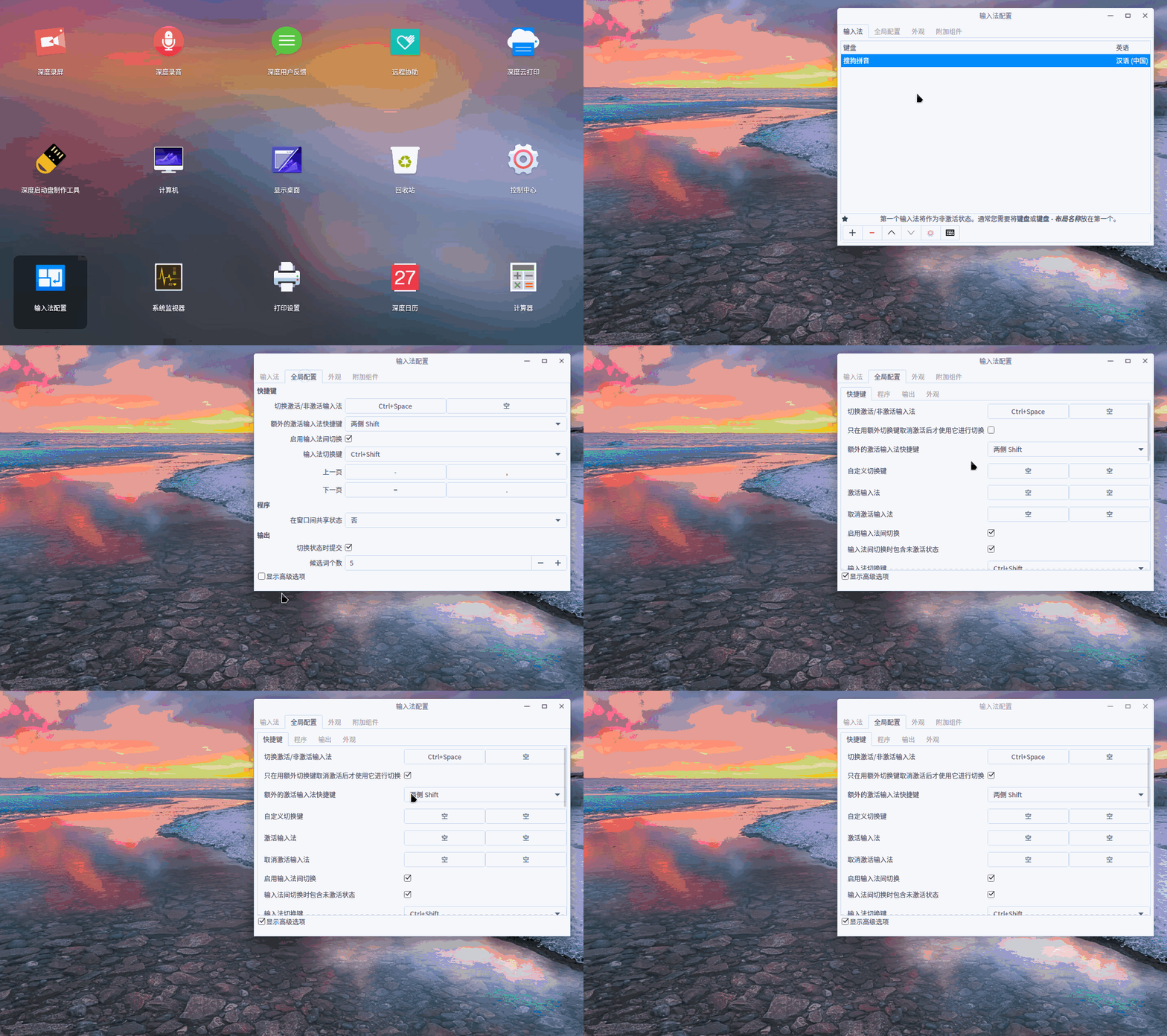
4.改变输入法默认的无论何时,按shift都切换中英文状态,变为只有按下Ctrl+Space激活搜狗后才能使用shift切换中英文
输入法配置→全局配置→显示高级选项→勾选“只在用额外切换键取消激活后才使用它进行切换”
这个功能是方便在使用纯英文输入时候不小心按了shift就会切换中文的尴尬情况。
PS:这里发现一个问题,就是重启之后还是会恢复原来 shift随便切换的问题。。期待后面版本能修复这个问题。
PPS:这里有个暂时的解决方案,就是把它的config文件的权限修改为只读,具体操作在终端输入:
chmod 444 ./.config/fcitx/config
这样权限就修改为只读了,如果后续想修改其他选项,那么要先修改权限为可写入,然后再在输入法配置里面修改。
修改为可写入只要把上面命令里的444改为644就好了。修改完成之后再把权限修改为只读。
Reply
Like 0
View the author
Comments
walle
2017-06-25 18:30
这个好,学习了
RedPanda
deepin
2017-06-25 19:02
#3
本帖最后由 windcz91 于 2017-7-1 19:30 编辑
5.手动更新firefox浏览器要求更新最新版的Adobe flashplayer.
为了防止apt-get安装出现其他问题,所以手动更新Flashplayer
步骤如下:
1).在Adobe Flash Player下载下载最新版本的.tar.gz包(要注意下载的文件是不是给Firefox用的,chromium又是一种下载文件)
链接:https://get.adobe.com/flashplayer/?loc=cn
2).终端进入下载目录 :cd ./Downloads
3).将压缩包解压,并提取其中的文件"libflashplayer.so"。
我下载的版本是flash_player_npapi_linux.x86_64,所以输入命令:tar -xzvf flash_player_npapi_linux.x86_64.tar.gz libflashplayer.so
4).查看firefox安装目录
一般是/usr/lib/mozilla/plugins
5).备份原libflashplayer.so文件(为了防止最新的flashplayer出现问题)。
备份在一个能找到的地方,我直接复制到了别的盘里。
6).把新libflashplayer.so文件复制到firefox安装目录下
命令:sudo cp libflashplayer.so /usr/lib/mozilla/plugins
输入密码。
Reply
Like 0
View the author
jingle
deepin
2017-06-26 16:51
#4
谢谢分享
Reply
Like 0
View the author
Comments
windcz91
2017-06-27 00:06
fcitx输入法设置完成后,重启还是会恢复为之前默认状态,烦请向开发组的大神们反馈一下.......
jingle
deepin
2017-06-27 00:42
#5
https://bbs.deepin.org/user/30944
Reply
Like 0
View the author
RedPanda
deepin
2017-06-27 01:29
#6
本帖最后由 windcz91 于 2017-6-26 19:08 编辑
6.开机后鼠标悬浮在wifi连接图标上发现出现显示不全的情况 A:设置里面将有线连接关闭就好了。
Reply
Like 0
View the author
RedPanda
deepin
2017-07-18 03:53
#7
本帖最后由 windcz91 于 2017-7-20 18:59 编辑
7.Q:VMware安装deepin后进入桌面前选择特效与普通模式模式,出现鼠标消失的情况,无法进入到桌面了。
A:Crtl+Alt+F2进入tty2之后输入命令ps -e 查看“dde welcome”这个进程的前面的进程号码(4位数字)。然后输入命令kill xxxx(那4位数字),切回tty7就出现鼠标了
Reply
Like 0
View the author
RedPanda
deepin
2017-07-21 00:52
#8
本帖最后由 windcz91 于 2017-7-20 19:03 编辑
8.dde-dock-monitor-plugin网速小插件:
https://bbs.deepin.org/
Reply
Like 0
View the author
RedPanda
deepin
2017-07-23 21:58
#9
9.手动刷入intel 闭源驱动,来自@lineme
原帖地址:
https://bbs.deepin.org/post/142234
视频地址:
https://www.bilibili.com/video/av12007015/
deepin下文件管理器进程名为 dde-file-manager
Reply
Like 0
View the author
RedPanda
deepin
2017-07-29 02:20
#10
本帖最后由 windcz91 于 2017-12-29 12:52 编辑
10.回收站有文件删不掉
回收站文件夹路径为/home/xxx(用户名)/.local/share/Trash/files/
控制台cd 进入该文件夹后sudo rm -rf *(谨慎操作,千万不要进错了文件夹)
Reply
Like 0
View the author
RedPanda
deepin
2018-01-14 21:33
#11
本帖最后由 windcz91 于 2018-1-14 14:37 编辑
11.WIFI断线的两种解决方案:
1)
https://bbs.deepin.org/post/151063
2)
https://bbs.deepin.org/post/151276
Reply
Like 0
View the author
lxflhy
deepin
2018-01-14 22:23
#12
这个好啊,我也想过要整个这样的帖子,墨迹时间长了,好多都不记得当时咋解决的了
Reply
Like 0
View the author
Comments
windcz91
2018-01-14 22:36
我个人是很希望各位都能在自己的签名里搞一个这样的帖子。这样大家就可以在遇到各种问题的时候通过各位的签名尝试着找到解决办法
RedPanda
deepin
2018-01-25 17:56
#13
12.安装启动黑屏,修改启动参数
内容来自@comzhong
https://bbs.deepin.org/post/151416
Reply
Like 0
View the author
RedPanda
deepin
2018-05-09 02:09
#14
13.单独关闭开机音乐
开机音乐文件在/usr/share/sounds/deepin/stereos 文件夹下
有desktop-login.ogg和desktop-logout.ogg,分别代表开机音乐和关机音乐。
在两个文件名后面加上.bak,再建立两个新的空文件,命名为开关机音乐的名称。即可关闭。
Reply
Like 0
View the author
Comments
Undivided
2019-01-19 07:15
你是真的骚,我看着看着就看到我需要的
didiaodetaoge
deepin
2018-05-27 20:30
#15
多谢分享经验
Reply
Like 0
View the author
realgm
deepin
2018-05-29 14:18
#16
卸载搜狗输入法后找不到系统托盘
[系统托盘]:sudo apt install fcitx-ui-classic
Reply
Like 0
View the author
RedPanda
deepin
2018-06-20 06:40
#17
windows下的U盘制作工具:rufus
Reply
Like 0
View the author
RedPanda
deepin
2019-05-15 05:27
#18
最新版本的crossover安装不上的问题:
感谢
https://bbs.deepin.org/user/146333
的解答
可以在文件夹下给*.bin文件加上执行权限进行安装
方法:
进入crossover解压后的文件夹,
命令1(给.bin文件加上可执行权限):sudo chmod a+x *.bin
命令2(超级用户执行该文件):sudo ./*.bin
https://bbs.deepin.org/post/176871
Reply
Like 0
View the author
Please
sign
in first
Featured Collection
Change
Nuntia - Modern IMAP/SMTP mail client for Deepin (Beta tester wanted!)
[Tutorial] deepin25 WSL Offline Installation Guide
UOS AI 2.8 Released! Three New Intelligent Agents & Major Evolution
Solid Q&A | deepin 25 Common Questions – The Immutable System Edition
New Thread
Popular Ranking
Change
Four agent skills for laptop power, sleep, and honest bug reports
Installing qemu-user breaks deepin
Adding a Dancing Spectrum Bar to the Deepin Taskbar | deepin-spectrum
Popular Events
More
刚安装新系统,遇到了两个小问题。还好解决了。发个帖子留下作为以后遇到问题时的提醒,也给其他朋友作为一个参考。
1.刚安装完成后发现触摸板右侧的滑动翻页不好用(用的是15.4的全新安装包,问题已过期)
A:更新过后就好了。
打开终端后输入:sudo apt update&&sudo apt upgrade
2.QQ点击之后返回桌面,没有反应,资源监视器发现没有QQ的进程
A:根据https://bbs.deepin.org/user/54457 的回帖
“rm -r ~/.deepinwine/Deepin-QQ
删除这个目录之后再运行看看”
将命令在终端运行,然后重新打开QQ,会出现更新wine配置的窗口。更新完成后QQ就可以打开了