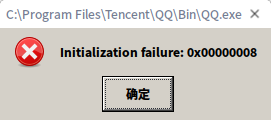
更新完成后QQ使用不了
Tofloor
poster avatar
shellshot
deepin
2017-06-18 15:42
Author
点击qq无反应,怎么回事?
Reply Favorite View the author
All Replies
avatar
He8617439
deepin
2017-06-18 16:00
#1
更新后每一次使用要等一会,好像有个什么部署之类的要重新进行。
Reply View the author
avatar
jingle
deepin
2017-06-18 18:05
#2
首次加载时候要等一会。
Reply View the author
avatar
shellshot
deepin
2017-06-18 19:00
#3
https://bbs.deepin.org/post/141228
首次加载时候要等一会。

等半小时了
Reply View the author
avatar
shellshot
deepin
2017-06-18 19:18
#4
https://bbs.deepin.org/post/141228
更新后每一次使用要等一会,好像有个什么部署之类的要重新进行。

点击一直不出现登录界面呢,等再长时间都没用
Reply View the author
avatar
pikachuhy
deepin
2017-06-18 20:05
#5
如果是第一次的话 确实要等很久 还会有一个比较丑陋的win的进度条
Reply View the author
avatar
130******52
deepin
2017-06-18 20:57
#6
貌似每次更新后第一次启动的时候都会重新配置下wine的配置文件的。时间特别长,等一下看看吧。
Reply View the author
avatar
shellshot
deepin
2017-06-18 21:18
#7
https://bbs.deepin.org/post/141228
貌似每次更新后第一次启动的时候都会重新配置下wine的配置文件的。时间特别长,等一下看看吧。 ...

没有进度条怎么办?
Reply View the author
avatar
shellshot
deepin
2017-06-18 21:27
#8
https://bbs.deepin.org/post/141228
如果是第一次的话 确实要等很久 还会有一个比较丑陋的win的进度条

没有进度条怎么办?卸载重新安装还不行
Reply View the author
avatar
He8617439
deepin
2017-06-19 16:53
#9
没有进度条就多点几次就出来了。。。
Reply View the author
avatar
xiewei
deepin
2017-06-19 16:57
#10
rm -r ~/.deepinwine/Deepin-QQ
删除这个目录之后看看
如果还是不行,执行下面命令生成一份日志看看
/opt/deepinwine/tools/log.sh Deepin-QQ +pid,+tid,+process,+seh,+module
Reply View the author
avatar
metanoia1989
deepin
2017-06-21 04:55
#11

更新之后我也不能使用了,显示初始化失败。


Reply View the author
avatar
shellshot
deepin
2017-06-22 00:32
#12
https://bbs.deepin.org/post/141228
rm -r ~/.deepinwine/Deepin-QQ
删除这个目录之后看看
如果还是不行,执行下面命令生成一份日志看看

Reply View the author
avatar
shellshot
deepin
2017-06-22 00:33
#13
https://bbs.deepin.org/post/141228
rm -r ~/.deepinwine/Deepin-QQ
删除这个目录之后看看
如果还是不行,执行下面命令生成一份日志看看

0008:0009:trace:module:load_builtin_callback loaded ntdll.dll 0x110158 0x7bc10000
0008:0009:trace:module:load_builtin_dll Trying built-in L"kernel32.dll"
0008:0009:trace:module:load_dll looking for L"ntdll.dll" in L""
0008:0009:trace:module:load_dll Found L"ntdll.dll" for L"ntdll.dll" at 0x7bc10000, count=2
0008:0009:trace:module:load_builtin_callback loaded KERNEL32.dll 0x110200 0x7b810000
0008:0009:trace:moduledrGetDllHandle L"kernel32" -> 0x7b810000 (load path (null))
0008:0009:err:process:init_windows_dirs directory L"C:\\windows" could not be created, error 267
0008:0009:err:process:init_windows_dirs directory L"C:\\windows\\system32" could not be created, error 3
0008:0009:trace:process:init_current_directory starting in L"unix\\home\\gordon\\Desktop\\" 0x14
wine: cannot find 'c:\\Program Files\\Tencent\\QQ\\Bin\\QQ.exe'
0008:0009:trace:moduledrShutdownProcess ()
Reply View the author
avatar
xiewei
deepin
2017-06-22 01:18
#14
https://bbs.deepin.org/post/141228
更新之后我也不能使用了,显示初始化失败。

rm -r ~/.deepinwine/Deepin-QQ
删除这个目录之后重新运行也不行吗
Reply View the author
avatar
xiewei
deepin
2017-06-22 01:20
#15
https://bbs.deepin.org/post/141228
0008:0009:trace:module:load_builtin_callback loaded ntdll.dll 0x110158 0x7bc10000
0008:0009:trace: ...

rm -r ~/.deepinwine/Deepin-QQ
删除这个目录之后重新运行也不行吗
Reply View the author
avatar
metanoia1989
deepin
2017-06-22 01:51
#16
https://bbs.deepin.org/post/141228
rm -r ~/.deepinwine/Deepin-QQ
删除这个目录之后重新运行也不行吗

删除之后就可以了,谢谢你。
Reply View the author