WPS的云文档非常好用,如果云文档功能能加在Linux版里最好
Tofloor
poster avatar
baoding-fenshuajiang_Odoo
deepin
2017-06-17 05:05
Author
本帖最后由 fenshuajiang 于 2017-6-16 21:07 编辑

如题。
Reply Favorite View the author
All Replies
avatar
ddb_01
deepin
2017-06-17 06:12
#1
这个应该跟金山说。wps是金山开发的,深度只是合作方。
Reply View the author
avatar
fanxzh
deepin
2017-06-17 06:33
#2
确实,我有好多文档时wps云文档,linux用起来不是很方便,如果金山能把这个全平台打通就好了
Reply View the author
Comments
yao1110313
2017-06-17 07:30
看楼下
avatar
山西姚一
deepin
2017-06-17 07:29
#3
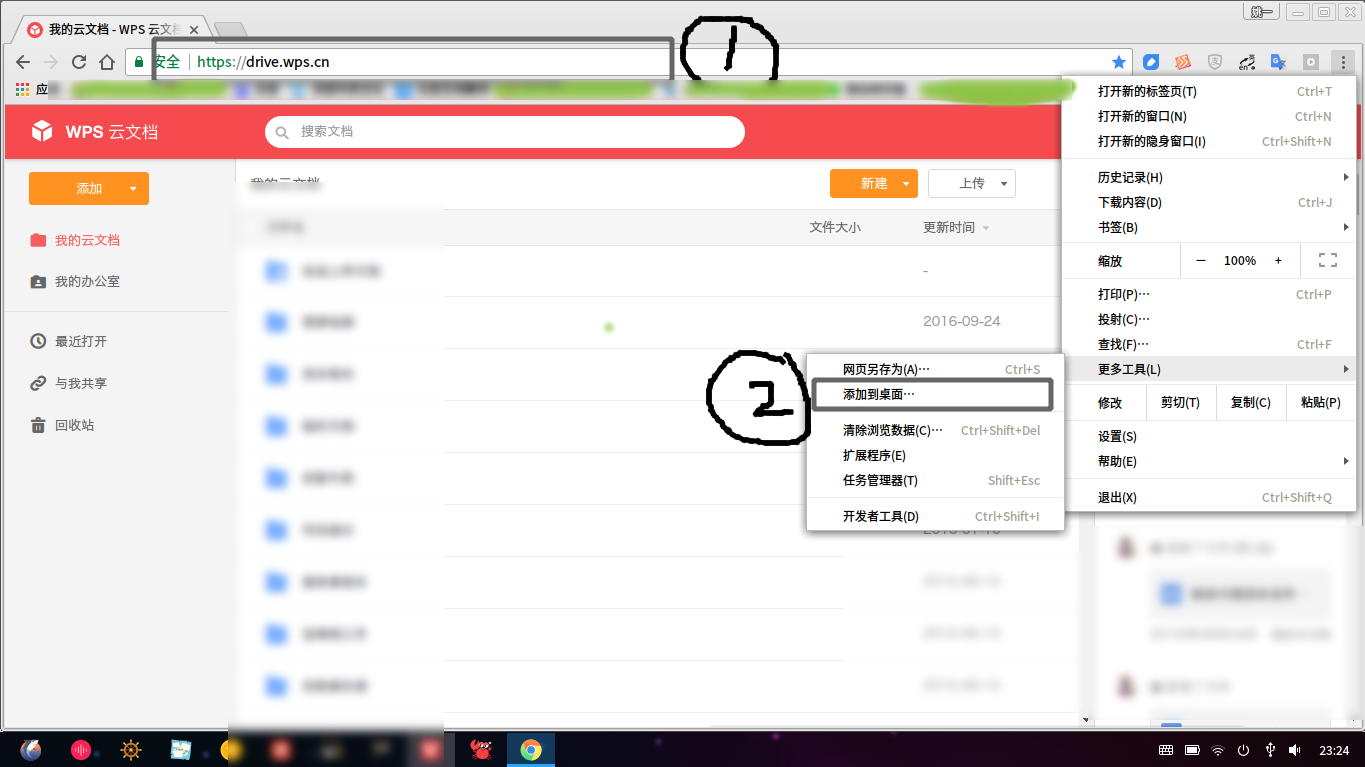
请打开网址:https://drive.wps.cn/

如果使用频率高,可以1.chrome中打开https://drive.wps.cn/
2.看图:

Reply View the author
avatar
山西姚一
deepin
2017-06-17 07:32
#4
https://bbs.deepin.org/post/141163
这个应该跟金山说。wps是金山开发的,深度只是合作方。

不用东奔西走,看4楼就行。
Reply View the author
avatar
山西姚一
deepin
2017-06-17 07:54
#5
补张效果图

Reply View the author
avatar
Guumi
deepin
2017-06-17 08:05
#6
应该会在专业版中推出,否则wps 就失去了优势
Reply View the author
avatar
fanxzh
deepin
2017-06-17 15:08
#7
https://bbs.deepin.org/post/141163
请打开网址:https://drive.wps.cn/

如果使用频率高,可以1.chrome中打开https://drive.wps.cn/

刚试了一下,文档没法在线编辑,不像windowns版直接可以云同步,这个要先下下来编辑,然后再上传,不大方便,还是希望能像windows下面把云同步云操作内嵌到wps软件中
Reply View the author
avatar
山西姚一
deepin
2017-06-17 21:40
#8
https://bbs.deepin.org/post/141163
刚试了一下,文档没法在线编辑,不像windowns版直接可以云同步,这个要先下下来编辑,然后再上传,不大方 ...

那样的话一部分敏感文件是不方便用WPS打开的。
Reply View the author
avatar
baoding-fenshuajiang_Odoo
deepin
2017-06-18 02:00
#9
我试了,可以在深度Linux中安装windows版本的wps,安装后可以正常使用云文档。
Reply View the author