deepin系统怎么安全弹出移动硬盘/U盘
Tofloor
poster avatar
sh******ui@126.com
deepin
2017-06-05 22:19
Author
各位大哥、大姐:
小弟第一次接触linux内核系统,想问问deepin系统怎么安全弹出移动硬盘/U盘。需要输入命令吗?
Reply Favorite View the author
All Replies
avatar
kingskill
deepin
2017-06-05 22:35
#1
和win一样的操作。。。
Reply View the author
avatar
sh******ui@126.com
deepin
2017-06-05 22:37
#2
https://bbs.deepin.org/post/140560
和win一样的操作。。。

点哪?我怎么没找到能点的地方啊
Reply View the author
avatar
sh******ui@126.com
deepin
2017-06-05 22:47
#3
https://bbs.deepin.org/post/140560
和win一样的操作。。。

移动硬盘怎么弄?
Reply View the author
avatar
herdde
deepin
2017-06-05 22:47
#4
https://bbs.deepin.org/post/140560
点哪?我怎么没找到能点的地方啊

在文件管理器右键弹出
Reply View the author
avatar
sh******ui@126.com
deepin
2017-06-05 22:48
#5
https://bbs.deepin.org/post/140560
在文件管理器右键弹出

移动硬盘没有弹出,U盘有弹出选项。
Reply View the author
avatar
李逍遥mx
deepin
2017-06-05 23:08
#6
一般都是直接撸出来的
Reply View the author
avatar
sh******ui@126.com
deepin
2017-06-05 23:13
#7
https://bbs.deepin.org/post/140560
一般都是直接撸出来的

好想法,好的,呢我也就这样了!
Reply View the author
avatar
山西姚一
deepin
2017-06-05 23:23
#8


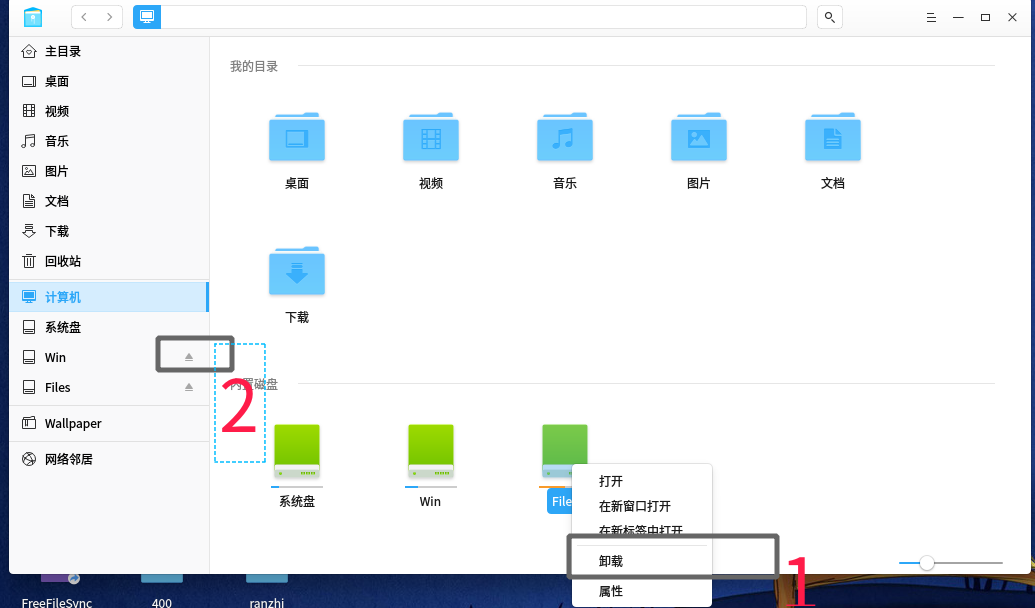
点击1,或者2,任意一个都可以。
Reply View the author
avatar
ghou
deepin
2017-06-05 23:23
#9
文管左侧不是有你的移动硬盘/u盘?右键你就懂了
Reply View the author
avatar
sh******ui@126.com
deepin
2017-06-06 15:44
#10
https://bbs.deepin.org/post/140560
文管左侧不是有你的移动硬盘/u盘?右键你就懂了

就是卸载即可是不
Reply View the author
avatar
sh******ui@126.com
deepin
2017-06-06 15:45
#11
https://bbs.deepin.org/post/140560
点击1,或者2,任意一个都可以。

ok,谢谢啦,明白了。
Reply View the author
avatar
山西姚一
deepin
2017-06-07 01:28
#12
https://bbs.deepin.org/post/140560
ok,谢谢啦,明白了。

不客气……
Reply View the author