deepin引导win10后怎么删除多余的启动项
Tofloor
poster avatar
ttong
deepin
2017-05-26 02:55
Author

怎么删除不需要的启动项呢?
Reply Favorite View the author
All Replies
avatar
mlx
deepin
2017-05-26 04:30
#1
去改/boot/gurb/grub.cfg  注释掉你不要的 更改默认启动值
Reply View the author
avatar
billy123456
deepin
2017-05-26 06:02
#2
https://bbs.deepin.org/post/140010
去改/boot/gurb/grub.cfg  注释掉你不要的 更改默认启动值

是改/etc/grub.d吧
Reply View the author
avatar
bbccy
deepin
2017-05-26 06:32
#3
楼上正解。。。
Reply View the author
avatar
mlx
deepin
2017-05-27 16:45
#4

/etc/grub.d是文件夹目录 怎么改?
Reply View the author
Comments
billy123456
2017-05-28 01:57
全都是
avatar
billy123456
deepin
2017-05-28 01:57
#5
https://bbs.deepin.org/post/140010
/etc/grub.d是文件夹目录 怎么改?

底下每个文件都看一遍,看看那个文件写错了就改一下
Reply View the author
avatar
comzhong
deepin
2017-05-28 02:25
#6
把第6个分区上的 Windows 引导文件删掉,重新更新一下 grub2 菜单
Reply View the author
avatar
DebuggerX
deepin
2017-05-28 02:43
#7
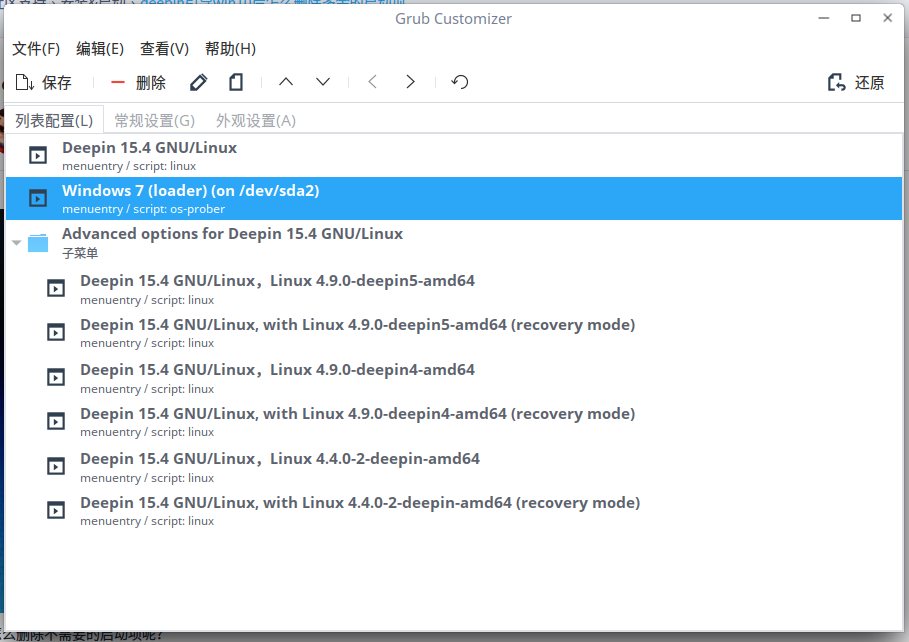
我一直推荐新手用grub-customizer解决这个问题:

下载地址:
  1. https://launchpad.net/~danielrichter2007/+archive/ubuntu/grub-customizer/+files/grub-customizer_5.0.6-0ubuntu1~ppa1z_amd64.deb
Copy the Code
有些特定的需求的时候或者特性需求的时候可以手动修改文件不迟……
好像有不少开发反对用这个工具,具体原因是什么不知道。。。
Reply View the author
Comments
wzhjcj
2017-12-03 06:54
新手福音,不错不错
billy123456
2017-05-28 06:20
哦?