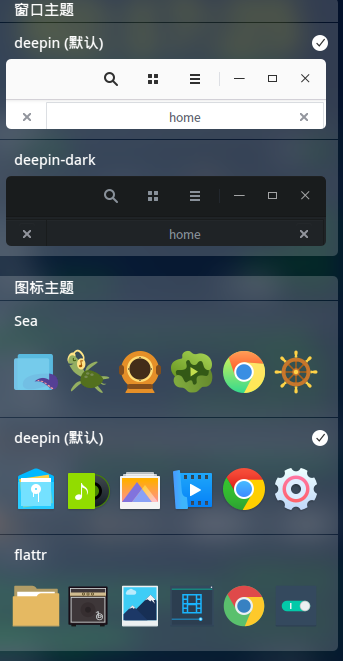
deepin更新之后, 默认主题的图标不见了
Tofloor
poster avatar
jwenjian
deepin
2017-05-18 09:13
Author
任务栏的图标正常, 但是启动页面上的图标不能正常显示了。
Reply Favorite View the author
All Replies
avatar
kingskill
deepin
2017-05-18 10:18
#1
我的还在。。。


Reply View the author
avatar
jingle
deepin
2017-05-18 16:52
#2
你都更新了什么? 主题正常的
Reply View the author
avatar
jwenjian
deepin
2017-05-18 16:54
#3
https://bbs.deepin.org/post/139618
你都更新了什么?

系统提示说要我立即更新, 我就立即更新了, 重启之后就这样了
Reply View the author
avatar
jwenjian
deepin
2017-05-18 16:56
#4
https://bbs.deepin.org/post/139618
系统提示说要我立即更新, 我就立即更新了, 重启之后就这样了

默认主题的话,就成这样了
Reply View the author
avatar
jwenjian
deepin
2017-05-18 16:58
#5
另外两个主题都是正常的, deepin默认主题的任务栏图标也是正常的
Reply View the author
avatar
Island
deepin
2017-05-18 16:58
#6
apt-cache policy deepin-icon-theme  看下主题版本号
Reply View the author
avatar
jwenjian
deepin
2017-05-18 17:02
#7
版本号
Reply View the author
avatar
jingle
deepin
2017-05-18 17:03
#8

版本号是对的
Reply View the author
avatar
jwenjian
deepin
2017-05-18 17:39
#9
jingle 发表于 2017-5-18 09:03
版本号是对的

有什么方法吗?
Reply View the author
avatar
jingle
deepin
2017-05-18 17:47
#10

sudo apt-get install --reinstall deepin-icon-theme  试试
Reply View the author
avatar
jwenjian
deepin
2017-05-18 18:03
#11
好,等我下班回家了试试
Reply View the author
avatar
jingle
deepin
2017-05-18 18:04
#12
或者试试  sudo apt-get update && sudo apt-get install -f && sudo apt-get dist-upgrade && sudo apt-get install dde  这个命令试试
Reply View the author
avatar
jwenjian
deepin
2017-05-19 03:57
#13
https://bbs.deepin.org/post/139618
sudo apt-get install --reinstall deepin-icon-theme  试试

多谢, 用这个命令之后就好了
Reply View the author
avatar
jiancheng_wang
deepin
2017-07-21 02:51
#14
https://bbs.deepin.org/post/139618
多谢, 用这个命令之后就好了

重安装之后需要执行什么操作,我的不行
Reply View the author
avatar
jiancheng_wang
deepin
2017-07-28 05:16
#15
https://bbs.deepin.org/post/139618
sudo apt-get install --reinstall deepin-icon-theme  试试

wjc@wjc-pc:~$ apt-cache policy deepin-icon-theme 
N: Unable to locate package deepin-icon-theme 
Reply View the author