

 中文

wangyong deepin
2017-05-11 05:12 deepin 尝试一下:
/usr/bin/deepin-terminal -e $(CMD)
/usr/bin/deepin-terminal -e $(CMD)
Reply Like 0 View the author
 deepin

 deepin
https://bbs.deepin.org/post/139244
尝试一下:
/usr/bin/deepin-terminal -e $(CMD)
deepin deepin https://bbs.deepin.org/post/139244
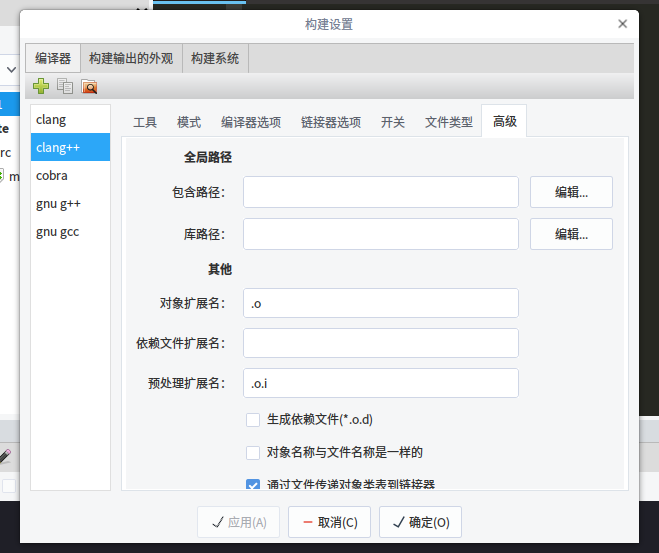
我研究了一下 /usr/lib/codelite/codelite_exec 的实现方式
你只用像我截图中设置成

 deepin
 deepin deepin deepin
https://bbs.deepin.org/post/139244
多谢兄台!让我知道了这个可以用,不过不知道为什么我的还是不行。。。不知道是不是这里的配置,刚刚卸 ...
deepin deepin https://bbs.deepin.org/post/139244
不好用……哎
难道是我的电脑问题?
deepin https://bbs.deepin.org/post/139244
哈哈,我也是第一次使用codelite,我就按照你的步骤来配置的。
只是codelite的程序解析程序的行为有点怪, ...
deepin https://bbs.deepin.org/post/139244
你新建一个用户再重新配置一遍看看可不可以?
排除一下你当前用户的配置已经被你折腾坏了。
 deepin
https://bbs.deepin.org/post/139244
新建立了一个账号,果然codelite都是默认值了,可是还是一样的问题……蛋疼,不过谢谢您哈 我再研究研究 ...
deepin https://bbs.deepin.org/post/139244
你按的是 Ctrl + F5 去运行工程的吗?
deepin Popular Ranking
ChangePopular Events
More


 什么是IDE……新手不懂啊


 Adding a Dancing Spectrum Bar to the Deepin Taskbar | deepin-spectrum
1.应用商店安装;
2.运行后,新建了工程,选择了GCC和相应的配置,如图:
这个终端应该如何更改?
我安装了xterm但是并不知道安装到了哪里。。。。。。
有知道的朋友吗?