mac主题安装求助
Tofloor
poster avatar
qq731008714
deepin
2017-05-02 21:54
Author
深度的主题怎么安装啊!好想换个主题!  
Reply Favorite View the author
All Replies
1 / 2
To page
avatar
isunny
deepin
2017-05-02 22:37
#1
/usr/share/theme 好像是主题的目录    如果不对百度一下
Reply View the author
avatar
qq731008714
deepin
2017-05-02 22:45
#2
本帖最后由 qq731008714 于 2017-5-2 14:54 编辑

我找了个主题包并且尝试在弄到/usr/share/theme下边,但是并没有什么作用
是不是我弄错了?

Reply View the author
avatar
qq731008714
deepin
2017-05-02 22:46
#3
本帖最后由 qq731008714 于 2017-5-2 14:54 编辑
https://bbs.deepin.org/post/138800
/usr/share/theme 好像是主题的目录    如果不对百度一下

   目录是对的
Reply View the author
avatar
yanhuacuo
deepin
2017-05-02 23:07
#4
deepin充满朝气,macOS老气横秋。


Reply View the author
avatar
isunny
deepin
2017-05-02 23:40
#5
https://bbs.deepin.org/post/138800
deepin充满朝气,macOS老气横秋。

就是喜欢mac  风格。。。又想使用deepin 怎么办
Reply View the author
avatar
qq731008714
deepin
2017-05-02 23:42
#6
https://bbs.deepin.org/post/138800
deepin充满朝气,macOS老气横秋。

也不是啦,主要是喜欢mac的窗口化图标。哇擦嘞,那个帅多了   “最小化and最大化以及关闭”3个按钮。想想都美
Reply View the author
avatar
arlen
deepin
2017-05-03 00:57
#7
我擦,没人发现那个vivo主题犀利了么?
Reply View the author
avatar
qq731008714
deepin
2017-05-03 00:59
#8
本帖最后由 qq731008714 于 2017-5-2 17:01 编辑
https://bbs.deepin.org/post/138800
我擦,没人发现那个vivo主题犀利了么?

我自己都没发现,他应该是mac样式怎么会是这样的?不会加mac主题啊
Reply View the author
avatar
nmbgwc
deepin
2017-05-03 05:28
#9
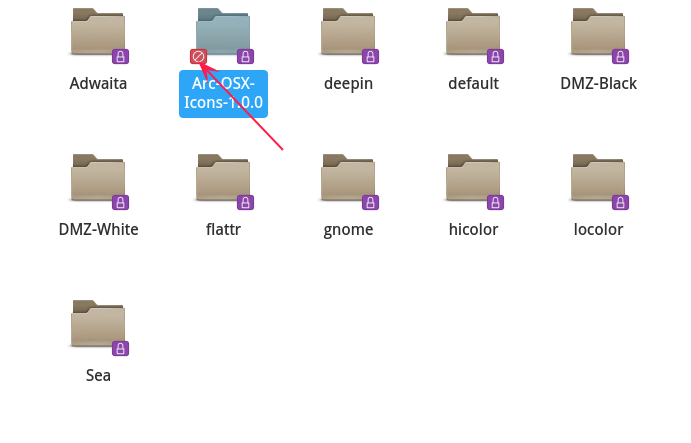
也许只能安装图标,把图标移到/usr/share/icons或者.local/share/icons
Reply View the author
avatar
klkl132
deepin
2017-05-03 17:09
#10
https://bbs.deepin.org/post/138800
也许只能安装图标,把图标移到/usr/share/icons或者.local/share/icons


我试过复制到icons目录 但是提示权限不足啊
Reply View the author
avatar
^9星守辰^
Moderator
2017-05-03 17:41
#11
这个你可以改了目录权限,我貌似用的就是这款主题,其实没多少变化,感觉最大的就是边框和边框按钮的变化
Reply View the author
avatar
xnf616008568
deepin
2017-05-03 20:52
#12
你那文件夹多了一层  把OSX目录放到themes下就行
Reply View the author
avatar
w***l@163.com
deepin
2017-05-04 00:12
#13
https://bbs.deepin.org/post/138800
deepin充满朝气,macOS老气横秋。

提供一下这款主题??
Reply View the author
Comments
yanhuacuo
2017-05-04 02:02
https://www.apple.com/cn/macbook-pro/?afid=p238|16322Tkyr-dc_mtid_18707vxu38484_pcrid_13738831408_&cid=aos-cn-kwba-mac
avatar
qq731008714
deepin
2017-05-04 22:46
#14
https://bbs.deepin.org/post/138800
这个你可以改了目录权限,我貌似用的就是这款主题,其实没多少变化,感觉最大的就是边框和边框按钮的变化 ...

怎么变更的主题,弄了好久没弄好
Reply View the author
avatar
134******86
deepin
2017-05-05 01:42
#15
https://bbs.deepin.org/post/138800
就是喜欢mac  风格。。。又想使用deepin 怎么办

去安装黑苹果吧
Reply View the author
avatar
isunny
deepin
2017-05-05 02:03
#16

已经安装
Reply View the author
avatar
qq731008714
deepin
2017-05-05 16:09
#17
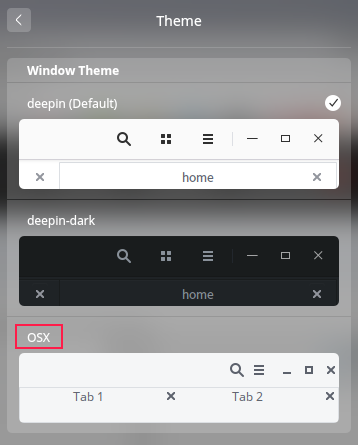
为什么主题加完,也选择完了不生效?重启注销都没有作用deepin 15.04  不会不让自己更换主题吧!
Reply View the author
avatar
sevenid
deepin
2017-05-05 17:11
#18
刚刚试了一下,是可以的。
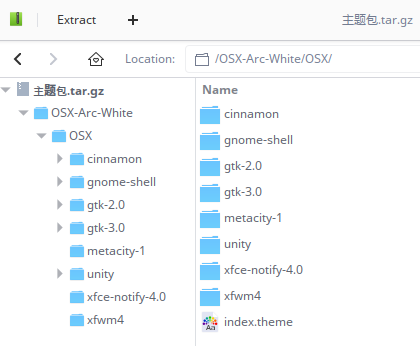
楼主是不是解压后把“OSX-Arc-White”文件夹放到了/usr/share/themes/下?
正确的做法是吧“OSX-Arc-White”下的“OSX”文件夹放到那里,因为每个主题的文件夹根目录下都要有index.theme和相应文件夹。


不过好像没有那么好看啊...
Ubuntu时候用Flatabulous主题不错
Reply View the author
avatar
lee3164
deepin
2017-05-05 17:53
#19
和deepin相关的程序如窗口管理器这些窗口主题都是改不了的,你自己下载的程序比如什么Qt Creator那样的能改,你试试用那个mac主题,可以看到效果,我以前试过。
Reply View the author
avatar
qq731008714
deepin
2017-05-05 17:57
#20
https://bbs.deepin.org/post/138800
和deepin相关的程序如窗口管理器这些窗口主题都是改不了的,你自己下载的程序比如什么Qt Creator那样的能改 ...

66666
Reply View the author
1 / 2
To page