

 中文

cbfjw deepin
2017-04-21 17:33 deepin https://bbs.deepin.org/post/137851
/usr/share/fontconfig/conf.avail/10-enhance-rending.conf
/etc/fonts/conf.d/10-enhance-rending.conf
我试了,没多大变化。——
Reply Like 0 View the author
deepin https://bbs.deepin.org/post/137851
/usr/share/fontconfig/conf.avail/10-enhance-rending.conf
/etc/fonts/conf.d/10-enhance-rending.conf
 deepin
https://bbs.deepin.org/post/137851
我试了,没多大变化。——
 deepin
https://bbs.deepin.org/post/137851
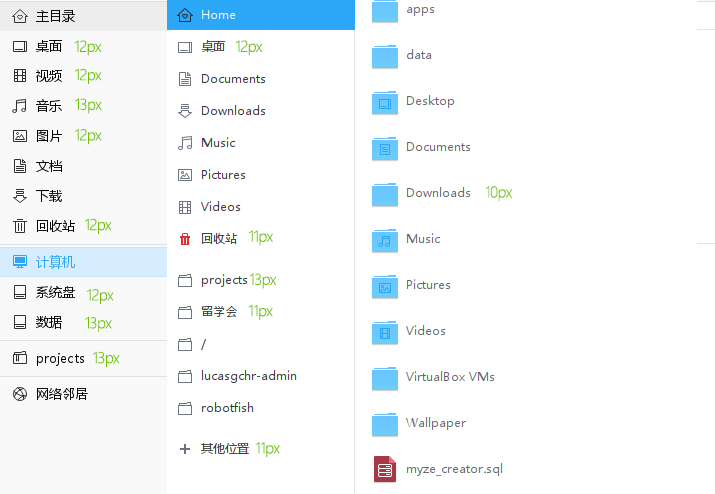
我这注销再重新登录后貌似是有效果的,字体粗细正常了。问题还是有,我上面的回复中说的字体大小不一样, ...
deepin https://bbs.deepin.org/post/137851
dpi设置的问题。96dpi最好。目测左侧是13px=10pt。右侧是12px=9pt。
看看~/.Xresources能否设置。 ...
deepin https://bbs.deepin.org/post/137851
没找到这文件。不知怎么设置。。
deepin https://bbs.deepin.org/post/137851
把如下内容写到空白记事本中,保存为~/.Xresources,然后注销再进入看看。
...
Popular Events
More


 Four agent skills for laptop power, sleep, and honest bug reports
字体是Microsoft YaHei UI,能明显看出鹦鹉螺里的字体粗细正常,非常清晰,而deepin文管的字体就发黑和模糊,看起来像是加了某种“特效”,不知道有啥办法可以让deepin系的渲染和其它软件一样?