win10用u盘装deepinlinux出问题啦求大神
Tofloor
poster avatar
jameswwl
deepin
2017-04-14 20:35
Author
我的电脑c盘是win10,然后单独分了两个ext4分区出来,一个挂载/boot装Linux引导,一个挂载/装deepinlinux,装完之后拔u盘重启,结果引导还是坏了,系统提示找不到启动盘,怎么办呢,以前就是这样装Ubuntu没有问题。
Reply Favorite View the author
All Replies
avatar
187******09
deepin
2017-04-14 21:40
#1
deepin百科有,比方说win系统在sdc上,就要把deepin的引导装在整个sdc上,不用分/boot,我就分了根目录和/home
Reply View the author
avatar
jameswwl
deepin
2017-04-14 21:43
#2
https://bbs.deepin.org/post/137593
deepin百科有,比方说win系统在sdc上,就要把deepin的引导装在整个sdc上,不用分/boot,我就分了根目录和/h ...

嗯我试了,这样的话装好后就是用deepin引导了,怎么才能用win10引导呢
Reply View the author
avatar
187******09
deepin
2017-04-14 21:45
#3
https://bbs.deepin.org/post/137593
嗯我试了,这样的话装好后就是用deepin引导了,怎么才能用win10引导呢

这就不知道了,纠结谁引导干什么,deepin引导挺好的啊
Reply View the author
avatar
xushaohua
deepin
2017-04-14 21:59
#4
https://bbs.deepin.org/post/137593
deepin百科有,比方说win系统在sdc上,就要把deepin的引导装在整个sdc上,不用分/boot,我就分了根目录和/h ...

这个正解啊!

看情况, 楼主用的是 Legacy BIOS 方式来引导的, 这种情况下只支持一个引导, 如果想安装多个操作系统, 必须有一个系统的引导工具来引导所有其它系统.

要么换用 UEFI 方式来引导, 系统之间可以不相互影响
Reply View the author
avatar
jameswwl
deepin
2017-04-14 22:00
#5
https://bbs.deepin.org/post/137593
这个正解啊!

看情况, 楼主用的是 Legacy BIOS 方式来引导的, 这种情况下只支持一个引导, 如果想安装多个 ...

我想用WIN10来引导,怎么做呢
Reply View the author
avatar
zwq133
deepin
2017-04-15 06:01
#6
https://bbs.deepin.org/post/137593
我想用WIN10来引导,怎么做呢

给你一个参考,重点注意安装ubuntu部分
http://www.linuxdiyf.com/linux/13140.html
Reply View the author
avatar
jameswwl
deepin
2017-04-15 09:00
#7
zwq133 发表于 2017-4-14 22:01
给你一个参考,重点注意安装ubuntu部分
http://www.linuxdiyf.com/linux/13140.html

我就是这样装的,装Ubuntu没有问题,双系统win10引导不会出错,装deepin也这样就不行了,装完重启进不去win10的。
Reply View the author
avatar
dxqwx1
deepin
2017-04-15 17:31
#8
本帖最后由 dxqwx1 于 2017-4-15 09:42 编辑

有grub2win 可以实现如果win10和deepin在一个硬盘上 下载一个haikuos64位每夜映像在虚拟机中安装多系统引导最简单了
Reply View the author
avatar
jameswwl
deepin
2017-04-17 03:39
#9
https://bbs.deepin.org/post/137593
有grub2win 可以实现如果win10和deepin在一个硬盘上 下载一个haikuos64位每夜映像在虚拟机中安装多系统引导 ...

用这个可以实现把deepinlinux的引导装到单独一个分区之后重启能进入win10吗?
Reply View the author
avatar
dxqwx1
deepin
2017-04-17 04:22
#10
https://bbs.deepin.org/post/137593
用这个可以实现把deepinlinux的引导装到单独一个分区之后重启能进入win10吗? ...

前提条件是win10可以正常启动 这个就是一个启动器可以启动硬盘的多个系统。。。。。。好处是重装win10不会影响深度系统。。。。。
Reply View the author
avatar
jameswwl
deepin
2017-04-17 08:03
#11
dxqwx1 发表于 2017-4-16 20:22
前提条件是win10可以正常启动 这个就是一个启动器可以启动硬盘的多个系统。。。。。。好处是重装win10不 ...

好的明天试试,感谢大神
Reply View the author
Comments
dxqwx1
2017-04-17 17:36
这个用于win可以启动 linux引导安装在系统分区。并且是mbr硬盘。。。。。。。。
avatar
jameswwl
deepin
2017-04-17 18:09
#12
https://bbs.deepin.org/post/137593
前提条件是win10可以正常启动 这个就是一个启动器可以启动硬盘的多个系统。。。。。。好处是重装win10不 ...

帅哥这个怎么用啊,点了add new entry之后只有选择OS type没有OS路径啊,里面有bootinfo、debian、fedora等等,没有windows- -怎么添加win10的引导进去呢?
Reply View the author
avatar
dxqwx1
deepin
2017-04-17 18:24
#13
https://bbs.deepin.org/post/137593
帅哥这个怎么用啊,点了add new entry之后只有选择OS type没有OS路径啊,里面有bootinfo、debian、fedor ...

不知你下载的是哪个软件 你进不去win如何下载软件呢?难道在深度系统中无法启动win?深度启动菜单不能发现win吗?我机械硬盘一个分区上的深度引导菜单都可以自动发现添加另一个固盘上的win。。。。。。而固盘上的grub可以搜索到机械硬盘分区中的深度系统启动菜单。。。。。。。。
Reply View the author
avatar
jameswwl
deepin
2017-04-17 18:28
#14
dxqwx1 发表于 2017-4-17 10:24
不知你下载的是哪个软件 你进不去win如何下载软件呢?难道在深度系统中无法启动win?深度启动菜单不能发 ...

可以进去win啊,我现在就是在用win里面的grub2win添加引导啊。。。装好之后里面默认只有一个选项,bootinfo。。。
Reply View the author
avatar
dxqwx1
deepin
2017-04-17 18:38
#15
https://bbs.deepin.org/post/137593
可以进去win啊,我现在就是在用win里面的grub2win添加引导啊。。。装好之后里面默认只有一个选项,bootin ...

你还是用haikuos的系统引导吧 那个简单。。。。。win10下载VWplayer 12 加载物理硬盘 加载光盘映像进入系统后找那个靴子的图标 运行选硬盘 选安装 win分区 linux分区 选好 安装到硬盘主引导就可以了
Reply View the author
avatar
dxqwx1
deepin
2017-04-17 18:53
#16
本帖最后由 dxqwx1 于 2017-4-17 11:04 编辑

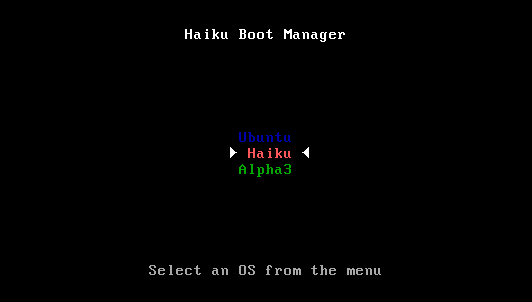
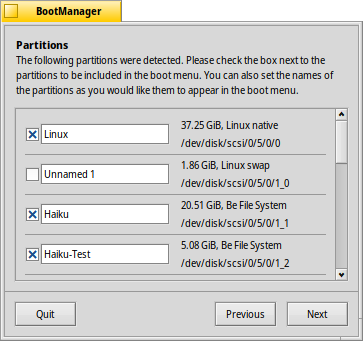
If you don't add the Haiku partition to an existing boot manager like GRUB, BootManager can install a small boot menu in the Master Boot Record (MBR) that looks something like this:

anager isn't yet tested very well and still has a few restrictions that it will complain about if they aren't met: the menu can only be installed on your first harddisk and there has to be a 2KiB space after the Master Boot Record (MBR).
BootManager guides you through the installation process of the boot menu.

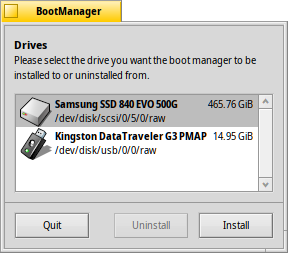
index Choosing the destination drive


The BootManager starts off with a list of all available drives from which you choose the destination. If there's already a boot menu on that drive, the Uninstall button becomes active, leading you through the simple procedure to restore a formerly backed-up MBR, thereby removing the boot menu again.
Otherwise, choose Install to continue.

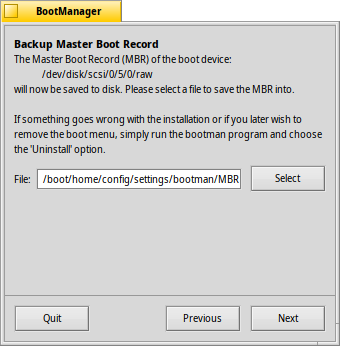
index Backing up the Master Boot Record (MBR)

In case anything goes wrong or you want to remove the boot menu again, the Master Boot Record (MBR) is now saved. This is obviously a very important step, make sure you don't accidentally overwrite some other MBR-backup maybe from some earlier experimentation, for example!


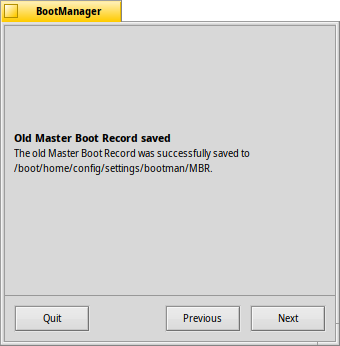
Just select a destination for the backup file "MBR" or leave the default path. After clicking Next you'll get a confirmation if the backup was successful.

index Configuring the boot menu


Next you're presented with a list of all partitions on the destination drive. By setting checkmarks you decide what entries will appear in the boot menu, the text boxes allow you to rename an entry.

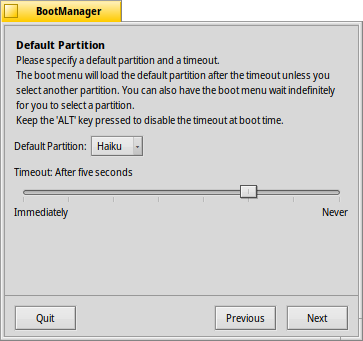
After that, you pick from the pop-up menu which partition will be booted from by default and set a timeout with the slider below. Here, "Immediately" will skip the boot menu entirely, "Never" will just stop at the boot menu. You can override the timeout setting by holding ALT while booting.

index Writing the boot menu


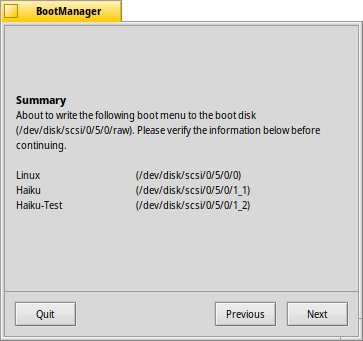
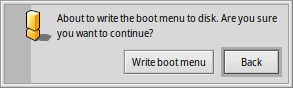
Before the boot menu is written to the MBR, you'll get a summary of your configuration and then one last chance to abort the operation. Don't worry though, as long as you keep the MBR backup safe, you can easily revert the changes. Should things get thoroughly messed up, you can always boot from a Haiku install CD or USB stick and write back the MBR backup with BootManager.

Reply View the author
avatar
jameswwl
deepin
2017-04-17 20:53
#17
dxqwx1 发表于 2017-4-17 10:53
If you don't add the Haiku partition to an existing boot manager like GRUB, BootManager can install  ...

搞定了,装了deepin之后要用pe启动盘打开里面的分区工具,取消deepin分区激活状态,再重启进win10用easybcd添加grub2引导,就可以了,metro引导win10和deepin成功。
Reply View the author