怎样查看Deepin的详细版本号?
Tofloor
poster avatar
blue
deepin
2017-03-24 01:59
Author
如题所述:怎样查看Deepin的详细版本号?
从控制中心看到的就“15.4桌面版”,至于是Beta还是RC版或Alpha ,就看不明白了
怎样查看它的详细的版本号


Reply Favorite View the author
All Replies
avatar
DebuggerX
deepin
2017-03-24 02:33
#1
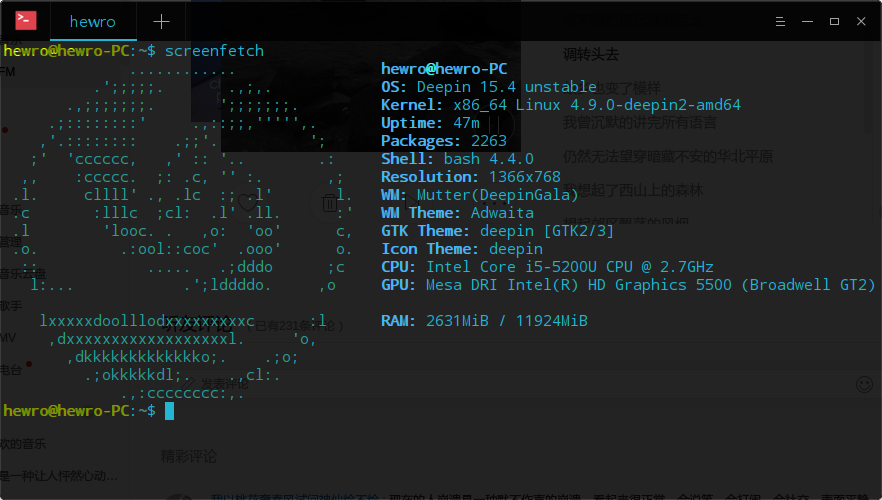
试试终端运行screenfetch?
Reply View the author
avatar
blue
deepin
2017-03-24 03:50
#2
https://bbs.deepin.org/post/136504
试试终端运行screenfetch?

这是啥命令?运行时显示找不到命令
screenfetch
bash: screenfetch: 未找到命令

Reply View the author
avatar
zwq133
deepin
2017-03-24 04:11
#3
你要先安装screenfetch啊大哥
Reply View the author
avatar
AnselCC
deepin
2017-03-24 22:28
#4
uname   -a
Reply View the author
avatar
johnmy
deepin
2017-03-24 23:02
#5
https://bbs.deepin.org/post/136504
你要先安装screenfetch啊大哥

也只能看出是15.4 unstalbe,不知道是beta还是RC
Reply View the author
avatar
kaile
deepin
2017-03-24 23:07
#6
别找了,估计找不到,只能一些版本特征来区别,比如beta换了新壁纸等
Reply View the author
avatar
hewro
deepin
2017-03-24 23:14
#7
screenfetch 也不能看出来。。。deepin连版本号都木有吗???

Reply View the author
avatar
blue
deepin
2017-03-25 17:24
#8
是啊,screenfetch还是看不到,查/etc/deepin-version和os-release也只有15.4字样,不知Deepin开发人员是根据啥来确认Beta、RC等的


deepin-version内容:
[Release]
Version=15.4
Type=Desktop
Type[zh_CN]=桌面版

[Addition]
Milestone=

os-release内容:
PRETTY_NAME="Deepin 15"
NAME="Deepin"
VERSION_ID="15.4"
VERSION="15.4"
ID=deepin
HOME_URL="https://www.deepin.org/"
BUG_REPORT_URL="http://feedback.deepin.org/feedback/"
Reply View the author