求解 geany 执行C 程序终端什么都不显示?
Tofloor
poster avatar
hewro
deepin
2017-03-03 03:45
Author
本帖最后由 hewro 于 2017-3-2 19:52 编辑

在深度商店下载的geany.
系统:deepin 15.4 beta

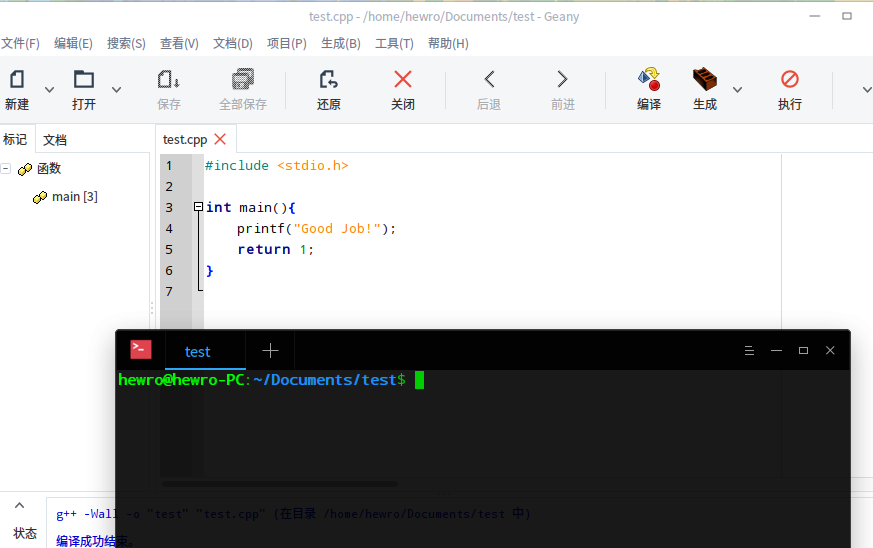
点击编译——生成——F5execute

打开终端什么都没有?(见下面的动图,如果动图是白色的,右键打开就行,话说深度录屏录制gif经常会出现白屏是什么问题呢?)

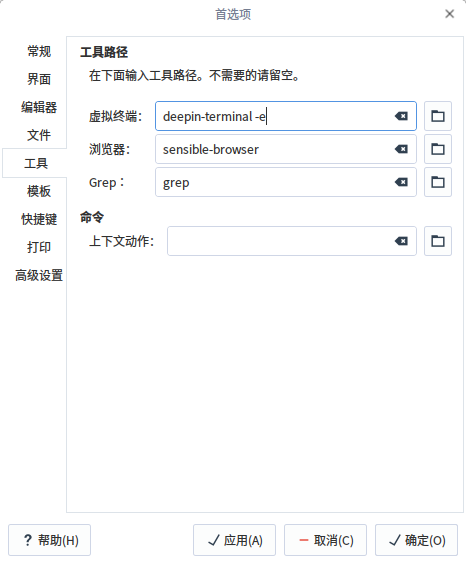
配置:


求指教


Reply Favorite View the author
All Replies
avatar
moli3
deepin
2017-03-03 04:04
#1
楼主建议你用qtcreator,比这个好用多了
Reply View the author
avatar
wangyong
deepin
2017-03-03 04:20
#2
虚拟终端写 deepin-terminal -e
Reply View the author
avatar
hewro
deepin
2017-03-03 05:06
#3
https://bbs.deepin.org/post/135435
虚拟终端写 deepin-terminal -e

填了这个,但是没有输出任何信息呢?


Reply View the author
avatar
hewro
deepin
2017-03-03 05:12
#4
https://bbs.deepin.org/post/135435
楼主建议你用qtcreator,比这个好用多了

恩恩,我去试试!
Reply View the author
avatar
wangyong
deepin
2017-03-03 05:28
#5
你首先要编译你的程序,然后用 deepin-terminal -e "/bin/sh %c" 就可以了。
最后 geany 太烂了
Reply View the author
avatar
hewro
deepin
2017-03-03 06:36
#6
https://bbs.deepin.org/post/135435
你首先要编译你的程序,然后用 deepin-terminal -e "/bin/sh %c" 就可以了。
最后 geany 太烂了 ...

谢谢指导
Reply View the author
avatar
wangyong
deepin
2017-03-21 06:07
#7
终端设置命令成:
deepin-terminal -x "/bin/sh" %c

然后点击 “生成”, 再点击 “执行” 就可以了。
Reply View the author
avatar
SnDream
deepin
2017-03-21 06:57
#8
其实如果是用geany,我个人建议使用它内置的虚拟终端。
首先执行
  1. sudo aptitude install lxterminal
Copy the Code

安装lx终端,然后在geany里面就能看到一个内置终端。
再在 编辑-首选项-虚拟终端 中勾选“在虚拟终端中运行程序”
Reply View the author
avatar
soldier
deepin
2017-08-05 04:03
#9
https://bbs.deepin.org/post/135435
终端设置命令成:
deepin-terminal -x "/bin/sh" %c

谢谢,受教了!
Reply View the author
avatar
maituzifree
deepin
2017-12-19 07:08
#10
老铁  我怎么感觉我的geans下的跟你不一样 我连虚拟终端在哪我都没有找到
Reply View the author
avatar
4***8@qq.com
deepin
2017-12-19 08:52
#11
maituzifree 发表于 2017-12-18 23:08
老铁  我怎么感觉我的geans下的跟你不一样 我连虚拟终端在哪我都没有找到

人家用的是linux系统,你这用的windows,肯定在geany中的配置有点不一样了。
Reply View the author
avatar
maituzifree
deepin
2017-12-20 05:07
#12
https://bbs.deepin.org/post/135435
人家用的是linux系统,你这用的windows,肯定在geany中的配置有点不一样了。

我这个系统不知道什么原因配置不成功 程序直接没有执行 我也不知道问题出在哪里  能不能帮我看看
Reply View the author
avatar
TwistFate
deepin
2018-01-30 08:52
#13
https://bbs.deepin.org/post/135435
你首先要编译你的程序,然后用 deepin-terminal -e "/bin/sh %c" 就可以了。
最后 geany 太烂了 ...

大神为啥我这个执行的时候显示这个,纯小白
Reply View the author
avatar
ritter
deepin
2018-01-30 10:24
#14
为什么要return 1呢,看着好难受,快点改成return 0吧!
Reply View the author
avatar
szdyanghao
deepin
2018-04-05 19:49
#15
我也是找了好一会,才发现:geany左下角,有上下翻动的箭头,翻到“虚拟终端”,再按照帖子里讲的操作。我已经可以自动跑到deepin终端并自动执行代码
Reply View the author
avatar
szdyanghao
deepin
2018-04-05 19:51
#16
补充:翻到“虚拟终端”后,鼠标右击
Reply View the author
avatar
tushantutu
deepin
2018-06-17 03:47
#17
https://bbs.deepin.org/post/135435
终端设置命令成:
deepin-terminal -x "/bin/sh" %c

谢谢大佬谢谢谢谢
Reply View the author
avatar
wzhwok
deepin
2018-06-28 06:12
#18
本帖最后由 wzhwok 于 2018-6-27 23:28 编辑

同样碰到这个问题,搜到这里,按有朋友回复,修改终端配置:deepin-terminal -x "/bin/sh" %c   ,成功。
实际上发现默认配置只是分号括错了,分号仅是充当了分隔符,所以x-terminal-emulator -e "/bin/sh" %c,或   -e /bin/sh  "/%c",或是仅是空格也可以 -e /bin/sh  /%c。另外参数-e和-x都可以
Reply View the author