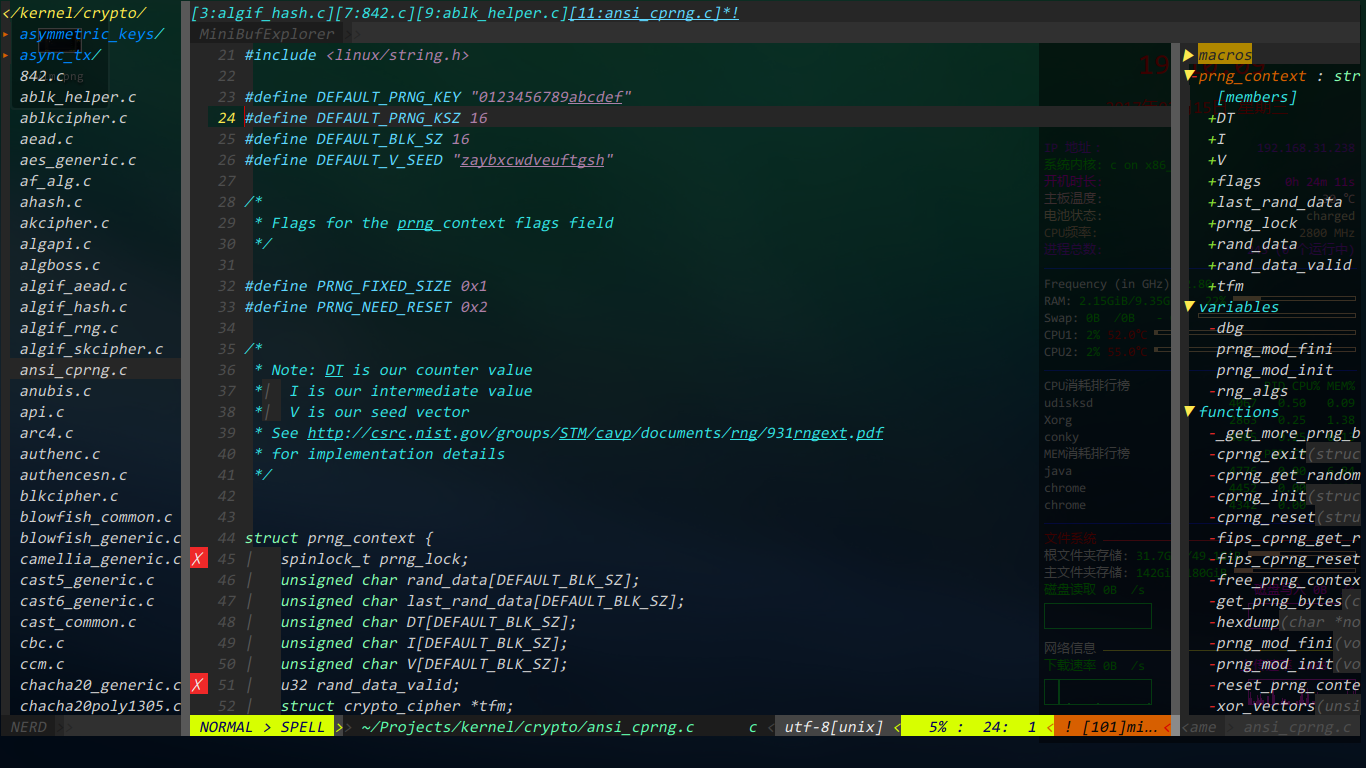
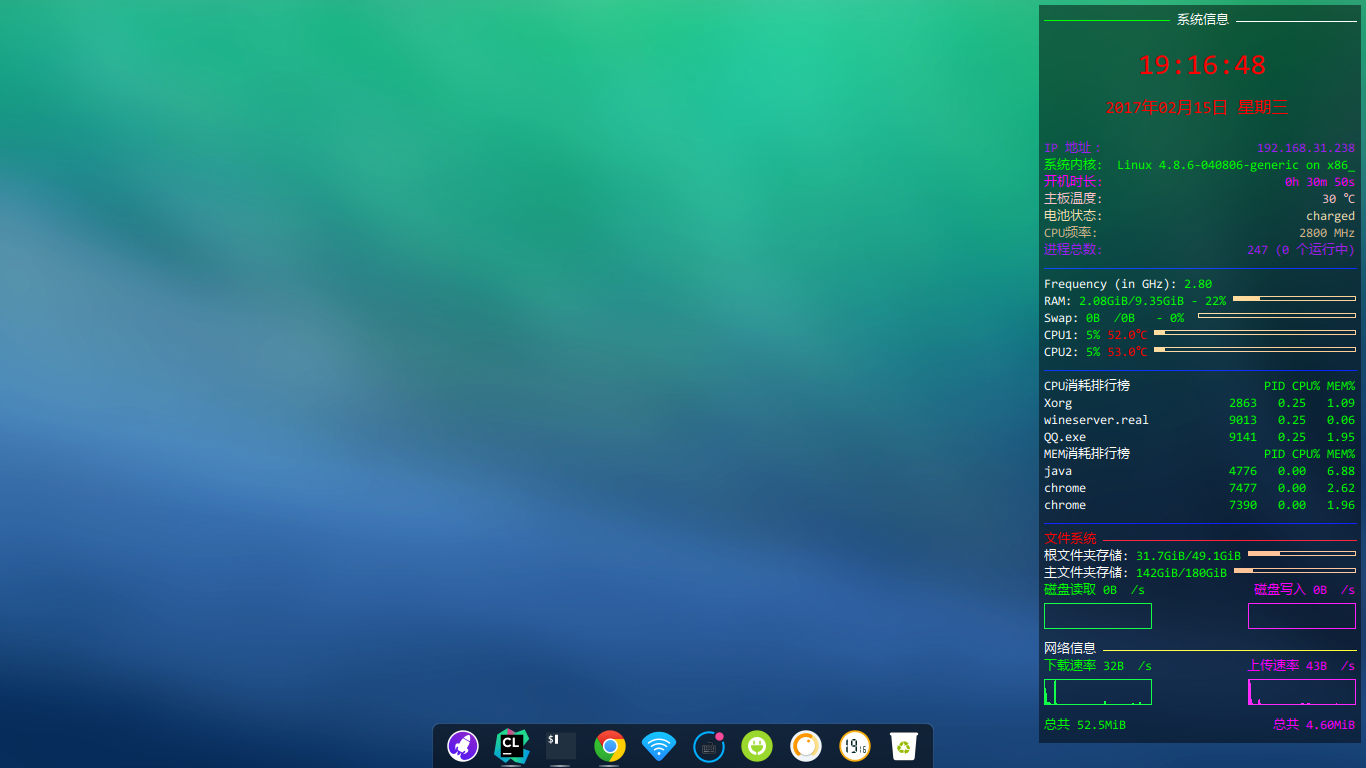
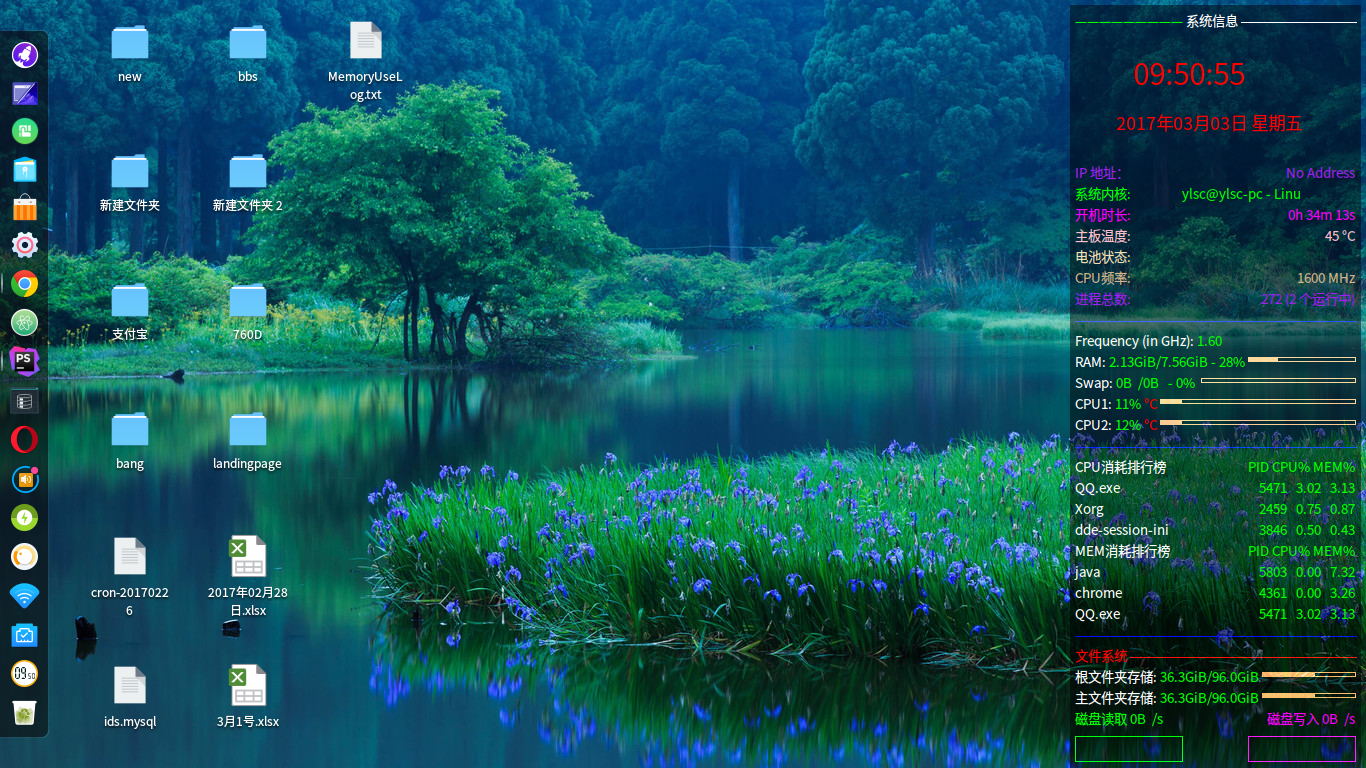
我是好人,不拉仇恨(vim与conky效果及配置文件)
Tofloor
poster avatar
aurthur
deepin
2017-02-16 03:18
Author
本帖最后由 aurthur 于 2017-3-4 16:32 编辑

vimrc.tar.gz


Reply Favorite View the author
All Replies
1 / 2
To page
avatar
moli3
deepin
2017-02-16 03:24
#1
我认为你是来秀桌面的
Reply View the author
avatar
Guumi
deepin
2017-02-16 03:44
#2
我更认为他是来拉仇恨的
Reply View the author
avatar
A·S·M·X·T 😏😜
deepin
2017-02-16 04:11
#3
右边的监视器配置交出来!
Reply View the author
avatar
luoyeqingzhou
deepin
2017-02-16 05:29
#4
不错!!!!!!!!!!!
Reply View the author
avatar
aurthur
deepin
2017-02-16 06:00
#5
https://bbs.deepin.org/post/134957
我认为你是来秀桌面的

本来是想与配置文件内容一起贴出来的,说内容太长了,不让发
Reply View the author
Comments
twtccw
2017-03-03 22:33
可以附件的形式发上来
avatar
aurthur
deepin
2017-02-16 06:00
#6
https://bbs.deepin.org/post/134957
右边的监视器配置交出来!


alignment top_right
background yes
border_width 1
cpu_avg_samples 2
default_color green
default_outline_color blue
default_shade_color blue
draw_borders no
draw_graph_borders yes
draw_outline no
draw_shades no
use_xft yes
xftfont AR PL KaitiM GB:size=10
gap_x 10
gap_y 10
minimum_size 280 10
net_avg_samples 2
no_buffers yes
out_to_console no
out_to_stderr no
extra_newline no
own_window yes
own_window_class Conky
own_window_type desktop
own_window_argb_visual true
own_window_argb_value 120
double_buffer yes
stippled_borders 0
update_interval 1
uppercase no
use_spacer none
show_graph_scale no
show_graph_range no

TEXT
————————— ${color white}系统信息 $hr ${color}
${font Yahei\ Consolas\ Hybrid PL KaitiM GB:style=Blod:size=5}
${goto 35}${color red}${font Yahei\ consolas \Hybrid PL KaitiM GB:style=Blod:size=22}    ${time %H:%M:%S}
${goto 30}${font Yahei\Consolas\ Hybrid PL KaitiM GB:style=Blod:size=13}    ${time %Y年%m月%d日} 星期${time %a}
${font Yahei\ Consolas\ Hybrid PL KaitiM GB:style=Blod:size=10}
${color purple}IP 地址:$alignr${addr wlp3s0}
${color green}系统内核: ${font Yahei\ Consolas\ Hybrid PL KaitiM GB:style=Blod:size=10}${scroll 35 ${exec whoami}@$nodename - $sysname $kernel on $machine}
${color rubine}开机时长: $alignr$uptime
${color pink}主板温度: $alignr${acpitemp} °C
${color wheat}电池状态alignr${battery BAT0}${alignr}${execi 1 nvidia-settings -q gpucoretemp | grep "Attribute" | cut -d" " -f6 | cut -c -2}
${color tan}CPU频率: ${alignr}${freq dyn} MHz
${color purple}进程总数: ${alignr}$processes ($running_processes 个运行中)
${color blue}$hr
${color white}Frequency (in GHz)color $freq_g
${color white}RAM: $color$mem/$memmax - $memperc% ${color sandybrown}${membar 4}
${color white}Swap: $color$swap/$swapmax - $swapperc% ${color sandybrown} ${swapbar 4}
${color white}CPU1: $color${cpu cpu1}% ${color red}${exec sensors | grep 'Core 0' | cut -c18-22}${color red}°C ${color sandybrown}${cpubar 4}
${color white}CPU2: $color${cpu cpu2}% ${color red}${exec sensors | grep 'Core 1' | cut -c18-22}${color red}°C ${color sandybrown}${cpubar 4}
#${font AR PL KaitiM GB:style=Blod:size=12}${color white}Uptimecolor $uptime
#${color white}Processes: $color $processes  ${color red}Runningcolor $running_processes
${color blue}$hr
${color white}CPU消耗排行榜${color green}$alignr PID CPU% MEM%
${color white}${top name 1}${color green}$alignr${top pid 1} ${top cpu 1} ${top mem 1}
${color white}${top name 2}${color green}$alignr${top pid 2} ${top cpu 2} ${top mem 2}
${color white}${top name 3}${color green}$alignr${top pid 3} ${top cpu 3} ${top mem 3}
${color white}MEM消耗排行榜${color green}$alignr PID CPU% MEM%
${color white}${top_mem name 1}${color green}$alignr${top_mem pid 1} ${top_mem cpu 1} ${top_mem mem 1}
${color white}${top_mem name 2}${color green}$alignr${top_mem pid 2} ${top_mem cpu 2} ${top_mem mem 2}
${color white}${top_mem name 3}${color green}$alignr${top_mem pid 3} ${top_mem cpu 3} ${top_mem mem 3}
${color blue}$hr
${color red}文件系统 ${hr 1}${color}
${color white}根文件夹存储: ${color green}${fs_free /}/${fs_size /} ${color sandybrown}${fs_bar 4 /}
${color white}主文件夹存储: ${color green}${fs_free /home}/${fs_size /home} ${color sandybrown}${fs_bar 4 /home}
${color}磁盘读取 ${diskio_read /dev/sdb}/s ${color rubine}$alignr磁盘写入 ${diskio_write /dev/sdb}/s
${color}${diskiograph_read /dev/sdb 25,107} ${color rubine}$alignr${diskiograph_write /dev/sdb 25,107}
${color white}网络信息 ${color yellow}${hr 1}
${color }下载速率 ${downspeed wlp3s0}/s ${color rubine}${alignr}上传速率 ${upspeed wlp3s0}/s
${color}${downspeedgraph wlp3s0 25,107} ${color rubine}${alignr}${upspeedgraph wlp3s0 25,107}
${color}总共 ${totaldown wlp3s0} ${color rubine}${alignr}总共 ${totalup wlp3s0}
Reply View the author
avatar
toppeng
deepin
2017-02-16 06:45
#7
卧槽   这是牛逼帖   表示看不懂!
Reply View the author
avatar
pikachuhy
deepin
2017-02-16 07:03
#8
右侧配置才是关键啊
Reply View the author
avatar
aurthur
deepin
2017-02-16 15:51
#9
https://bbs.deepin.org/post/134957
右侧配置才是关键啊

conky配置很少。vim配置内容才多
Reply View the author
avatar
devming
deepin
2017-03-01 21:20
#10
硬件驱动开发?卧槽!
Reply View the author
avatar
v6i6v
deepin
2017-03-01 22:25
#11
握草,,,拉仇恨,
Reply View the author
avatar
aurthur
deepin
2017-03-02 04:20
#12
https://bbs.deepin.org/post/134957
握草,,,拉仇恨,

何来仇恨?
Reply View the author
avatar
zhqh100
deepin
2017-03-02 04:34
#13
啊?配置文件写到哪个路径?
Reply View the author
avatar
aurthur
deepin
2017-03-02 23:03
#14
https://bbs.deepin.org/post/134957
啊?配置文件写到哪个路径?

这个我也不知道啊
Reply View the author
avatar
luxwen
deepin
2017-03-02 23:47
#15
卧槽 这个牛逼
故意来拉仇恨的吧
Reply View the author
avatar
ylsc633
deepin
2017-03-03 00:19
#16
ok  设置成功了.........谢谢分享  

这个时候 还是很喜欢拿来主义的
Reply View the author
avatar
aurthur
deepin
2017-03-03 02:37
#17
https://bbs.deepin.org/post/134957
ok  设置成功了.........谢谢分享  

这个时候 还是很喜欢拿来主义的

有图有真相
Reply View the author
avatar
aurthur
deepin
2017-03-03 02:38
#18
https://bbs.deepin.org/post/134957
卧槽 这个牛逼
故意来拉仇恨的吧

得瑟一下
Reply View the author
avatar
ylsc633
deepin
2017-03-03 17:51
#19
有图有真相
Reply View the author
avatar
v6i6v
deepin
2017-03-03 19:01
#20

辣么帅气的页面,,,
Reply View the author
1 / 2
To page