

 中文

南浦月 deepin
2017-02-09 20:28 deepin 90%都是驱动问题。
Reply Like 0 View the author
 deepin
 deepin
 deepin
https://bbs.deepin.org/post/134794
Deepin用Create_ap建热点辅助脚本2.0,附Windows下bat+vbs建热点脚本
https://bbs.deepin.org/forum.php?mo ...
 deepin
https://bbs.deepin.org/post/134794
嗨呀! 我一直用 wifi热点 做关键词搜索的,搜索不到又用 wifi 和热点分别搜索, 如果用“热点脚本”估计 ...

 deepin deepin

 deepin
https://bbs.deepin.org/post/134794
麻烦贴一下 iw list 的输出
Wiphy phy0
max # scan SSIDs: 20
max scan IEs length: 195 bytes
max # sched scan SSIDs: 0
max # match sets: 0
max # scan plans: 1
max scan plan interval: -1
max scan plan iterations: 0
Retry short limit: 7
Retry long limit: 4
Coverage class: 0 (up to 0m)
Device supports RSN-IBSS.
Supported Ciphers:
* WEP40 (00-0f-ac:1)
* WEP104 (00-0f-ac:5)
* TKIP (00-0f-ac:2)
* CCMP-128 (00-0f-ac:4)
* CCMP-256 (00-0f-ac:10)
* GCMP-128 (00-0f-ac:8)
* GCMP-256 (00-0f-ac:9)
Available Antennas: TX 0 RX 0
Supported interface modes:
* IBSS
* managed
* monitor
Band 1:
Capabilities: 0x1072
HT20/HT40
Static SM Power Save
RX Greenfield
RX HT20 SGI
RX HT40 SGI
No RX STBC
Max AMSDU length: 3839 bytes
DSSS/CCK HT40
Maximum RX AMPDU length 65535 bytes (exponent: 0x003)
Minimum RX AMPDU time spacing: 4 usec (0x05)
HT Max RX data rate: 300 Mbps
HT RX MCS rate indexes supported: 0-15
TX unequal modulation not supported
HT TX Max spatial streams: 1
HT TX MCS rate indexes supported may differ
Bitrates (non-HT):
* 1.0 Mbps
* 2.0 Mbps (short preamble supported)
* 5.5 Mbps (short preamble supported)
* 11.0 Mbps (short preamble supported)
* 6.0 Mbps
* 9.0 Mbps
* 12.0 Mbps
* 18.0 Mbps
* 24.0 Mbps
* 36.0 Mbps
* 48.0 Mbps
* 54.0 Mbps
Frequencies:
* 2412 MHz [1] (15.0 dBm)
* 2417 MHz [2] (15.0 dBm)
* 2422 MHz [3] (15.0 dBm)
* 2427 MHz [4] (15.0 dBm)
* 2432 MHz [5] (15.0 dBm)
* 2437 MHz [6] (15.0 dBm)
* 2442 MHz [7] (15.0 dBm)
* 2447 MHz [8] (15.0 dBm)
* 2452 MHz [9] (15.0 dBm)
* 2457 MHz [10] (15.0 dBm)
* 2462 MHz [11] (15.0 dBm)
* 2467 MHz [12] (15.0 dBm) (no IR)
* 2472 MHz [13] (15.0 dBm) (no IR)
Band 2:
Capabilities: 0x1072
HT20/HT40
Static SM Power Save
RX Greenfield
RX HT20 SGI
RX HT40 SGI
No RX STBC
Max AMSDU length: 3839 bytes
DSSS/CCK HT40
Maximum RX AMPDU length 65535 bytes (exponent: 0x003)
Minimum RX AMPDU time spacing: 4 usec (0x05)
HT Max RX data rate: 300 Mbps
HT RX MCS rate indexes supported: 0-15
TX unequal modulation not supported
HT TX Max spatial streams: 1
HT TX MCS rate indexes supported may differ
Bitrates (non-HT):
* 6.0 Mbps
* 9.0 Mbps
* 12.0 Mbps
* 18.0 Mbps
* 24.0 Mbps
* 36.0 Mbps
* 48.0 Mbps
* 54.0 Mbps
Frequencies:
* 5180 MHz [36] (14.0 dBm) (no IR)
* 5200 MHz [40] (15.0 dBm) (no IR)
* 5220 MHz [44] (15.0 dBm) (no IR)
* 5240 MHz [48] (15.0 dBm) (no IR)
* 5260 MHz [52] (15.0 dBm) (no IR, radar detection)
* 5280 MHz [56] (15.0 dBm) (no IR, radar detection)
* 5300 MHz [60] (15.0 dBm) (no IR, radar detection)
* 5320 MHz [64] (15.0 dBm) (no IR, radar detection)
* 5500 MHz [100] (15.0 dBm) (no IR, radar detection)
* 5520 MHz [104] (15.0 dBm) (no IR, radar detection)
* 5540 MHz [108] (15.0 dBm) (no IR, radar detection)
* 5560 MHz [112] (15.0 dBm) (no IR, radar detection)
* 5580 MHz [116] (15.0 dBm) (no IR, radar detection)
* 5600 MHz [120] (15.0 dBm) (no IR, radar detection)
* 5620 MHz [124] (15.0 dBm) (no IR, radar detection)
* 5640 MHz [128] (15.0 dBm) (no IR, radar detection)
* 5660 MHz [132] (15.0 dBm) (no IR, radar detection)
* 5680 MHz [136] (15.0 dBm) (no IR, radar detection)
* 5700 MHz [140] (15.0 dBm) (no IR, radar detection)
* 5745 MHz [149] (15.0 dBm) (no IR)
* 5765 MHz [153] (15.0 dBm) (no IR)
* 5785 MHz [157] (15.0 dBm) (no IR)
* 5805 MHz [161] (15.0 dBm) (no IR)
* 5825 MHz [165] (15.0 dBm) (no IR)
Supported commands:
* new_interface
* set_interface
* new_key
* start_ap
* new_station
* new_mpath
* set_mesh_config
* set_bss
* authenticate
* associate
* deauthenticate
* disassociate
* join_ibss
* join_mesh
* set_tx_bitrate_mask
* frame
* frame_wait_cancel
* set_wiphy_netns
* set_channel
* set_wds_peer
* probe_client
* set_noack_map
* register_beacons
* start_p2p_device
* set_mcast_rate
* set_qos_map
* connect
* disconnect
Supported TX frame types:
* IBSS: 0x00 0x10 0x20 0x30 0x40 0x50 0x60 0x70 0x80 0x90 0xa0 0xb0 0xc0 0xd0 0xe0 0xf0
* managed: 0x00 0x10 0x20 0x30 0x40 0x50 0x60 0x70 0x80 0x90 0xa0 0xb0 0xc0 0xd0 0xe0 0xf0
* AP: 0x00 0x10 0x20 0x30 0x40 0x50 0x60 0x70 0x80 0x90 0xa0 0xb0 0xc0 0xd0 0xe0 0xf0
* AP/VLAN: 0x00 0x10 0x20 0x30 0x40 0x50 0x60 0x70 0x80 0x90 0xa0 0xb0 0xc0 0xd0 0xe0 0xf0
* mesh point: 0x00 0x10 0x20 0x30 0x40 0x50 0x60 0x70 0x80 0x90 0xa0 0xb0 0xc0 0xd0 0xe0 0xf0
* P2P-client: 0x00 0x10 0x20 0x30 0x40 0x50 0x60 0x70 0x80 0x90 0xa0 0xb0 0xc0 0xd0 0xe0 0xf0
* P2P-GO: 0x00 0x10 0x20 0x30 0x40 0x50 0x60 0x70 0x80 0x90 0xa0 0xb0 0xc0 0xd0 0xe0 0xf0
* P2P-device: 0x00 0x10 0x20 0x30 0x40 0x50 0x60 0x70 0x80 0x90 0xa0 0xb0 0xc0 0xd0 0xe0 0xf0
Supported RX frame types:
* IBSS: 0x40 0xb0 0xc0 0xd0
* managed: 0x40 0xd0
* AP: 0x00 0x20 0x40 0xa0 0xb0 0xc0 0xd0
* AP/VLAN: 0x00 0x20 0x40 0xa0 0xb0 0xc0 0xd0
* mesh point: 0xb0 0xc0 0xd0
* P2P-client: 0x40 0xd0
* P2P-GO: 0x00 0x20 0x40 0xa0 0xb0 0xc0 0xd0
* P2P-device: 0x40 0xd0
software interface modes (can always be added):
* monitor
interface combinations are not supported
HT Capability overrides:
* MCS: ff ff ff ff ff ff ff ff ff ff
* maximum A-MSDU length
* supported channel width
* short GI for 40 MHz
* max A-MPDU length exponent
* min MPDU start spacing
Device supports TX status socket option.
Device supports HT-IBSS.
Device supports SAE with AUTHENTICATE command
Device supports scan flush.
Device supports per-vif TX power setting
Driver supports a userspace MPM
Device supports static SMPS
Device supports dynamic SMPS
Device supports configuring vdev MAC-addr on create.
deepin https://bbs.deepin.org/post/134794
以下为 iw list 的输出内容
deepin https://bbs.deepin.org/post/134794
从输出上看不支持 AP
 deepin
https://bbs.deepin.org/post/134794
Supported TX frame types:
下有AP项啊,为什么不支持呢?
Supported commands:
 deepin deepin deepin
https://bbs.deepin.org/post/134794
Supported TX frame types:
下有AP项啊,为什么不支持呢?
Supported commands:
 deepin deepin
https://bbs.deepin.org/post/134794
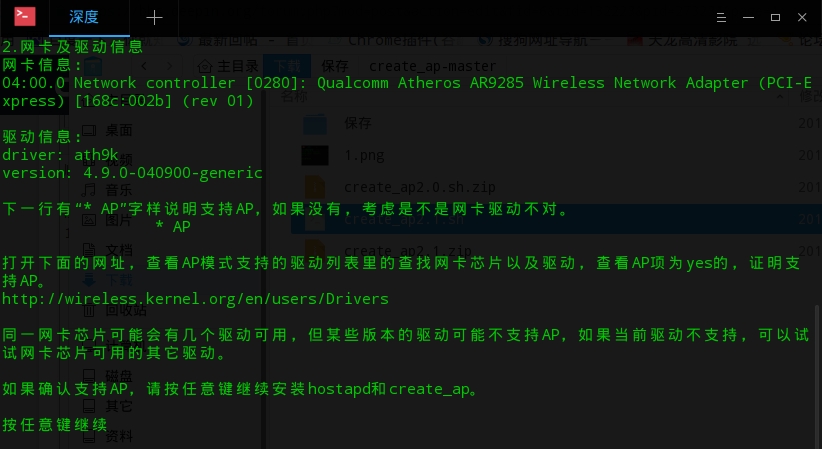
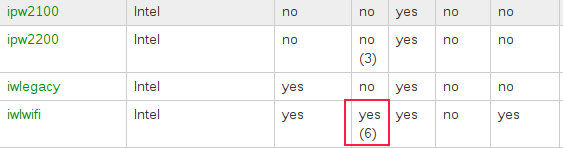
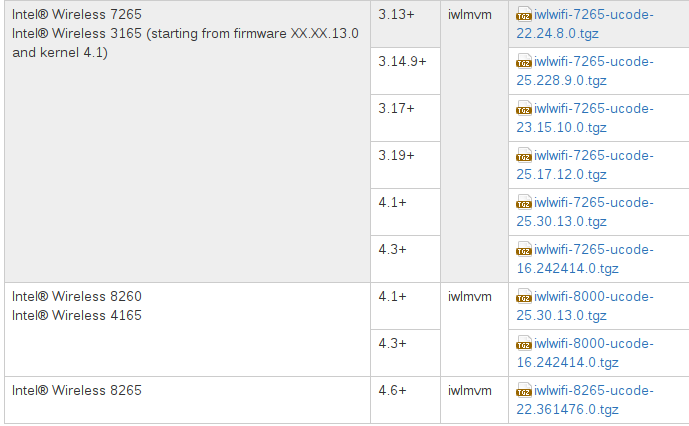
网卡没有ap模式,很难开的,软ap一般情况下linux应该没有,windows能开wifi因为windows有个技术叫virtual w ...
Popular Events
More


 Four agent skills for laptop power, sleep, and honest bug reports
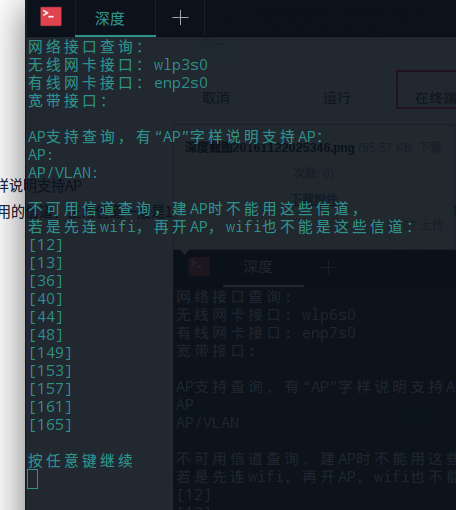
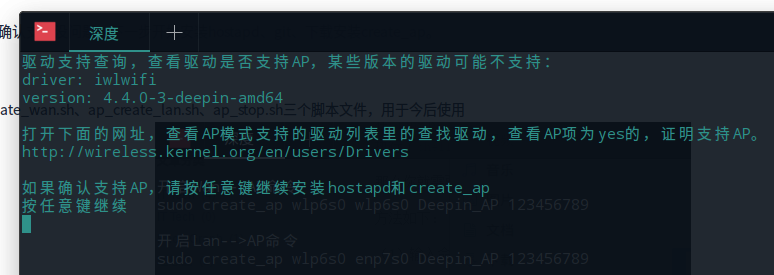
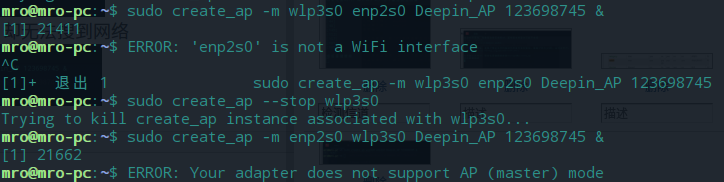
然后换用create_ap 来开启,又提示我的无线网卡不支持ap模式。
这个wifi网卡在win7和win10下都能直接通过系统自带的 netsh wlan set hostednetwork mode=allow 命令开启热点。
为什么在deepin下面就说我的网卡不支持了,难道是网卡驱动的问题?
恳请帮助。