网络畅通,无法连接软件源
Tofloor
poster avatar
873792861
deepin
2017-02-07 02:53
Author
本帖最后由 873792861 于 2017-2-6 19:14 编辑
  1. leon@leon-pc:~$ sudo apt-get update
  2. 错误:1 http://packages.deepin.com/deepin unstable InRelease
  3.   无法发起与 packages.deepin.com:80 (2001:da8:d800:95::114) 的连接 - connect (101: 网络不可达) [IP: 2001:da8:d800:95::114 80]
  4. 正在读取软件包列表... 完成                             
  5. W: 无法下载 http://packages.deepin.com/deepin/dists/unstable/InRelease  无法发起与 packages.deepin.com:80 (2001:da8:d800:95::114) 的连接 - connect (101: 网络不可达) [IP: 2001:da8:d800:95::114 80]
  6. W: 部分索引文件下载失败。如果忽略它们,那将转而使用旧的索引文件。
Copy the Code
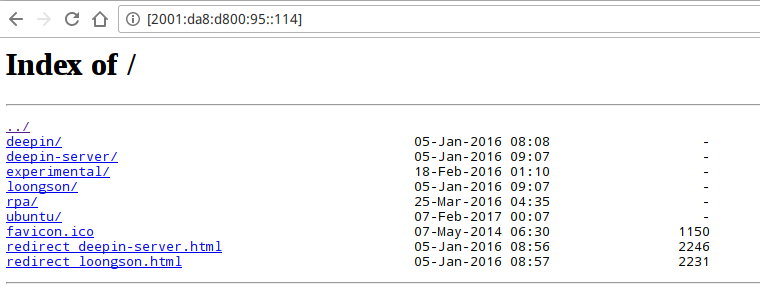
如题,update失败但网络是畅通的。在网页能打开访问到http://packages.deepin.com/deepin/dists/unstable/,使用的是官方源。尝试过中科大的源也是不行。sources.list文件内容如下:


  1. ## Generated by deepin-installer
  2. deb [by-hash=force] http://packages.deepin.com/deepin unstable main contrib non-free
  3. #deb-src http://packages.deepin.com/deepin unstable main contrib non-free

  4. #deb [by-hash=force] http://mirrors.ustc.edu.cn/deepin/ unstable main contrib non-free

  5. #deb [by-hash=force] http://proposed.packages.deepin.com/kernel-4.9/ unstable main contrib non-free

  6. #deb http://mirrors.163.com/debian jessie main non-free contrib
  7. #deb http://mirrors.163.com/debian jessie-proposed-updates main contrib non-free
  8. #deb http://mirrors.163.com/debian-security jessie/updates main contrib non-free   #deb-src
Copy the Code
这是什么问题呢?https://bbs.deepin.org/user/48640
用回debian网易163的源又可以正常update和安装软件喔。

Reply Favorite View the author
All Replies
avatar
Island
deepin
2017-02-07 18:25
#1
你那边使用的是ipv6访问吗? 好像deepin源没有开启ipv6访问
Reply View the author
avatar
南浦月
deepin
2017-02-07 18:45
#2

源是没问题的,应该是你的ipv6不可用,但是却解析到了ipv6上去。
Reply View the author
avatar
南浦月
deepin
2017-02-07 18:47
#3
在你的/etc/hosts里面加一行:
  1. 202.141.160.114 packages.deepin.com
Copy the Code
Reply View the author
avatar
南浦月
deepin
2017-02-07 18:51
#4
或者把你的源改到
cdn.packages.deepin.com
Reply View the author
avatar
873792861
deepin
2017-02-08 09:01
#5
https://bbs.deepin.org/post/134697
源是没问题的,应该是你的ipv6不可用,但是却解析到了ipv6上去。

在控制中心把wifi连接的ipv6设为了忽略,然后可以了,多半是你说的这个原因!但令人疑惑的是,在我印象中并没有设置过ipv6的相关选项,怎么会解析到ipv6去了呢?怎么设置解析到ipv6以及对应的取消方法,你知道吗?
Reply View the author
avatar
xysemies
deepin
2017-02-09 02:58
#6
ping 一下 如果ping有问题,可以去设置成alidns
223.5.5.5
223.6.6.6
Reply View the author