

 中文

luke deepin
2017-01-26 07:03 deepin 错了错了 上面的命令应该是less txt| awk '{print $1 "\n"print $2 “\n”print$3……}'
Reply Like 0 View the author
deepin deepin  deepin deepin
https://bbs.deepin.org/post/134499
tr命令,替换空格为换行符。tr '\t' '\n'
 deepin deepin
https://bbs.deepin.org/post/134499
tr命令,替换空格为换行符。tr '\t' '\n'
deepin https://bbs.deepin.org/post/134499
awk '{ for (i = 1; i
deepin 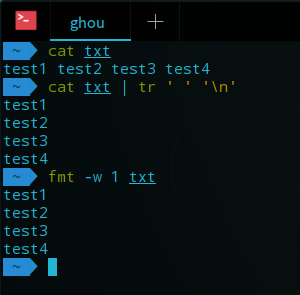
 deepin deepin
https://bbs.deepin.org/post/134499
发现一个不错的文本格式化命令 fmt
deepin https://bbs.deepin.org/post/134499
tr和fmt是最方便的
然而还是分享一个奇技淫巧
for i in `cat txt`;do echo $i ;done

Popular Ranking
ChangePopular Events
More


 Adding a Dancing Spectrum Bar to the Deepin Taskbar | deepin-spectrum
如题,如图,我在shell用less显示了一个txt文本文件,文本文件是有一个一个词组成的。
我现在想把文本排版成一个词一行,比如“研究”一行,下一行是“法”,以此类推。
我以前用的方法是less txt| awk '{print $1 "\t"print $2 “\t”print$3……}' 这样的方法。可以做到但是实在是太麻烦了,一点都不高效。求一种更加渐变的分行方法。欢迎讨论