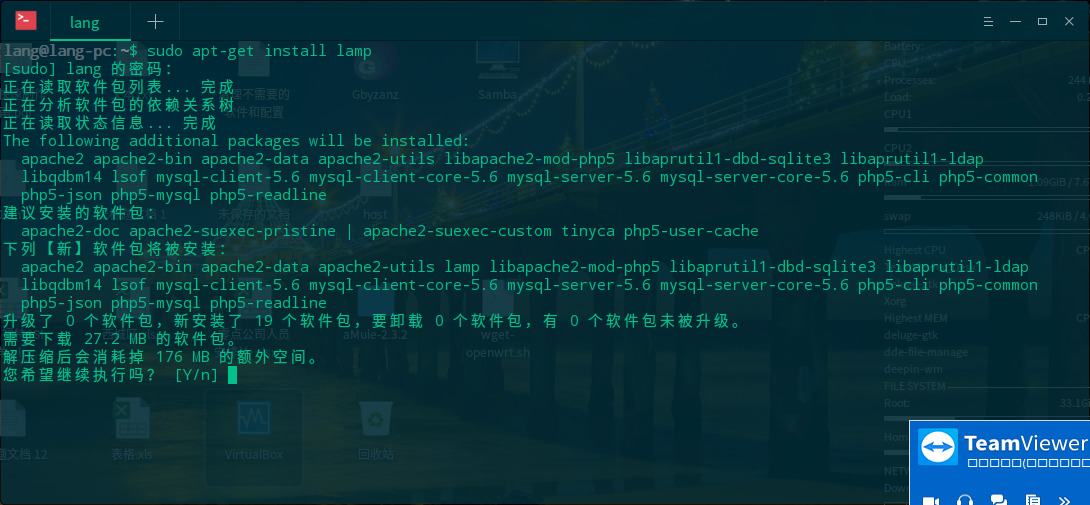
解决deepin下安装lamp,lnmp卸载dde的问题。
Tofloor
poster avatar
a58039427
deepin
2017-01-11 23:36
Author

  deepin操作系统是一个致力于为全球用户提供美观易用、安全可靠体验的Linux发行版。deepin操作系统非常注重易用的体验和美观的设计,对于大多数用户来说,它易于安装和使用,能够很好的代替Windows系统进行工作与娱乐。它不仅仅对最优秀的开源产品进行集成和配置,还基于Qt技术开发了深度桌面环境和深度控制中心,并且开发了一系列面向日常使用的深度特色应用如深度商店、深度截图、深度音乐、深度影院等。。linux平台的优势显而易见,今天带来的是如何在deepin下安装LAMP开发环境!

首先按CTRL+ALT+T打开命令行终端

一、切换到root用户

     sudo -i

二、安装apache

     apt-get install apache2 -y

三、安装mysql,期间会提示输入输入密码和确认密码

     apt-get install mysql-server mysql-client

四、安装php5

     apt-get install php5 -y

五、整合php,mysql,apache

     apt-get install libapache2-mod-php5 libapache2-mod-auth-myql php5-mysql php5-gd

六、安装phpmyadmin

     apt-get install phpmyadmin

七、在/var/www/html根目录为phpmyadmin设置一个链接(ln -s),前提是先得给根目录权限。

     sudo chmod 777 /var/www/html
     sudo ln -s /usr/share/phpmyadmin /var/www/html

八、启动apache服务器,在浏览器中输入相应地址。


原文链接:https://www.z1006.top/47.html

Reply Favorite View the author
All Replies
1 / 2
To page
avatar
a58039427
deepin
2017-01-11 23:41
#1
Reply View the author
avatar
a58039427
deepin
2017-01-11 23:46
#2
再顶一贴
Reply View the author
avatar
153******45
deepin
2017-01-12 00:02
#3
从仓库装没事,用一键安装包才会卸载
Reply View the author
avatar
sinux
deepin
2017-01-12 01:25
#4
蛤?
take this
  1. sudo apt install lnmp
  2. sudo apt install lamp
Copy the Code
Reply View the author
avatar
a58039427
deepin
2017-01-12 01:28
#5

会把dde卸载的 不信你试试呀
Reply View the author
avatar
153******45
deepin
2017-01-12 04:17
#6
https://bbs.deepin.org/post/134049
会把dde卸载的 不信你试试呀


没问题呀
Reply View the author
avatar
zsh2401
deepin
2017-01-12 07:01
#7
之前用lnmp一键包,装着装着程序越来越少,然后图形界面就进不去了。当场就哭死我
最后折腾半天,重装系统。
但到现在为止,一直没弄好lnmp或lamp,求楼主出个lnmp教程。不太喜欢apache,不知道为什么
Reply View the author
avatar
153******45
deepin
2017-01-12 20:03
#8
zsh2401 发表于 2017-1-11 23:01
之前用lnmp一键包,装着装着程序越来越少,然后图形界面就进不去了。当场就哭死我
最后折腾半天,重装系统 ...

之前有人发过帖子,你搜一下,有可用的一键安装包
Reply View the author
avatar
sinux
deepin
2017-01-12 23:57
#9
https://bbs.deepin.org/post/134049
会把dde卸载的 不信你试试呀

绝对不信
Reply View the author
avatar
a58039427
deepin
2017-01-13 22:41
#10

我自己试过了 要不然我也不会发这个帖子
Reply View the author
avatar
a58039427
deepin
2017-01-13 22:42
#11
https://bbs.deepin.org/post/134049
之前用lnmp一键包,装着装着程序越来越少,然后图形界面就进不去了。当场就哭死我
最后折腾半天,重装系统 ...

一样的道理呀 兄弟
Reply View the author
avatar
a58039427
deepin
2017-01-13 22:42
#12

你按Y 让他走完试试
Reply View the author
avatar
153******45
deepin
2017-01-14 05:16
#13
https://bbs.deepin.org/post/134049
你按Y 让他走完试试

sudo apt install lamp
正在读取软件包列表... 完成
正在分析软件包的依赖关系树      
正在读取状态信息... 完成      
下列软件包是自动安装的并且现在不需要了:
  libevent-core-2.0-5 libmcrypt4 libmecab2 php7.0-cgi php7.0-mcrypt php7.0-mysql
使用'sudo apt autoremove'来卸载它(它们)。
The following additional packages will be installed:
  apache2 apache2-bin apache2-data apache2-utils libapache2-mod-php5 libaprutil1-dbd-sqlite3 libaprutil1-ldap
  libqdbm14 lsof mysql-client-5.6 mysql-client-core-5.6 mysql-server-5.6 mysql-server-core-5.6 php5-cli php5-common
  php5-json php5-mysql php5-readline
建议安装的软件包:
  apache2-doc apache2-suexec-pristine | apache2-suexec-custom tinyca php5-user-cache
下列软件包将被【卸载】:
  lnmp mysql-client-5.7 mysql-client-core-5.7 mysql-server mysql-server-5.7 mysql-server-core-5.7
下列【新】软件包将被安装:
  apache2 apache2-bin apache2-data apache2-utils lamp libapache2-mod-php5 libaprutil1-dbd-sqlite3 libaprutil1-ldap
  libqdbm14 lsof mysql-client-5.6 mysql-client-core-5.6 mysql-server-5.6 mysql-server-core-5.6 php5-cli php5-common
  php5-json php5-mysql php5-readline
升级了 0 个软件包,新安装了 19 个软件包,要卸载 6 个软件包,有 0 个软件包未被升级。
需要下载 27.2 MB 的软件包。
解压缩后会消耗掉 16.2 MB 的额外空间。
您希望继续执行吗? [Y/n]
获取:1 http://192.168.199.217/deepin unstable/main amd64 libaprutil1-dbd-sqlite3 amd64 1.5.4-2 [19.1 kB]
获取:2 http://192.168.199.217/deepin unstable/main amd64 libaprutil1-ldap amd64 1.5.4-2 [17.2 kB]
获取:3 http://192.168.199.217/deepin unstable/main amd64 apache2-bin amd64 2.4.23-5 [1,150 kB]
获取:4 http://192.168.199.217/deepin unstable/main amd64 apache2-utils amd64 2.4.23-5 [211 kB]
获取:5 http://192.168.199.217/deepin unstable/main amd64 apache2-data all 2.4.23-5 [162 kB]
获取:6 http://192.168.199.217/deepin unstable/main amd64 apache2 amd64 2.4.23-5 [229 kB]
获取:7 http://192.168.199.217/deepin unstable/main amd64 mysql-client-core-5.6 amd64 5.6.30-1 [4,419 kB]
获取:8 http://192.168.199.217/deepin unstable/main amd64 mysql-client-5.6 amd64 5.6.30-1 [5,289 kB]
获取:9 http://192.168.199.217/deepin unstable/main amd64 mysql-server-core-5.6 amd64 5.6.30-1 [4,562 kB]
获取:10 http://192.168.199.217/deepin unstable/main amd64 mysql-server-5.6 amd64 5.6.30-1 [5,448 kB]
获取:11 http://192.168.199.217/deepin unstable/main amd64 lsof amd64 4.89+dfsg-0.1 [313 kB]
获取:12 http://192.168.199.217/deepin unstable/main amd64 libqdbm14 amd64 1.8.78-6+b5 [118 kB]
获取:13 http://192.168.199.217/deepin unstable/main amd64 php5-common amd64 5.6.26+dfsg-1 [742 kB]
获取:14 http://192.168.199.217/deepin unstable/main amd64 php5-json amd64 1.3.9-1 [31.6 kB]
获取:15 http://192.168.199.217/deepin unstable/main amd64 php5-cli amd64 5.6.26+dfsg-1 [2,183 kB]
获取:16 http://192.168.199.217/deepin unstable/main amd64 libapache2-mod-php5 amd64 5.6.26+dfsg-1 [2,219 kB]
获取:17 http://192.168.199.217/deepin unstable/main amd64 php5-mysql amd64 5.6.26+dfsg-1 [65.2 kB]
获取:18 http://192.168.199.217/deepin unstable/main amd64 php5-readline amd64 5.6.26+dfsg-1 [12.6 kB]
获取:19 http://192.168.199.217/deepin unstable/main amd64 lamp all 0.3 [2,144 B]
下载 27.2 MB,耗时 0秒 (50.6 MB/s)
正在预设定软件包 ...
(正在读取数据库 ... 系统当前共安装有 277650 个文件和目录。)
正在卸载 lnmp (0.2) ...
正在卸载 mysql-server (5.7.15-1) ...
正在卸载 mysql-server-5.7 (5.7.15-1) ...
正在卸载 mysql-client-5.7 (5.7.15-1) ...
正在卸载 mysql-client-core-5.7 (5.7.15-1) ...
正在卸载 mysql-server-core-5.7 (5.7.15-1) ...
正在处理用于 man-db (2.7.5-1) 的触发器 ...
正在选中未选择的软件包 libaprutil1-dbd-sqlite3:amd64。
(正在读取数据库 ... 系统当前共安装有 277421 个文件和目录。)
正准备解包 .../libaprutil1-dbd-sqlite3_1.5.4-2_amd64.deb  ...
正在解包 libaprutil1-dbd-sqlite3:amd64 (1.5.4-2) ...
正在选中未选择的软件包 libaprutil1-ldap:amd64。
正准备解包 .../libaprutil1-ldap_1.5.4-2_amd64.deb  ...
正在解包 libaprutil1-ldap:amd64 (1.5.4-2) ...
正在选中未选择的软件包 apache2-bin。
正准备解包 .../apache2-bin_2.4.23-5_amd64.deb  ...
正在解包 apache2-bin (2.4.23-5) ...
正在选中未选择的软件包 apache2-utils。
正准备解包 .../apache2-utils_2.4.23-5_amd64.deb  ...
正在解包 apache2-utils (2.4.23-5) ...
正在选中未选择的软件包 apache2-data。
正准备解包 .../apache2-data_2.4.23-5_all.deb  ...
正在解包 apache2-data (2.4.23-5) ...
正在选中未选择的软件包 apache2。
正准备解包 .../apache2_2.4.23-5_amd64.deb  ...
正在解包 apache2 (2.4.23-5) ...
正在选中未选择的软件包 mysql-client-core-5.6。
正准备解包 .../mysql-client-core-5.6_5.6.30-1_amd64.deb  ...
正在解包 mysql-client-core-5.6 (5.6.30-1) ...
正在选中未选择的软件包 mysql-client-5.6。
正准备解包 .../mysql-client-5.6_5.6.30-1_amd64.deb  ...
正在解包 mysql-client-5.6 (5.6.30-1) ...
正在选中未选择的软件包 mysql-server-core-5.6。
正准备解包 .../mysql-server-core-5.6_5.6.30-1_amd64.deb  ...
正在解包 mysql-server-core-5.6 (5.6.30-1) ...
正在选中未选择的软件包 mysql-server-5.6。
正准备解包 .../mysql-server-5.6_5.6.30-1_amd64.deb  ...
Aborting downgrade from (at least) 5.7 to 5.6.
If are sure you want to downgrade to 5.6, remove the file
/var/lib/mysql/debian-*.flag and try installing again.
dpkg: 处理归档 /var/cache/apt/archives/mysql-server-5.6_5.6.30-1_amd64.deb (--unpack)时出错:
子进程 新的 pre-installation 脚本 返回错误状态 1
正在选中未选择的软件包 lsof。
正准备解包 .../lsof_4.89+dfsg-0.1_amd64.deb  ...
正在解包 lsof (4.89+dfsg-0.1) ...
正在选中未选择的软件包 libqdbm14。
正准备解包 .../libqdbm14_1.8.78-6+b5_amd64.deb  ...
正在解包 libqdbm14 (1.8.78-6+b5) ...
正在选中未选择的软件包 php5-common。
正准备解包 .../php5-common_5.6.26+dfsg-1_amd64.deb  ...
正在解包 php5-common (5.6.26+dfsg-1) ...
正在选中未选择的软件包 php5-json。
正准备解包 .../php5-json_1.3.9-1_amd64.deb  ...
正在解包 php5-json (1.3.9-1) ...
正在选中未选择的软件包 php5-cli。
正准备解包 .../php5-cli_5.6.26+dfsg-1_amd64.deb  ...
正在解包 php5-cli (5.6.26+dfsg-1) ...
正在选中未选择的软件包 libapache2-mod-php5。
正准备解包 .../libapache2-mod-php5_5.6.26+dfsg-1_amd64.deb  ...
正在解包 libapache2-mod-php5 (5.6.26+dfsg-1) ...
正在选中未选择的软件包 php5-mysql。
正准备解包 .../php5-mysql_5.6.26+dfsg-1_amd64.deb  ...
正在解包 php5-mysql (5.6.26+dfsg-1) ...
正在选中未选择的软件包 php5-readline。
正准备解包 .../php5-readline_5.6.26+dfsg-1_amd64.deb  ...
正在解包 php5-readline (5.6.26+dfsg-1) ...
正在选中未选择的软件包 lamp。
正准备解包 .../apt/archives/lamp_0.3_all.deb  ...
正在解包 lamp (0.3) ...
正在处理用于 man-db (2.7.5-1) 的触发器 ...
正在处理用于 systemd (231-1) 的触发器 ...
正在处理用于 libc-bin (2.24-5) 的触发器 ...
在处理时有错误发生:
/var/cache/apt/archives/mysql-server-5.6_5.6.30-1_amd64.deb
E: Sub-process /usr/bin/dpkg returned an error code (1)
Reply View the author
avatar
153******45
deepin
2017-01-14 05:17
#14
https://bbs.deepin.org/post/134049
你按Y 让他走完试试

sudo apt install lnmp
[sudo] lang 的密码:
正在读取软件包列表... 完成
正在分析软件包的依赖关系树      
正在读取状态信息... 完成      
The following additional packages will be installed:
  libevent-core-2.0-5 libmcrypt4 libmecab2 mysql-client-5.7 mysql-client-core-5.7 mysql-server mysql-server-5.7
  mysql-server-core-5.7 php7.0-cgi php7.0-mcrypt php7.0-mysql
建议安装的软件包:
  libmcrypt-dev mcrypt tinyca
下列【新】软件包将被安装:
  libevent-core-2.0-5 libmcrypt4 libmecab2 lnmp mysql-client-5.7 mysql-client-core-5.7 mysql-server mysql-server-5.7
  mysql-server-core-5.7 php7.0-cgi php7.0-mcrypt php7.0-mysql
升级了 0 个软件包,新安装了 12 个软件包,要卸载 0 个软件包,有 0 个软件包未被升级。
需要下载 20.6 MB 的软件包。
解压缩后会消耗掉 171 MB 的额外空间。
您希望继续执行吗? [Y/n]
获取:1 http://192.168.199.217/deepin unstable/main amd64 mysql-client-core-5.7 amd64 5.7.15-1 [6,539 kB]
获取:2 http://192.168.199.217/deepin unstable/main amd64 mysql-client-5.7 amd64 5.7.15-1 [1,765 kB]
获取:3 http://192.168.199.217/deepin unstable/main amd64 mysql-server-core-5.7 amd64 5.7.15-1 [7,711 kB]
获取:4 http://192.168.199.217/deepin unstable/main amd64 libevent-core-2.0-5 amd64 2.0.21-stable-2.1 [109 kB]
获取:5 http://192.168.199.217/deepin unstable/main amd64 libmecab2 amd64 0.996-3 [255 kB]
获取:6 http://192.168.199.217/deepin unstable/main amd64 mysql-server-5.7 amd64 5.7.15-1 [2,657 kB]
获取:7 http://192.168.199.217/deepin unstable/main amd64 libmcrypt4 amd64 2.5.8-3.3 [71.2 kB]
获取:8 http://192.168.199.217/deepin unstable/main amd64 mysql-server all 5.7.15-1 [104 kB]
获取:9 http://192.168.199.217/deepin unstable/main amd64 php7.0-cgi amd64 7.0.12-2 [1,250 kB]
获取:10 http://192.168.199.217/deepin unstable/main amd64 php7.0-mcrypt amd64 7.0.12-2 [14.3 kB]
获取:11 http://192.168.199.217/deepin unstable/main amd64 php7.0-mysql amd64 7.0.12-2 [123 kB]
获取:12 http://192.168.199.217/deepin unstable/main amd64 lnmp all 0.2 [2,060 B]
下载 20.6 MB,耗时 1秒 (13.2 MB/s)
正在预设定软件包 ...
正在选中未选择的软件包 mysql-client-core-5.7。
(正在读取数据库 ... 系统当前共安装有 277364 个文件和目录。)
正准备解包 .../mysql-client-core-5.7_5.7.15-1_amd64.deb  ...
正在解包 mysql-client-core-5.7 (5.7.15-1) ...
正在选中未选择的软件包 mysql-client-5.7。
正准备解包 .../mysql-client-5.7_5.7.15-1_amd64.deb  ...
正在解包 mysql-client-5.7 (5.7.15-1) ...
正在选中未选择的软件包 mysql-server-core-5.7。
正准备解包 .../mysql-server-core-5.7_5.7.15-1_amd64.deb  ...
正在解包 mysql-server-core-5.7 (5.7.15-1) ...
正在选中未选择的软件包 libevent-core-2.0-5:amd64。
正准备解包 .../libevent-core-2.0-5_2.0.21-stable-2.1_amd64.deb  ...
正在解包 libevent-core-2.0-5:amd64 (2.0.21-stable-2.1) ...
正在选中未选择的软件包 libmecab2:amd64。
正准备解包 .../libmecab2_0.996-3_amd64.deb  ...
正在解包 libmecab2:amd64 (0.996-3) ...
正在选中未选择的软件包 mysql-server-5.7。
正准备解包 .../mysql-server-5.7_5.7.15-1_amd64.deb  ...
正在解包 mysql-server-5.7 (5.7.15-1) ...
正在选中未选择的软件包 libmcrypt4。
正准备解包 .../libmcrypt4_2.5.8-3.3_amd64.deb  ...
正在解包 libmcrypt4 (2.5.8-3.3) ...
正在选中未选择的软件包 mysql-server。
正准备解包 .../mysql-server_5.7.15-1_all.deb  ...
正在解包 mysql-server (5.7.15-1) ...
正在选中未选择的软件包 php7.0-cgi。
正准备解包 .../php7.0-cgi_7.0.12-2_amd64.deb  ...
正在解包 php7.0-cgi (7.0.12-2) ...
正在选中未选择的软件包 php7.0-mcrypt。
正准备解包 .../php7.0-mcrypt_7.0.12-2_amd64.deb  ...
正在解包 php7.0-mcrypt (7.0.12-2) ...
正在选中未选择的软件包 php7.0-mysql。
正准备解包 .../php7.0-mysql_7.0.12-2_amd64.deb  ...
正在解包 php7.0-mysql (7.0.12-2) ...
正在选中未选择的软件包 lnmp。
正准备解包 .../apt/archives/lnmp_0.2_all.deb  ...
正在解包 lnmp (0.2) ...
正在处理用于 man-db (2.7.5-1) 的触发器 ...
正在处理用于 libc-bin (2.24-5) 的触发器 ...
正在处理用于 systemd (231-1) 的触发器 ...
正在处理用于 php7.0-fpm (7.0.12-2) 的触发器 ...
正在设置 mysql-client-core-5.7 (5.7.15-1) ...
正在设置 mysql-client-5.7 (5.7.15-1) ...
正在设置 mysql-server-core-5.7 (5.7.15-1) ...
正在设置 libevent-core-2.0-5:amd64 (2.0.21-stable-2.1) ...
正在设置 libmecab2:amd64 (0.996-3) ...
正在设置 mysql-server-5.7 (5.7.15-1) ...
正在安装新版本配置文件 /etc/apparmor.d/usr.sbin.mysqld ...
正在安装新版本配置文件 /etc/init.d/mysql ...
正在安装新版本配置文件 /etc/init/mysql.conf ...
正在安装新版本配置文件 /etc/mysql/debian-start ...
正在安装新版本配置文件 /etc/mysql/mysql.conf.d/mysqld.cnf ...
Renaming removed key_buffer and myisam-recover options (if present)
Checking if update is needed.
Checking server version.
Running queries to upgrade MySQL server.
Checking system database.
mysql.columns_priv                                 OK
mysql.db                                           OK
mysql.engine_cost                                  OK
mysql.event                                        OK
mysql.func                                         OK
mysql.general_log                                  OK
mysql.gtid_executed                                OK
mysql.help_category                                OK
mysql.help_keyword                                 OK
mysql.help_relation                                OK
mysql.help_topic                                   OK
mysql.innodb_index_stats                           OK
mysql.innodb_table_stats                           OK
mysql.ndb_binlog_index                             OK
mysql.plugin                                       OK
mysql.proc                                         OK
mysql.procs_priv                                   OK
mysql.proxies_priv                                 OK
mysql.server_cost                                  OK
mysql.servers                                      OK
mysql.slave_master_info                            OK
mysql.slave_relay_log_info                         OK
mysql.slave_worker_info                            OK
mysql.slow_log                                     OK
mysql.tables_priv                                  OK
mysql.time_zone                                    OK
mysql.time_zone_leap_second                        OK
mysql.time_zone_name                               OK
mysql.time_zone_transition                         OK
mysql.time_zone_transition_type                    OK
mysql.user                                         OK
Upgrading the sys schema.
Checking databases.
sys.sys_config                                     OK
Upgrade process completed successfully.
Checking if update is needed.
正在设置 libmcrypt4 (2.5.8-3.3) ...
正在设置 mysql-server (5.7.15-1) ...
正在设置 php7.0-cgi (7.0.12-2) ...
update-alternatives: 使用 /usr/bin/php-cgi7.0 来在自动模式中提供 /usr/bin/php-cgi (php-cgi)
update-alternatives: 使用 /usr/lib/cgi-bin/php7.0 来在自动模式中提供 /usr/lib/cgi-bin/php (php-cgi-bin)

Creating config file /etc/php/7.0/cgi/php.ini with new version
php_invoke: Enable module xmlreader for cgi sapi
php_invoke: Enable module xsl for cgi sapi
php_invoke: Enable module sysvsem for cgi sapi
php_invoke: Enable module sockets for cgi sapi
php_invoke: Enable module json for cgi sapi
php_invoke: Enable module ctype for cgi sapi
php_invoke: Enable module opcache for cgi sapi
php_invoke: Enable module iconv for cgi sapi
php_invoke: Enable module ftp for cgi sapi
php_invoke: Enable module phar for cgi sapi
php_invoke: Enable module exif for cgi sapi
php_invoke: Enable module readline for cgi sapi
php_invoke: Enable module calendar for cgi sapi
php_invoke: Enable module fileinfo for cgi sapi
php_invoke: Enable module pdo for cgi sapi
php_invoke: Enable module sysvmsg for cgi sapi
php_invoke: Enable module gettext for cgi sapi
php_invoke: Enable module posix for cgi sapi
php_invoke: Enable module xml for cgi sapi
php_invoke: Enable module simplexml for cgi sapi
php_invoke: Enable module wddx for cgi sapi
php_invoke: Enable module sysvshm for cgi sapi
php_invoke: Enable module shmop for cgi sapi
php_invoke: Enable module dom for cgi sapi
php_invoke: Enable module tokenizer for cgi sapi
php_invoke: Enable module xmlwriter for cgi sapi
正在设置 php7.0-mcrypt (7.0.12-2) ...

Creating config file /etc/php/7.0/mods-available/mcrypt.ini with new version
正在设置 php7.0-mysql (7.0.12-2) ...

Creating config file /etc/php/7.0/mods-available/mysqlnd.ini with new version

Creating config file /etc/php/7.0/mods-available/mysqli.ini with new version

Creating config file /etc/php/7.0/mods-available/pdo_mysql.ini with new version
正在设置 lnmp (0.2) ...
正在处理用于 libc-bin (2.24-5) 的触发器 ...
正在处理用于 systemd (231-1) 的触发器 ...
正在处理用于 php7.0-fpm (7.0.12-2) 的触发器 ...
Reply View the author
avatar
phperfan
deepin
2017-01-17 18:05
#15
为什么不直接用  xampp 呢? 不会破坏任何依赖 , 只是需要安装好之后加一个软连接而已 。。  
Reply View the author
avatar
myTTYY
deepin
2017-02-07 19:47
#16
https://bbs.deepin.org/post/134049
会把dde卸载的 不信你试试呀

lamp不会,网上下的lanmp.sh脚本才会卸载dee
Reply View the author
avatar
ylsc633
deepin
2017-02-07 22:16
#17
https://bbs.deepin.org/post/134049
之前用lnmp一键包,装着装着程序越来越少,然后图形界面就进不去了。当场就哭死我
最后折腾半天,重装系统 ...

我一次就安装好.......之前也遇到过  把我其他软件卸载掉的情况...........  请选择    oneinstack 一键安装包的最新版..........  莫要选择  lnmp.org的 软件包........
Reply View the author
avatar
ylsc633
deepin
2017-02-07 22:18
#18
我个人亲自测试过.............   我这人不喜欢自己去装环境...........   不过 php7是自己装的.......


开始用 deepin的时候,  装了  lnmp.org 的一键安装包.........  装完 我软件都没了........   

然后我重装了系统........  

换了 oneinstack的 最新版的  环境包   就可以了!

现在都还在用.........

建议各位不要随意尝试......... 不然你得重装系统..........

记住 oneinstack 最新版本的  就行了........
Reply View the author
avatar
laobaoabc
deepin
2017-02-08 21:05
#19
不要在实体机装,用docker或者vagrant
Reply View the author
avatar
kaile
deepin
2017-02-08 21:57
#20
装个软件竟然会卸载系统软件,linux的依赖果然是个垃圾机制
Reply View the author
1 / 2
To page