关于分区扩容求助
Tofloor
poster avatar
jerryjiang
deepin
2017-01-04 05:16
Author
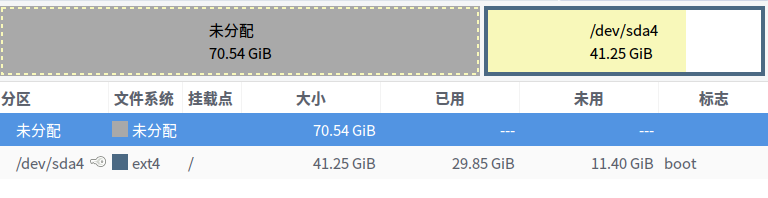
刚开始是win10+deepin双系统,win10挂掉后索性把它格了,再然后有在此基础上安装了另外一个发行版,目前分区是这样的。

现在deepin位于sda4上,能不能把前面的分区全部划分给deepin呀???
google说把系统cp出来,然后扩大,再cp回去(我是这样理解的),
试过通过live cd使用GParted,但是并不能合并。
那么还有其他方法吗?
还有,我记得我安装的时候,通过专家模式给home单独挂载了的,不过貌似并没有单独出来???
谢谢!!!
Reply Favorite View the author
All Replies
avatar
MeowSprite
deepin
2017-01-04 05:49
#1
要想重新改变挂载根目录的分区的大小,比较麻烦,需要chroot或者live cd什么的。但是根目录分区基本不会用到什么的,平时用的比较多的其实是home分区,改它比较容易些。
所以可以把前面的分区全部都变成一个home分区。
先关闭swap分区,然后用磁盘软件把前面的分区都给删除重新格式化成一个大分区,然后挂载把home分区里的东西,全部拷贝到这个分区下。然后把分区挂载到/home。
至于swap分区嘛,就不要算了,如果你还想要么再划分的时候,重新划分个swap分区。
上面的感觉还是太麻烦了。
所以你就把这两个分区格式化下,然后拿来当D盘或者E盘用不就觉得轻松多了嘛。
Reply View the author
avatar
jerryjiang
deepin
2017-01-04 06:09
#2
https://bbs.deepin.org/post/133716
要想重新改变挂载根目录的分区的大小,比较麻烦,需要chroot或者live cd什么的。但是根目录分区基本不会用 ...

感谢!!!
你是指不用把前面的分区划分到根区了,直接格式了当挂载用?
主要是我看有些从商店或者直接deb安装的是在根分区里面的路径,当初分的有点小,然后我是打算长期滚动更新使用,就怕容量不够。

Reply View the author
avatar
Feng Yu
deepin
2017-01-04 06:35
#3
ext4印象中只有相邻的分区才可以resize2fs操作,btrfs和xfs,以及zfs似乎没这个限制。

你可以试试把/dev/sda1这个扩展分区整个干掉,然后sudo resize2fs /,理论上应该能扩展。
Reply View the author
avatar
MeowSprite
deepin
2017-01-04 07:08
#4
jerryjiang 发表于 2017-1-3 22:09
感谢!!!
你是指不用把前面的分区划分到根区了,直接格式了当挂载用?
主要是我看有些从商店或者直接de ...

在根目录里,那些软件才多大点。一个软件顶多100mb。平时你根本不可能会在根目录下放媒体文件这类大文件。40G够你用了。home目录才是重点,一部电影,一堆音乐,一堆文件。我都是home目录分区划得最大。
Reply View the author
avatar
MeowSprite
deepin
2017-01-04 07:09
#5
jerryjiang 发表于 2017-1-3 22:09
感谢!!!
你是指不用把前面的分区划分到根区了,直接格式了当挂载用?
主要是我看有些从商店或者直接de ...

还有我ssd根目录才30g。
根本用不了那么多。
Reply View the author
avatar
jerryjiang
deepin
2017-01-04 18:20
#6
https://bbs.deepin.org/post/133716
ext4印象中只有相邻的分区才可以resize2fs操作,btrfs和xfs,以及zfs似乎没这个限制。

你可以试试把/dev/s ...

我找了下resize2fs的命令,和fdisk配合使用。
我把前面的分区都给删了,
执行如下:
-------↓-----------
sudo resize2fs /
[sudo] xxxx的密码:
resize2fs 1.43.1 (08-Jun-2016)
open: 是一个目录 打开/时
-------↑-----------

然后通过ubuntu14的Gparted
报错:
-------↓-----------
检查 /dev/sda4 上的文件系统错误并在可能的情况下修正  00:00:00    ( 错误 )         
e2fsck -f -y -v -C 0 /dev/sda4           
e2fsck 1.42.9 (4-Feb-2014) -------↑-----------
这个错误貌似是软件版本低了,现在正在重做live cd。

Reply View the author
avatar
jerryjiang
deepin
2017-01-04 18:24
#7
https://bbs.deepin.org/post/133716
在根目录里,那些软件才多大点。一个软件顶多100mb。平时你根本不可能会在根目录下放媒体文件这类大文件 ...

我记得我装系统的时候通过专家模式选择一个分区挂载根,一个分区挂载home,可是现在貌似只有一个根分区,而且现在也只剩下10G左右,上次忘了清理就连镜像都下载不下来了。所以才想扩容。
Reply View the author
avatar
jerryjiang
deepin
2017-01-04 18:25
#8
https://bbs.deepin.org/post/133716
还有我ssd根目录才30g。
根本用不了那么多。

我是打算deepin单系统跑到底,ssd全给他,然后就跟着滚动更新了。
Reply View the author
avatar
Feng Yu
deepin
2017-01-04 18:49
#9
https://bbs.deepin.org/post/133716
我找了下resize2fs的命令,和fdisk配合使用。
我把前面的分区都给删了,
执行如下:

记错,resize2fs跟的是设备,不是挂载点: https://access.redhat.com/docume ... Guide/ext4grow.html
Reply View the author
avatar
jerryjiang
deepin
2017-01-04 19:16
#10
https://bbs.deepin.org/post/133716
记错,resize2fs跟的是设备,不是挂载点: https://access.redhat.com/documentation/en-US/Red_Hat_Enter ...


xxx@xxx:~$ sudo resize2fs /dev/sda4
resize2fs 1.43.1 (08-Jun-2016)
The filesystem is already 10813184 (4k) blocks long.  Nothing to do!
报错。目前是这样的分区:

这是因为resize2fs是向后扩容,导致的?
网上类似案列:
ec2-user$ sudo fdisk /dev/xvde

WARNING: DOS-compatible mode is deprecated. It's strongly recommended to
switch off the mode (command 'c') and change display units to
sectors (command 'u').

Command (m for help): p

Disk /dev/xvde: 107.4 GB, 107374182400 bytes
255 heads, 63 sectors/track, 13054 cylinders
Units = cylinders of 16065 * 512 = 8225280 bytes
Sector size (logical/physical): 512 bytes / 512 bytes
I/O size (minimum/optimal): 512 bytes / 512 bytes
Disk identifier: 0x00076be1

Device Boot Start End Blocks Id System
/dev/xvde1 * 1 1045 8387584 83 Linux

ec2-user$ df -h
Filesystem Size Used Avail Use% Mounted on
/dev/xvde1 7.9G 7.6G 0 100% /
tmpfs 3.6G 76K 3.6G 1% /dev/shm
/dev/xvdk 99G 37G 58G 39% /data
/dev/xvdo 100G 4.3G 96G 5% /mnt/ebs

ec2-user$ sudo resize2fs /dev/xvde1
resize2fs 1.41.12 (17-May-2010)
**The filesystem is already 2096896 blocks long. Nothing to do!**              

ec2-user$ cat /etc/*release
CentOS release 6.3 (Final)


[ec2-user]$ sudo vgdisplay
  No volume groups found


[size=1.3em]Your problem is that your system is set up to boot from a single partition on the disk and there is no LVM involved. The partition you are using starts on cylinder 1 and ends on 1045 so you are using 1045/13054 of the space available on the disk.
[size=1.3em]

You either need to repartition the disk, add a second (and possibly more) partitions, format them and mount them somewhere you can use the extra space or you need to do the same thing and create one large partition then tag that as type 0x8e (LVM) and use pvcreate/vgcreate/lvcreate to create some new LVM logical volumes that you can likewise format and mount appropriately.

The third and more dangerous option is that you go into fdisk, put it into 'units' mode by typing 'u' then 'p' to print the partition table as it is now and write down the starting sector of the existing partition. Then delete that partition and make a new one, with the same partition number and starting on exactly the same sector and ending at the end of the disk, make sure that partition is 'active' then save your changes and reboot. Once you reboot after that, you should be able to resize2fs the existing filesystem to take up all space. Backups are recommended and it's your data to lose!!


Reply View the author
avatar
133******90
deepin
2017-01-04 19:36
#11
分区只能向后扩展,不能向前扩展.你的sda4后面没有空闲的空间了,没办法扩展.
Reply View the author