也说点深度文件管理器问题和建议
Tofloor
poster avatar
左心房的痛
deepin
2017-01-03 23:44
Author
本帖最后由 wanzhende 于 2017-1-5 13:38 编辑

deepin好用又漂亮,其中又有很多深度自己开发比较好的软件,既然15.4必须得用深度文件管理器,那么就不能再将就了,为了deepin能越做越好,也必须得提点建议啦:


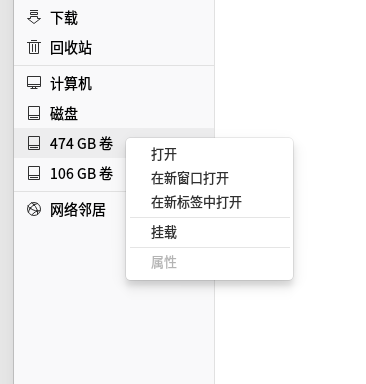
两块儿硬盘的分区,搞不懂为什么深度文件管理器只显示另一块硬盘的两个分区?


1.如图所示,在深度文件管理器中,左侧会显示磁盘列表,但显示的又不全(参考鹦鹉螺文件管理器的其它位置里的磁盘数目),感觉左侧不挂载的磁盘没有规律的显示,不如像鹦鹉螺一样,给收缩到“其它位置”栏中;


2.深度文件管理器能否增加类似于鹦鹉螺文件管理器的“以管理员身份打开”的选项??选择这个选项后,仍然会请求用户输入密码来进一步确认,所以本身是不存在系统自身安全性问题的,有问题也是用户自己授权的;

3.以深度文件管理器打开回收站,经常存在无法清空回收站或者还原文件的问题,使用鹦鹉螺就没问题了;

4.访问网上邻居经常没响应,同一时间鹦鹉螺则是飞快;


Reply Favorite View the author
All Replies
avatar
yanbowen
deepin
Community Developer
2017-01-04 01:18
#1
第一个问题,麻烦贴下 gvfs-mount -l 和  dbus-send --print-reply --dest=com.deepin.daemon.DiskMount /com/deepin/daemon/DiskMount com.deepin.daemon.DiskMount.ListDisk  这2条命令的输出,谢谢!
Reply View the author
avatar
左心房的痛
deepin
2017-01-04 01:56
#2
本帖最后由 wanzhende 于 2017-1-3 18:00 编辑
  1. lion@lion-pc:~[        DISCUZ_CODE_2        ]nbsp; gvfs-mount -l
  2. Drive(0): ST2000DX001-1CM164
  3.   Type: GProxyDrive (GProxyVolumeMonitorUDisks2)
  4.   Volume(0): 472 GB 卷
  5.     Type: GProxyVolume (GProxyVolumeMonitorUDisks2)
  6.   Volume(1): 474 GB 卷
  7.     Type: GProxyVolume (GProxyVolumeMonitorUDisks2)
  8.   Volume(2): 474 GB 卷
  9.     Type: GProxyVolume (GProxyVolumeMonitorUDisks2)
  10.   Volume(3): 474 GB 卷
  11.     Type: GProxyVolume (GProxyVolumeMonitorUDisks2)
  12.   Volume(4): 106 GB 卷
  13.     Type: GProxyVolume (GProxyVolumeMonitorUDisks2)
  14. Drive(1): WDC WD10EZEX-08M2NA0
  15.   Type: GProxyDrive (GProxyVolumeMonitorUDisks2)
  16. Mount(0): 192.168.0.253 上的 办公文件 -> smb://192.168.0.253/%E5%8A%9E%E5%85%AC%E6%96%87%E4%BB%B6/
  17.   Type: GDaemonMount
Copy the Code
  1. lion@lion-pc:~$ dbus-send --print-reply --dest=com.deepin.daemon.DiskMount /com/deepin/daemon/DiskMount com.deepin.daemon.DiskMount.ListDisk
  2. method return time=1483437446.604320 sender=:1.26 -> destination=:1.206 serial=17363 reply_serial=2
  3.    array [
  4.       struct {
  5.          string "0000678400004823"
  6.          string "474 GB 卷"
  7.          string "native"
  8.          string "/dev/sda6"
  9.          string ""
  10.          string "drive-harddisk"
  11.          boolean false
  12.          boolean false
  13.          uint64 0
  14.          uint64 462422020
  15.       }
  16.       struct {
  17.          string "A0084BFA084BCE4A"
  18.          string "106 GB 卷"
  19.          string "native"
  20.          string "/dev/sda3"
  21.          string ""
  22.          string "drive-harddisk"
  23.          boolean false
  24.          boolean false
  25.          uint64 0
  26.          uint64 103924381
  27.       }
  28.       struct {
  29.          string "smb://192.168.0.253/%E5%8A%9E%E5%85%AC%E6%96%87%E4%BB%B6/"
  30.          string "192.168.0.253 上的 办公文件"
  31.          string "network"
  32.          string ""
  33.          string "smb://192.168.0.253/%E5%8A%9E%E5%85%AC%E6%96%87%E4%BB%B6/"
  34.          string "folder-remote"
  35.          boolean true
  36.          boolean false
  37.          uint64 73020260
  38.          uint64 2879621632
  39.       }
  40.    ]
Copy the Code

@yanbowen

Reply View the author
avatar
y***z@tom.com
deepin
2017-01-04 02:34
#3
从网络文件夹复制或粘贴文件比WINDOWS下慢很多。
直接播放高清视频,拖动时甚至有点卡
Reply View the author
avatar
yanbowen
deepin
Community Developer
2017-01-06 21:49
#4

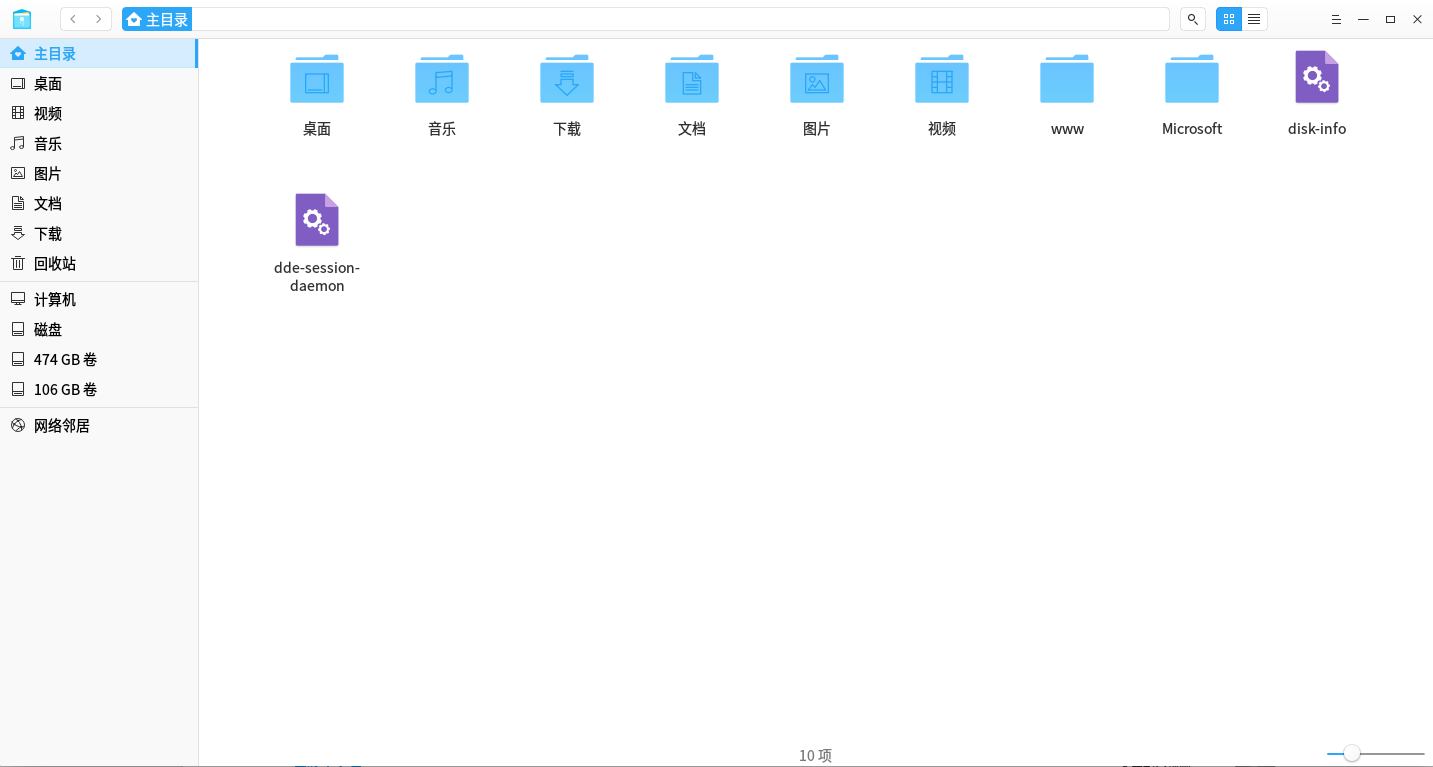
64 系统是吧,麻烦解压下附件,给上可执行权限,执行下里面的命令,然后贴一下输出,谢谢!
Reply View the author
avatar
左心房的痛
deepin
2017-01-08 00:15
#5
https://bbs.deepin.org/post/133707
64 系统是吧,麻烦解压下附件,给上可执行权限,执行下里面的命令,然后贴一下输出,谢谢! ...
  1. lion@lion-pc:~$ ./disk-info
  2. Volume number: 5
  3. Volume info: 472 GB 卷
  4.         CanEject: false
  5.         UUID:
  6.         Path: /dev/sda9
  7.         CanMount: true
  8.         ShouldAutomount: false
  9.         Icon: ". GThemedIcon drive-harddisk drive"
  10.         Type: GProxyVolume
  11. Drive info: ST2000DX001-1CM164
  12.         CanEject: false
  13.         UUID:
  14.         Path: /dev/sda
  15.         HasVolume: true
  16.         HasMedia: true
  17.         Icon: ". GThemedIcon drive-harddisk drive"
  18.         Type: GProxyDrive
  19. Volume info: 474 GB 卷
  20.         CanEject: false
  21.         UUID:
  22.         Path: /dev/sda8
  23.         CanMount: true
  24.         ShouldAutomount: false
  25.         Icon: ". GThemedIcon drive-harddisk drive"
  26.         Type: GProxyVolume
  27. Drive info: ST2000DX001-1CM164
  28.         CanEject: false
  29.         UUID:
  30.         Path: /dev/sda
  31.         HasVolume: true
  32.         HasMedia: true
  33.         Icon: ". GThemedIcon drive-harddisk drive"
  34.         Type: GProxyDrive
  35. Volume info: 474 GB 卷
  36.         CanEject: false
  37.         UUID:
  38.         Path: /dev/sda7
  39.         CanMount: true
  40.         ShouldAutomount: false
  41.         Icon: ". GThemedIcon drive-harddisk drive"
  42.         Type: GProxyVolume
  43. Drive info: ST2000DX001-1CM164
  44.         CanEject: false
  45.         UUID:
  46.         Path: /dev/sda
  47.         HasVolume: true
  48.         HasMedia: true
  49.         Icon: ". GThemedIcon drive-harddisk drive"
  50.         Type: GProxyDrive
  51. Volume info: 474 GB 卷
  52.         CanEject: false
  53.         UUID:
  54.         Path: /dev/sda6
  55.         CanMount: true
  56.         ShouldAutomount: false
  57.         Icon: ". GThemedIcon drive-harddisk drive"
  58.         Type: GProxyVolume
  59. Drive info: ST2000DX001-1CM164
  60.         CanEject: false
  61.         UUID:
  62.         Path: /dev/sda
  63.         HasVolume: true
  64.         HasMedia: true
  65.         Icon: ". GThemedIcon drive-harddisk drive"
  66.         Type: GProxyDrive
  67. Volume info: 106 GB 卷
  68.         CanEject: false
  69.         UUID:
  70.         Path: /dev/sda3
  71.         CanMount: true
  72.         ShouldAutomount: false
  73.         Icon: ". GThemedIcon drive-harddisk drive"
  74.         Type: GProxyVolume
  75. Drive info: ST2000DX001-1CM164
  76.         CanEject: false
  77.         UUID:
  78.         Path: /dev/sda
  79.         HasVolume: true
  80.         HasMedia: true
  81.         Icon: ". GThemedIcon drive-harddisk drive"
  82.         Type: GProxyDrive
  83. Mount number: 0
Copy the Code
Reply View the author
avatar
yanbowen
deepin
Community Developer
2017-01-08 06:31
#6

Thanks,容我研究下
Reply View the author
avatar
yanbowen
deepin
Community Developer
2017-01-08 07:37
#7
链接: https://pan.baidu.com/s/1i5frKpB 密码: j85w
麻烦下载测试下,执行 killall dde-session-daemon;./dde-session-daemon 看下文件管理器上会显示几个磁盘分区,然后把这个命令的输出贴一下,谢谢!
Reply View the author
avatar
左心房的痛
deepin
2017-01-09 17:47
#8
https://bbs.deepin.org/post/133707
链接: https://pan.baidu.com/s/1i5frKpB 密码: j85w
麻烦下载测试下,执行 killall dde-session-daemon;./ ...

执行前后是一样的:


  1. lion@lion-pc:~$  killall dde-session-daemon;./dde-session-daemon

  2. (dde-session-daemon:5208): GLib-GIO-ERROR **: Settings schema 'com.deepin.dde.daemon' does not contain a key named 'gesture'
  3. SIGTRAP: trace trap
  4. PC=0x7f0885e53a6b m=0
  5. signal arrived during cgo execution

  6. goroutine 1 [syscall, locked to thread]:
  7. runtime.cgocall(0xc554c0, 0xc420057c10, 0xc400000000)
  8.         /usr/lib/go/src/runtime/cgocall.go:131 +0x110 fp=0xc420057be0 sp=0xc420057ba0
  9. gir/gio-2%2e0._Cfunc_g_settings_get_boolean(0x21b2ab0, 0x2239f80, 0x0)
  10.         ??:0 +0x4d fp=0xc420057c10 sp=0xc420057be0
  11. gir/gio-2%2e0.(*Settings).GetBoolean(0xc4201c41c8, 0xdf4506, 0x7, 0xc420057c00)
  12.         /Data/Projects/GoLang/src/gir/gio-2.0/gio.go:10165 +0xed fp=0xc420057c68 sp=0xc420057c10
  13. main.(*SessionDaemon).initModules(0xc4201c9440)
  14.         /Data/Projects/GoLang/src/pkg.deepin.io/dde/daemon/bin/dde-session-daemon/daemon.go:130 +0xa5 fp=0xc420057d10 sp=0xc420057c68
  15. main.NewSessionDaemon(0xc4201bcf10, 0xc4201c41c8, 0xc4201c8880, 0x0)
  16.         /Data/Projects/GoLang/src/pkg.deepin.io/dde/daemon/bin/dde-session-daemon/daemon.go:89 +0x143 fp=0xc420057d50 sp=0xc420057d10
  17. main.main()
  18.         /Data/Projects/GoLang/src/pkg.deepin.io/dde/daemon/bin/dde-session-daemon/main.go:58 +0xa77 fp=0xc420057f48 sp=0xc420057d50
  19. runtime.main()
  20.         /usr/lib/go/src/runtime/proc.go:183 +0x1f4 fp=0xc420057fa0 sp=0xc420057f48
  21. runtime.goexit()
  22.         /usr/lib/go/src/runtime/asm_amd64.s:2086 +0x1 fp=0xc420057fa8 sp=0xc420057fa0

  23. goroutine 17 [syscall, locked to thread]:
  24. runtime.goexit()
  25.         /usr/lib/go/src/runtime/asm_amd64.s:2086 +0x1

  26. goroutine 34 [select, locked to thread]:
  27. runtime.gopark(0xe81608, 0x0, 0xdf3330, 0x6, 0x18, 0x2)
  28.         /usr/lib/go/src/runtime/proc.go:259 +0x13a
  29. runtime.selectgoImpl(0xc420033f30, 0x0, 0x18)
  30.         /usr/lib/go/src/runtime/select.go:423 +0x11d9
  31. runtime.selectgo(0xc420033f30)
  32.         /usr/lib/go/src/runtime/select.go:238 +0x1c
  33. runtime.ensureSigM.func1()
  34.         /usr/lib/go/src/runtime/signal1_unix.go:304 +0x2f3
  35. runtime.goexit()
  36.         /usr/lib/go/src/runtime/asm_amd64.s:2086 +0x1

  37. goroutine 18 [syscall]:
  38. os/signal.signal_recv(0x0)
  39.         /usr/lib/go/src/runtime/sigqueue.go:116 +0x157
  40. os/signal.loop()
  41.         /usr/lib/go/src/os/signal/signal_unix.go:22 +0x22
  42. created by os/signal.init.1
  43.         /usr/lib/go/src/os/signal/signal_unix.go:28 +0x41

  44. goroutine 19 [chan receive]:
  45. pkg.deepin.io/lib/profile.(*Config).Start.func4(0xc4201ca9c0)
  46.         /Data/Projects/GoLang/src/pkg.deepin.io/lib/profile/profile.go:157 +0xb6
  47. created by pkg.deepin.io/lib/profile.(*Config).Start
  48.         /Data/Projects/GoLang/src/pkg.deepin.io/lib/profile/profile.go:162 +0x118

  49. rax    0x0
  50. rbx    0x2
  51. rcx    0x7f088423d1dd
  52. rdx    0x7f08844feb78
  53. rdi    0x7f08844feb20
  54. rsi    0x0
  55. rbp    0x4
  56. rsp    0x7ffd9a13c7b0
  57. r8     0x7f0888513a80
  58. r9     0x8
  59. r10    0x449
  60. r11    0x0
  61. r12    0x4
  62. r13    0x0
  63. r14    0x7f0885e53230
  64. r15    0x2
  65. rip    0x7f0885e53a6b
  66. rflags 0x246
  67. cs     0x33
  68. fs     0x0
  69. gs     0x0
Copy the Code


Reply View the author
avatar
yanbowen
deepin
Community Developer
2017-01-09 19:06
#9
https://bbs.deepin.org/post/133707
执行前后是一样的:

额,我的版本太新了. 你 dde-daemon 的版本是多少?
Reply View the author
avatar
左心房的痛
deepin
2017-01-09 19:13
#10
本帖最后由 wanzhende 于 2017-1-9 11:19 编辑
https://bbs.deepin.org/post/133707
额,我的版本太新了. 你 dde-daemon 的版本是多少?

请问dde-daemon这是什么?? 和dde-session-daemon是两回事吧??
另外dde-daemon这个版本号怎么看??
不知道这样操作对不对??
  1. lion@lion-pc:~$ dpkg --list|grep "dde-daemon"
  2. ii  dde-api                                  3.0.14-2                             amd64        Go-lang bingdings for dde-daemon
  3. ii  dde-daemon                               3.0.23-3                             amd64        daemon handling the DDE session settings
Copy the Code
Reply View the author
avatar
Wintersweet
deepin
2017-01-09 19:19
#11
剪切文件,界面反应和实际之间关系感觉同步显示有问题,经常出问题.很怕搞丢文件
Reply View the author
Comments
sevenid
2017-01-09 21:16
是的,删除也有类似问题,经常删除没反应(纹丝不动),打开回收站,发现已经删除好几次了(回收站出现好几个)....也是无语....
avatar
yanbowen
deepin
Community Developer
2017-01-10 18:28
#12
https://bbs.deepin.org/post/133707
请问dde-daemon这是什么?? 和dde-session-daemon是两回事吧??
另外dde-daemon这 ...

麻烦升级下系统,dde-daemon 有新版本,改了不少动心,在 dde-daemon 3.0.24 上调试比较方便
Reply View the author
avatar
左心房的痛
deepin
2017-01-10 18:41
#13
https://bbs.deepin.org/post/133707
麻烦升级下系统,dde-daemon 有新版本,改了不少动心,在 dde-daemon 3.0.24 上调试比较方便 ...

昨天刚好加入内测,已经升级了dde-daemon

输出超过字符限制了,所以只能以附件形式上传啦
dde-session-daemon输出.txt.zip


Reply View the author
avatar
yanbowen
deepin
Community Developer
2017-01-12 04:40
#14
https://bbs.deepin.org/post/133707
昨天刚好加入内测,已经升级了dde-daemon

输出超过字符限制了,所以只能以附件形式上传啦

我的dde-session-daemon对于你的系统还是太新,再发一下 dde-daemon 的版本吧,升级后应该不是 3.0.23 了吧
Reply View the author
avatar
左心房的痛
deepin
2017-01-13 02:03
#15
本帖最后由 wanzhende 于 2017-1-12 18:10 编辑
https://bbs.deepin.org/post/133707
我的dde-session-daemon对于你的系统还是太新,再发一下 dde-daemon 的版本吧,升级后应该不是 3.0.23 了 ...

今天测试安装器2.0,重装了deepin,貌似flash用不了了,话说论坛的附件上传的插件也该改改了,dde-daemon版本是:3.0.24-5
  1. lion@Lion-PC:~$ dpkg --list|grep dde-daemon
  2. ii  dde-api                                  3.0.15-2                             amd64        Go-lang bingdings for dde-daemon
  3. ii  dde-daemon                               3.0.24-5                             amd64        daemon handling the DDE session settings
Copy the Code
dde-session-daemon20170112输出.tar.gz
Reply View the author
avatar
yanbowen
deepin
Community Developer
2017-01-13 20:51
#16
不要用之前的那个链接了,那个对你还是太新,用这个链接: https://pan.baidu.com/s/1c16WsTU 密码: 6mmm
md5: 27544eb7fbb7026ed1ab9ec80d5bbf35
麻烦你了!
Reply View the author
avatar
左心房的痛
deepin
2017-01-13 22:43
#17
https://bbs.deepin.org/post/133707
不要用之前的那个链接了,那个对你还是太新,用这个链接: https://pan.baidu.com/s/1c16WsTU 密码: 6mmm
md ...

dde-session-daemon20170113输出.txt.tar.gz
不麻烦,已经上传,最后一直卡在这个地方不动了
  1. utils_bluez.go:89: org.bluez.Error.InProgress:Operation already in progress
  2.   ->  utils_bluez.go:168
  3.   ->  asm_amd64.s:2086
Copy the Code

Reply View the author
avatar
yanbowen
deepin
Community Developer
2017-01-17 21:32
#18
https://bbs.deepin.org/post/133707
不麻烦,已经上传,最后一直卡在这个地方不动了

额......  好奇怪,附件中发现卡在 network 那里了,方便远程吗?可以的话,麻烦加下微信:yanbowen1990
Reply View the author
avatar
jingle
deepin
2017-01-17 22:30
#19
https://bbs.deepin.org/post/133707
剪切文件,界面反应和实际之间关系感觉同步显示有问题,经常出问题.很怕搞丢文件 ...

这个在1.3.6 已经修复额,现在试试
Reply View the author
Comments
d-d-d-d-d
2017-01-18 22:33
V1.3.6剪贴的时候,都剪贴过来了,文件还在?还有重命名文件的时候,想顺便复制文件名直接出错