[Print Manager] hpm1005打印不清晰
Tofloor
poster avatar
shaozhu
deepin
11 hours ago
Author

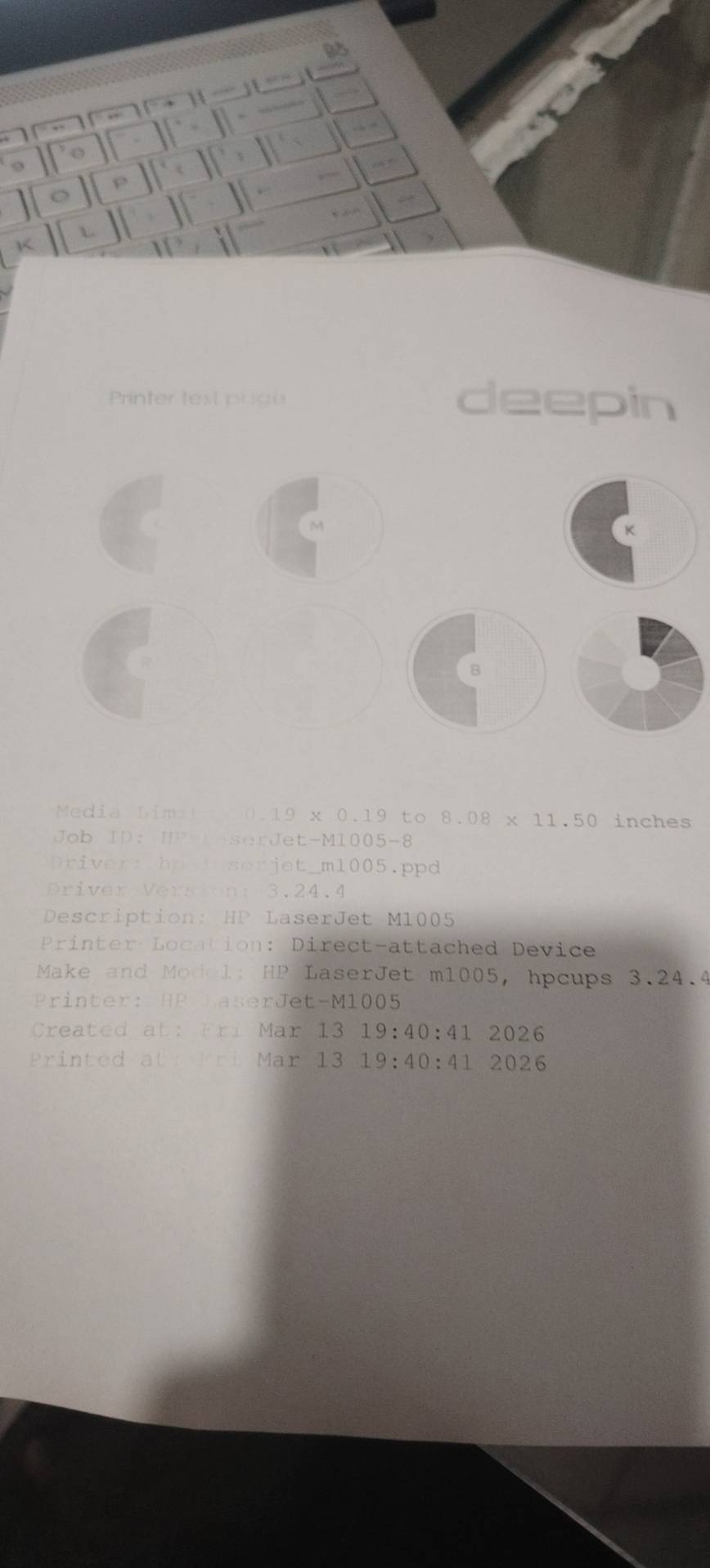
用打印管理器安装好惠普m1005打印机驱动3.24.4后,打印后颜色浅而且有一部分浅到看不清,打印机没问题,在windows系统下一切正常,而且也找不打印机属性调节加黑墨度,求大神指点。

Reply Favorite View the author
All Replies
LiuYongzhang
deepin
9 hours ago
#1

一、先排查最常见原因(省墨 / 经济模式)

1. 关闭省墨 / 经济模式(最关键)

M1005 在 Linux 下默认常开启 Economode(省墨),直接导致颜色浅。

  • 打开浏览器访问 CUPS 管理页:http://localhost:631/
  • 点击 Printers → 选中 HP_LaserJet_M1005_MFP
  • 点击 AdministrationSet Default Options
  • 找到 Print Quality / Toner Save / Economode
    • Economode:设为 Off(关闭)
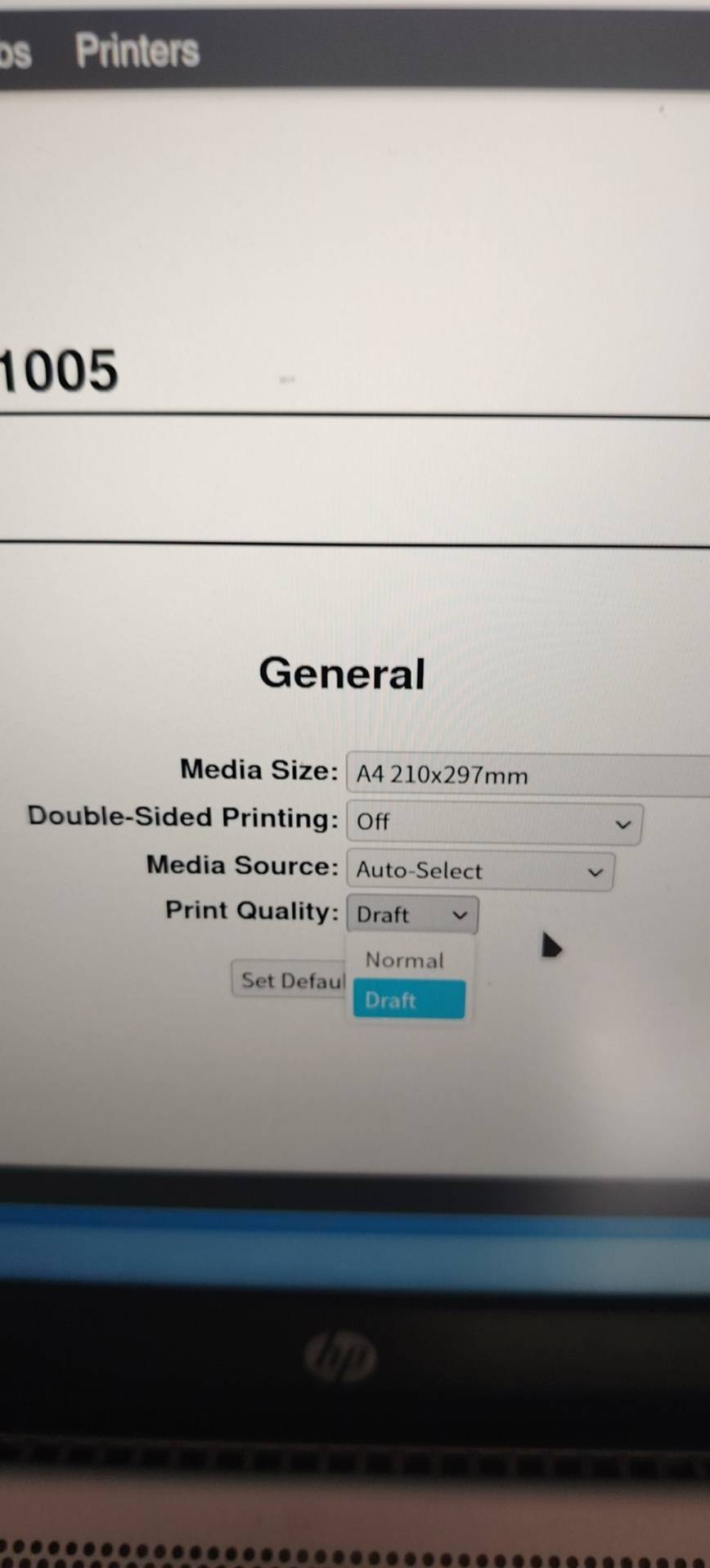
    • Print Quality:设为 600dpi 或 FastRes 1200(不要草稿 / 300dpi)
  • 点击 Set Default Options,输入系统密码保存

2. 检查打印机面板(复印 / 打印浓度)

M1005 面板可直接调复印 / 打印对比度,驱动设置会覆盖面板,但先确认面板正常

  • 按面板 Menu/Enter → 选 Copy setupDef. Light/dark
  • 用左右键调到 +2 或 +3(越深越好)→ 按 OK 保存

二:在终端运行

sudo apt update && sudo apt reinstall -y hplip libssl*

然后重新添加打印机试试

Reply View the author
shaozhu
deepin
6 hours ago
#2
LiuYongzhang

一、先排查最常见原因(省墨 / 经济模式)

1. 关闭省墨 / 经济模式(最关键)

M1005 在 Linux 下默认常开启 Economode(省墨),直接导致颜色浅。

  • 打开浏览器访问 CUPS 管理页:http://localhost:631/
  • 点击 Printers → 选中 HP_LaserJet_M1005_MFP
  • 点击 AdministrationSet Default Options
  • 找到 Print Quality / Toner Save / Economode
    • Economode:设为 Off(关闭)
    • Print Quality:设为 600dpi 或 FastRes 1200(不要草稿 / 300dpi)
  • 点击 Set Default Options,输入系统密码保存

2. 检查打印机面板(复印 / 打印浓度)

M1005 面板可直接调复印 / 打印对比度,驱动设置会覆盖面板,但先确认面板正常

  • 按面板 Menu/Enter → 选 Copy setupDef. Light/dark
  • 用左右键调到 +2 或 +3(越深越好)→ 按 OK 保存

二:在终端运行

sudo apt update && sudo apt reinstall -y hplip libssl*

然后重新添加打印机试试

Reply View the author
shaozhu
deepin
6 hours ago
#3
LiuYongzhang

一、先排查最常见原因(省墨 / 经济模式)

1. 关闭省墨 / 经济模式(最关键)

M1005 在 Linux 下默认常开启 Economode(省墨),直接导致颜色浅。

  • 打开浏览器访问 CUPS 管理页:http://localhost:631/
  • 点击 Printers → 选中 HP_LaserJet_M1005_MFP
  • 点击 AdministrationSet Default Options
  • 找到 Print Quality / Toner Save / Economode
    • Economode:设为 Off(关闭)
    • Print Quality:设为 600dpi 或 FastRes 1200(不要草稿 / 300dpi)
  • 点击 Set Default Options,输入系统密码保存

2. 检查打印机面板(复印 / 打印浓度)

M1005 面板可直接调复印 / 打印对比度,驱动设置会覆盖面板,但先确认面板正常

  • 按面板 Menu/Enter → 选 Copy setupDef. Light/dark
  • 用左右键调到 +2 或 +3(越深越好)→ 按 OK 保存

二:在终端运行

sudo apt update && sudo apt reinstall -y hplip libssl*

然后重新添加打印机试试

没有600 1200选项

Reply View the author
LiuYongzhang
deepin
an hour ago
#4
shaozhu

没有600 1200选项

选择 Normal(正常模式)

Reply View the author
shaozhu
deepin
an hour ago
#5
LiuYongzhang

选择 Normal(正常模式)

选了,没用,复印正常就打印不行,不清晰而且还一部分看不见

Reply View the author
shaozhu
deepin
an hour ago
#6
LiuYongzhang

选择 Normal(正常模式)

Reply View the author
LiuYongzhang
deepin
41 minutes ago
#7
shaozhu

把硒鼓拿出来平着左右晃一晃

建议删除打印机后在终端运行

sudo apt update && sudo apt reinstall -y hplip libssl*

然后重新添加打印机如果有多个驱动换个驱动版本试试

Reply View the author
shaozhu
deepin
29 minutes ago
#8
LiuYongzhang

把硒鼓拿出来平着左右晃一晃

建议删除打印机后在终端运行

sudo apt update && sudo apt reinstall -y hplip libssl*

然后重新添加打印机如果有多个驱动换个驱动版本试试

都试了,不行,直接复印就正常,换windows系统也打印正常

Reply View the author