

 中文
中文 
老鹰 deepin
2025-12-29 19:11 deepin 线路正常。
Reply Like 0 View the author
deepin 线路正常。

 deepin
 安装hp打印机驱动
sudo apt install libssl* com.hp.hplip -y
然后使用hp设备管理器添加打印机
deepin 完美解决,谢谢!
deepin 我的1020也是这样,安装了HP设备管理器也不行,找不出来,第一次可以,第二天开机就打印不了。
deepin 问题重现:
右下角提示:

deepin 问题重现:
右下角提示:
重新开机出现的
deepin 我的1020也是这样,安装了HP设备管理器也不行,找不出来,第一次可以,第二天开机就打印不了。
sudo apt install foomatic-db
重新开机出现的
其实这个问题的终极解决方案是修改传输协议,因为HP早期型号的固件通讯协议的原因,导致打印第一页正常,后面就中断。
现在提供经过(龙芯CPU)认证后的方案:
1、先正常安装惠普打印机驱动com.hp.hplip
2、再安装usbvidpid后端包,全架构支持安装。
printer-driver-usbvidpid_1.0_all.zip

3、使用lsusb 或其他命令查看打印机的 vid:pid (很重要)

4、在打印管理器中正常添加打印机,然后到打印机属性中,将打印机URI 地址改为: usbvidpid://vid/pid
如果你的打印机lsusb vid pid 分别是1234 6789 也就是 URI 地址改为: usbvidpid://1234/6789
目前在龙芯CPU上面测试是可以通过,你也可以按照上述步骤测试。等待你的反馈。
提交打印打印任务后

deepin 首先谢谢版主!
情况如下:


好像驱动正常。但是,打印机不工作。
deepin 然后:
sudo apt install foomatic-db
重启,打印正常了。
谢谢各位老师。有你们真好。
deepin 重启打印机电源,又不正常了。需要更换端口则可以打印。、驱动飘浮不定。

deepin 官网直达:www.chinauos.com/resource/download-drivers
重新安装驱动版本:
drive-service_signed_com.hp.hplip-3.25.2.2deepin0-amd64.deb
目前打印机工作正常。还是不敢高兴太早。
首先谢谢版主!
情况如下:
好像驱动正常。但是,打印机不工作。
你都没认证看完操作。

deepin 只保留一个打印机设备,目前工作正常。

deepin 你都没认证看完操作。
刚刚看到,小白啥也不懂,按您的方法,重新操作一遍。正常了。
👍
deepin 今天重装系统,HP打印机URI保存不住。咋办? @克亮
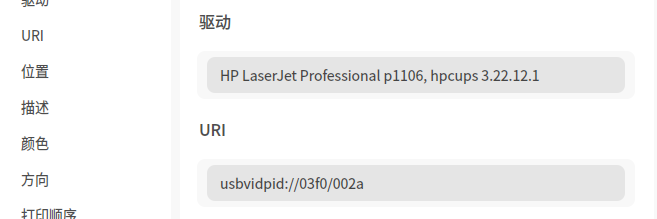
deepin 重新安装一遍后端包,又好了。
Popular Events
More

HP P1106打印机:打印 第一次没有问题,可是,打印 第二次就无反应。提示如下: