解决deepin操作系统开机特别特别特别慢的问题,以失败告终
Tofloor
poster avatar
iminto
deepin
2017-12-27 04:14
Author
本帖最后由 iminto 于 2019-5-7 11:34 编辑

我的深度,刚开始15.4的时候,开机只要20秒左右,现在要将近一分钟,忍不可忍.比Windows7的半分钟慢多了

那就来分析下问题在哪里,到底是哪个环节慢了

先在终端执行如下命令
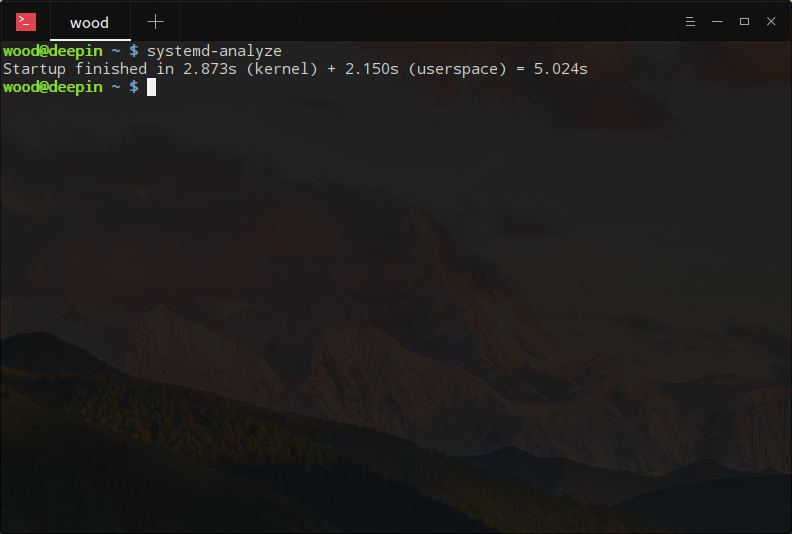
  1. systemd-analyze
Copy the Code
输出如下:
  1. ch@ai:~$ systemd-analyze
  2. Startup finished in 7.825s (kernel) + 38.210s (userspace) = 46.036s
Copy the Code
可以看到,开机花了46秒,最慢就慢在用户空间这块,内核启动实际上只花了7.8秒.

那么用户空间究竟干了啥导致deepin开机慢呢?执行下这个命令
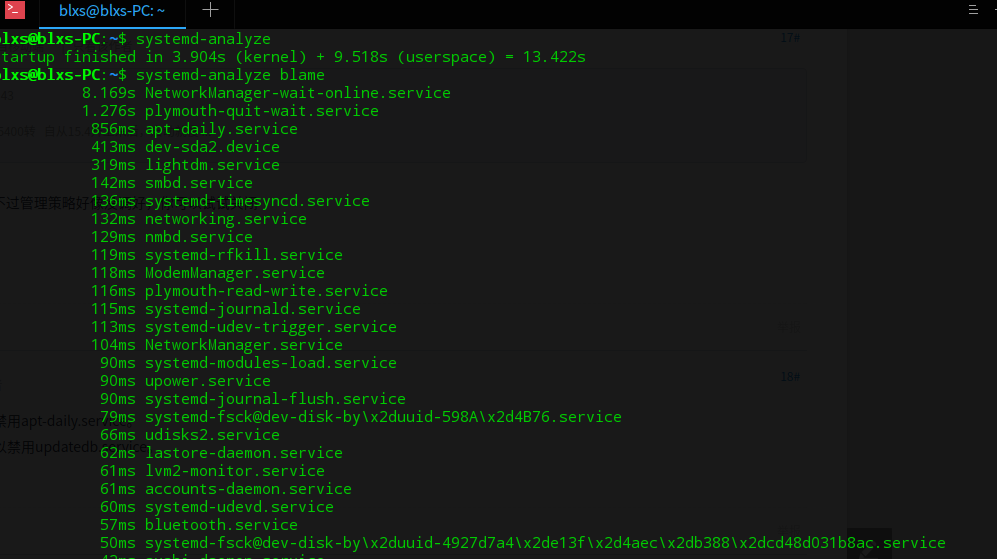
  1. systemd-analyze blame
Copy the Code
输出如下:
  1.          23.005s apt-daily.service
  2.          12.479s plymouth-quit-wait.service
  3.           7.729s ModemManager.service
  4.           7.714s loadcpufreq.service
  5.           7.572s dev-sda5.device
  6.           4.668s systemd-journal-flush.service
  7.           4.149s systemd-logind.service
  8.           3.417s systemd-rfkill.service
  9.           3.385s pppd-dns.service
  10.           3.330s alsa-restore.service
  11.           3.297s avahi-daemon.service
  12.           3.289s networking.service
  13.           2.741s lightdm.service
  14.           2.548s NetworkManager.service
  15.           2.544s lastore-daemon.service
  16.           1.884s lvm2-monitor.service
Copy the Code
好家伙,就plymouth-quit-wait.service 和 apt-daily.service 这俩家伙最坑爹.也可以
  1. sudo systemd-analyze plot > boot.svg
Copy the Code
导出分析结果为图片.


plymouth-quit-wait.service 这家伙是干啥的呢,这家伙就是开机动画.会不会是这里的问题

关闭 主题试试.
然后再禁用下服务:
  1. sudo systemctl mask plymouth-quit-wait.service
Copy the Code
关闭这个服务没事吧?没事的,只是开机会变丑一点.

那apt-daily.service又是干啥的呢?
我们来看下:
  1. systemctl status apt-daily.service
  2. ● apt-daily.service - Daily apt activities
  3.    Loaded: loaded (/lib/systemd/system/apt-daily.service; static; vendor preset: enabled)
  4.    Active: inactive (dead) since Tue 2017-12-26 19:21:27 CST; 36min ago
  5.      Docs: man:apt(8)
  6.   Process: 503 ExecStart=/usr/lib/apt/apt.systemd.daily (code=exited, status=0/SUCCESS)
  7. Main PID: 503 (code=exited, status=0/SUCCESS)

  8. Warning: Journal has been rotated since unit was started. Log output is incomplete or unavailable.
Copy the Code
看看这个服务都干了啥
  1. $ cat /usr/lib/apt/apt.systemd.daily
Copy the Code
发现干的都是些apt包管理的事情,这个也好办,大不了我需要的时候手动清理和升级就好了
执行下面的命令
  1. systemctl disable apt-daily.service
Copy the Code
.
打完收工,再重启下看看
  1. $ systemd-analyze
  2. Startup finished in 7.495s (kernel) + 18.579s (userspace) = 26.074s
Copy the Code


现在开机没有动画效果了,丑了一点,但是开机速度提高了20多秒

但是,问题在于,deepin从输入密码登录到壁纸显示到桌边图标都出来这段时间特别长,有半分钟吧,从而导致了上述的优化感觉不出明显的变化,都耗在登录的阶段了.显示开机26秒,实际上可用还是需要一分钟还多的时间.
********************************
你的systemd-analyze blame输出和我的不一定相同,我只是提供一种思路.


Reply Favorite View the author
All Replies
1 / 3
To page
iminto
deepin
2017-12-27 04:46
#1
本帖最后由 iminto 于 2017-12-26 22:23 编辑

掐着秒表算了下,重启一次deepin需要耗时达到90秒.

重启时,关机耗时11秒.
重新开机自检到出现deepin的logo时已经到了50多秒了.
然后是漫长的等待,64秒的时候出现登录登录窗口,
输入密码到进入桌面并可用,耗时长达30多秒.


在deepin 15.4 的时候,很明显是没有这么长的.

问题的关键在于优化进入桌面的时间 还在不断尝试优化这个问题
*******************
最新成绩,缩短进入桌面时间8秒,现在完整的重启时间是1分26秒,输入密码到桌面显示的时间明显缩短了几秒
Reply View the author
destory
deepin
2017-12-29 01:03
#2
我也想加快deepin的启动速度,参考了一些干货。思考了许久,花了两百多买一个固态,开机速度明显提升。和10s左右吧
Reply View the author
Comments
kirigaya
2018-08-29 23:58
花钱变强
wtz
2018-06-02 10:45
666
9***8@qq.com
deepin
2017-12-29 01:18
#3
实测了一下,从开机到进入选择引导界面9秒左右,取消延时,直接进入系统,用时20秒。
Reply View the author
9***8@qq.com
deepin
2017-12-29 01:19
#4
5秒关机
Reply View the author
jlice
deepin
2017-12-29 01:24
#5
系统装在SSD的没感觉到开机很慢  而且基本不需要关机
Reply View the author
woodelf
deepin
2017-12-29 02:45
#6
SATA3接口的SSD+F2FS,5秒启动完,关机秒关。

Reply View the author
iminto
deepin
2017-12-29 02:56
#7
https://bbs.deepin.org/post/150707
SATA3接口的SSD+F2FS,5秒启动完,关机秒关。

我这里再快都没用 卡在了logo黑屏和登录阶段.

无论是windows系统,还是15.4,都不存在这个问题,这是15.5引入的bug
Reply View the author
dzuiuabi
deepin
2017-12-29 03:39
#8
Startup finished in 7.872s (kernel) + 42.215s (userspace) = 50.087s
这是我的,不过你可真乃奇人也!你这个帖子我收藏了
Reply View the author
lulinux
deepin
2017-12-29 04:45
#9
好家伙,学到了一条牛逼的命令。
systemd-analyze blame
Reply View the author
lulinux
deepin
2017-12-29 04:47
#10
本帖最后由 lulinux 于 2017-12-28 20:48 编辑

这是我的:
╰─>systemd-analyze blame                                                                                                                                                                                                        17-12-28 20:46
         14.120s updatedb.service
         12.448s rc-local.service
          6.664s man-db.service
          1.437s dev-sda6.device
           668ms systemd-journal-flush.service
           605ms ModemManager.service
           604ms run-media-manjarocn-14\x2dForLinux.mount
           504ms systemd-modules-load.service
           500ms systemd-udevd.service
           467ms systemd-hwdb-update.service
           386ms systemd-fsck@dev-disk-by\x2duuid-b62f95de\x2d10e6\x2d4f2e\x2d9ea4\x2d839900523e1e.service
           369ms NetworkManager.service
           280ms polkit.service
           273ms ldconfig.service
           211ms tlp.service
           208ms logrotate.service
           200ms udisks2.service
           139ms home.mount
           113ms systemd-tmpfiles-setup-dev.service
            71ms avahi-daemon.service
            64ms systemd-tmpfiles-clean.service
            63ms dev-mqueue.mount
            63ms dev-hugepages.mount
            56ms upower.service
            55ms user@1000.service
            54ms systemd-udev-trigger.service
            53ms systemd-tmpfiles-setup.service
            53ms systemd-journald.service
            48ms systemd-binfmt.service
            47ms alsa-restore.service
            46ms accounts-daemon.service
            46ms systemd-sysusers.service
            39ms lightdm.service
            28ms kmod-static-nodes.service
            23ms systemd-journal-catalog-update.service
            22ms systemd-logind.service
            21ms systemd-update-done.service
            20ms systemd-random-seed.service
            19ms ntpd.service
            15ms systemd-sysctl.service
            10ms systemd-remount-fs.service
             9ms dev-disk-by\x2duuid-08af9c3a\x2d5e1e\x2d4332\x2db6f5\x2d00550de0907a.swap
             8ms sys-kernel-debug.mount
             6ms systemd-update-utmp.service
             5ms systemd-user-sessions.service
             4ms rtkit-daemon.service
             3ms sys-kernel-config.mount
             2ms tmp.mount
             1ms sys-fs-fuse-connections.mount
             1ms proc-sys-fs-binfmt_misc.mount

Reply View the author
蒙笛
deepin
2017-12-29 04:55
#11
大神又提供了一个槽点。

  1. ~$ systemd-analyze
  2. Startup finished in 3.079s (firmware) + 3.226s (loader) + 10.285s (kernel) + 29.707s (userspace) = 46.298s
  3. :~$ systemd-analyze blame
  4.          11.417s plymouth-quit-wait.service
  5.           9.499s NetworkManager-wait-online.service
  6.           5.505s dev-sda10.device
  7.           3.768s ModemManager.service
  8.           3.568s systemd-journal-flush.service
  9.           2.684s lvm2-monitor.service
  10.           2.516s systemd-fsck@dev-disk-by\x2duuid-E8FD\x2dE81B.service
  11.           2.473s nmbd.service
  12.           2.447s wpa_supplicant.service
  13.           1.842s systemd-modules-load.service
  14.           1.519s accounts-daemon.service
  15.           1.298s smbd.service
Copy the Code
Reply View the author
RedPanda
deepin
2017-12-29 06:06
#12
学习了,居然还有这种查看启动时长的命令~
Reply View the author
doge-linux
deepin
2017-12-29 07:50
#13
Startup finished in 6.854s (firmware) + 7.001s (loader) + 2.864s (kernel) + 36.345s (userspace) = 53.066s
固态表示很吃力。
Reply View the author
jlice
deepin
2017-12-29 08:06
#14
我也晒下我的

  1. $ systemd-analyze blame
  2.          11.810s mysql.service
  3.           3.860s NetworkManager-wait-online.service
  4.           3.444s smbd.service
  5.           3.014s iio-sensor-proxy.service
  6.           2.261s systemd-journal-flush.service
  7.           1.681s systemd-fsck@dev-disk-by\x2duuid-e7ca82a2\x2d3445\x2d4b31\x2dbe8d\x2d1a9d218f22a1.service
  8.           1.629s redis-server.service
  9.           1.502s home.mount
  10.           1.480s plymouth-quit-wait.service
  11.           1.430s networking.service
  12.           1.353s nmbd.service
  13.           1.266s teamviewerd.service
  14.           1.200s plymouth-read-write.service
  15.           1.005s systemd-fsck@dev-disk-by\x2duuid-bb965c54\x2d4a4b\x2d45d4\x2d8415\x2dc4cd0757a5c9.service
  16.            827ms upower.service
  17.            807ms systemd-tmpfiles-setup.service
  18.            654ms VBoxVMs.mount
  19.            638ms systemd-fsck@dev-disk-by\x2duuid-092ee742\x2d7b98\x2d423f\x2d9004\x2d7d4e99f7d796.service
  20.            605ms apt-daily.service
  21.            518ms exim4.service
  22.            505ms systemd-rfkill.service
  23.            493ms systemd-backlight@backlight:intel_backlight.service
  24.            404ms systemd-fsck@dev-disk-by\x2duuid-8044ef35\x2db7a4\x2d406d\x2dbe89\x2d4e920eba17d8.service
  25.            387ms tmp.mount
  26.            372ms var.mount
Copy the Code


Reply View the author
Comments
jiftle
2018-12-08 05:25
github关注你了伙计
le******ly@163.com
deepin
2017-12-29 09:43
#15
本帖最后由 lethappyfly 于 2017-12-29 02:12 编辑

又学到一个有用的命令,谢谢了!
第一张是320G  三星2.5机械硬盘    5400转   自从15.4升上来后,启动就慢得我开始怀疑人生了。   然后输入密码后,圈圈转比前面还长时间。
以前大概20秒-30秒就完全打开的。
第二张是2T    希捷3.5机械硬盘      7200转     新15.5 U盘安装
Reply View the author
comzhong
deepin
2017-12-29 10:43
#16
lethappyfly 发表于 2017-12-29 01:43
又学到一个有用的命令,谢谢了!
第一张是320G  三星2.5机械硬盘    5400转   自从15.4升上来后,启动就慢 ...

15.5好像是默认开启页面缓存,不过管理策略好像没调好,你可以试试关闭

swapoff /swapfile
rm  /swapfile
Reply View the author
wtz
deepin
2017-12-29 11:17
#17
不需要自动检查更新的话,可以禁用apt-daily.service。
不常用搜索文件的功能的话,可以禁用updatedb.service。
Reply View the author
li123789
deepin
2017-12-29 13:56
#18
看看我的
Reply View the author
百赖小生
deepin
2017-12-29 16:10
#19
本帖最后由 liuhong3056 于 2017-12-29 08:12 编辑

Reply View the author
dzuiuabi
deepin
2017-12-29 17:02
#20
https://bbs.deepin.org/post/150707
又学到一个有用的命令,谢谢了!
第一张是320G  三星2.5机械硬盘    5400转   自从15.4升上来后,启动就慢 ...

我的启动速度和你第一张差不了多少了。
Reply View the author
1 / 3
To page