

 中文
中文 
johnmy deepin
2025-10-17 21:35 deepin 下载编译好的,无法随系统一起启动。
Reply Like 0 View the author
deepin 下载编译好的,无法随系统一起启动。
deepin 找到原因了,关闭磐石系统即可。https://bbs.deepin.org.cn/post/286633

 deepin
 可以手动把desktop文件放到 ~/.config/autostart 目录,来启用开机启动
deepin 已经安装成功,但托盘中没有图标,怎么解决?谢谢
 deepin
 哈哈哈,我也是折腾半天,发现是这个磐石的原因无法读写/usr,我关了以后安装上微力同步,然后再打开
磐石,没毛病
deepin 已经安装成功,但托盘中没有图标,怎么解决?谢谢
linux系统的微力同步是没有图标的,浏览器访问localhost:8886就可以了
deepin 现在是在浏览器中这样操作的,我后来一直打开了磐石。
 deepin
 哈哈哈,我也是折腾半天,发现是这个磐石的原因无法读写/usr,我关了以后安装上微力同步,然后再打开
磐石,没毛病
这就叫搬起石头砸了DEEPIN的脚
deepin 是啊,不应该,不然没法折腾了

 deepin
 我是直接把程序和service文件从包里扒出来,搞成免安装加用户级服务方式运行了。
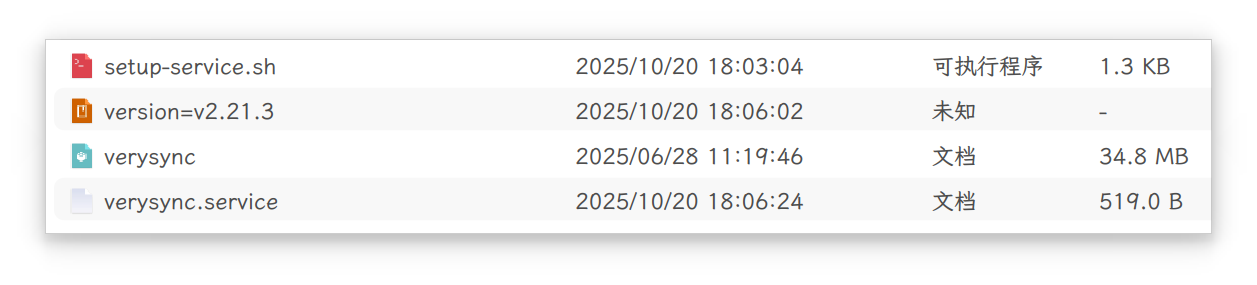
#!/bin/bash

set -x

unalias -a

IS_SERVICE="true"

THIS_DIR="$(readlink -f "$(dirname "$0")")"

cd "${THIS_DIR}"

[ -f verysync ] || exit 0

if [ x"true" = x"${IS_SERVICE}" -a -f verysync.service ]; then
    [ -d "${HOME}/.config/systemd/user" ] || mkdir -pv "${HOME}/.config/systemd/user"
    SERVICE_DST_FILE="${HOME}/.config/systemd/user/verysync.service"
    if [ -f "${SERVICE_DST_FILE}" ] && grep -q "ExecStart=${THIS_DIR}/verysync" "${SERVICE_DST_FILE}"; then
        if [ "$(systemctl --user is-active verysync.service)" != "active" ]; then
            systemctl --user daemon-reload
            systemctl --user enable --now verysync.service
        fi
        [ "$(systemctl --user is-active verysync.service)" = "active" ] && xdg-open http://127.0.0.1:8886/
    else
        sed -ri "s|^ExecStart=.*$|ExecStart=${THIS_DIR}/verysync -no-browser -no-restart -logflags=0|" verysync.service
        cp -fv verysync.service ${HOME}/.config/systemd/user/
        systemctl --user daemon-reload
        systemctl --user enable --now verysync.service
        [ "$(systemctl --user is-active verysync.service)" = "active" ] && xdg-open http://127.0.0.1:8886/
    fi
else
    if [ "$(systemctl --user is-active verysync.service)" != "active" ]; then
        "${THIS_DIR}"/verysync -no-browser -no-restart -logflags=0
    else
        xdg-open http://127.0.0.1:8886/
    fi
fi
我是直接把程序和service文件从包里扒出来,搞成免安装加用户级服务方式运行了。
#!/bin/bash

set -x

unalias -a

IS_SERVICE="true"

THIS_DIR="$(readlink -f "$(dirname "$0")")"

cd "${THIS_DIR}"

[ -f verysync ] || exit 0

if [ x"true" = x"${IS_SERVICE}" -a -f verysync.service ]; then
    [ -d "${HOME}/.config/systemd/user" ] || mkdir -pv "${HOME}/.config/systemd/user"
    SERVICE_DST_FILE="${HOME}/.config/systemd/user/verysync.service"
    if [ -f "${SERVICE_DST_FILE}" ] && grep -q "ExecStart=${THIS_DIR}/verysync" "${SERVICE_DST_FILE}"; then
        if [ "$(systemctl --user is-active verysync.service)" != "active" ]; then
            systemctl --user daemon-reload
            systemctl --user enable --now verysync.service
        fi
        [ "$(systemctl --user is-active verysync.service)" = "active" ] && xdg-open http://127.0.0.1:8886/
    else
        sed -ri "s|^ExecStart=.*$|ExecStart=${THIS_DIR}/verysync -no-browser -no-restart -logflags=0|" verysync.service
        cp -fv verysync.service ${HOME}/.config/systemd/user/
        systemctl --user daemon-reload
        systemctl --user enable --now verysync.service
        [ "$(systemctl --user is-active verysync.service)" = "active" ] && xdg-open http://127.0.0.1:8886/
    fi
else
    if [ "$(systemctl --user is-active verysync.service)" != "active" ]; then
        "${THIS_DIR}"/verysync -no-browser -no-restart -logflags=0
    else
        xdg-open http://127.0.0.1:8886/
    fi
fi
高,
我只把磐石关闭了。
Popular Events
More


 WhatsApp doesn't work in the official Deepin browser!
提示只读系统,怎么办呢