

 中文
中文 
swish deepin
2025-06-04 12:01 deepin 用 DeepSeek 编写了一个脚本,然后手动修改后加入了计划任务,每分钟执行一次来解决这个问题。
#!/bin/bash
# 蓝牙音频优化脚本 v2025.6
# 功能:自动切换蓝牙设备到高质量音频模式(A2DP Sink),按配置文件给出的优先级来激活

# 初始化设置
DEBUG_MODE=false
LOG_FILE="/tmp/bluetooth_audio_optimizer.log"
export LC_ALL=C
# 设置正确的环境变量
export XDG_RUNTIME_DIR="/run/user/$(id -u)"

# 等待 PulseAudio/Pipewire 服务启动
MAX_ATTEMPTS=10
ATTEMPT=0
while [ $ATTEMPT -lt $MAX_ATTEMPTS ]; do
    if pactl info &>/dev/null; then
        break
    fi
    sleep 1
    ATTEMPT=$((ATTEMPT+1))
done

if [ $ATTEMPT -ge $MAX_ATTEMPTS ]; then
    echo "$(date) - 错误:无法连接到 PulseAudio/Pipewire 服务" >&2
    exit 1
fi
# 记录日志函数
log() {
    local msg="$1"
    if $DEBUG_MODE; then
        echo -e "$(date +'%F %T'): $msg" | tee -a "$LOG_FILE"
    else
        echo -e "$msg"
    fi
}

# === 核心功能:语言无关的设备识别 ===

# 获取蓝牙MAC地址(完全语言无关)
get_bt_mac() {
    pactl list sinks | grep -m1 -oP 'api\.bluez5\.address\s*=\s*"\K([0-9A-F:]{17})'
}

# 获取蓝牙卡路径(兼容所有语言环境)
get_bt_card_path() {
    local mac
    mac=$(pactl list sinks | grep -m1 -oP 'api\.bluez5\.address\s*=\s*"\K([0-9A-F:]{17})')
    [ -n "$mac" ] && echo "bluez_card.${mac//:/_}"
}

# === A2DP/LDAC状态检测 ===

# 检测当前配置文件
get_active_profile() {
    local card_path="$1"
    pactl list cards | awk -v card="$card_path" '
        $0 ~ " " card {
            active = 0
            while (getline) {
                if (/Active Profile:/) {
                    print $3
                    exit
                }
                if (/^$/ || /^Card/) break
            }
        }
    '
}

# 检测当前编码器
get_active_codec() {
    pactl list sinks | awk '
        /api\.bluez5\.codec = "/ {
            match($0, /"([^"]+)"/, a);
            if (a[1] != "") print a[1]
        }' | head -1
}

# 检测支持的编码列表
get_supported_codecs() {
    local card_path="$1"
    pactl list cards | grep -A50 " $card_path" |
        grep -oP 'bluez5\.codecs = \[\K[^\]]+' |
        tr -d '"' | tr ',' '\n' | sed 's/^ //'
}

# === A2DP模式切换(兼容多Profile)===

switch_to_a2dp() {
    local card_path="$1"
    declare -a profile_entries
    local profile_name="" priority=""
	declare -i -x retval=1
    log "检测可用的A2DP配置并准备按优先级排序..."

    # 解析所有可用A2DP配置
    pactl list cards | awk -v card="$card_path" '
        $0 ~ " " card {
            in_card = 1
            next
        }
        in_card && /Profiles:/ {
            in_profiles = 1
            next
        }
        in_profiles && /^$/ {
            exit # 遇到空行结束解析
        }
        in_profiles && /available:[[:space:]]*yes/ && /a2dp-sink/ {
            # 提取配置名
            profile_name = $0
            sub(/:.*/, "", profile_name)
            gsub(/^[[:space:]]+/, "", profile_name)

            # 提取优先级
            match($0, /priority:[[:space:]]*([0-9]+)/, m)
            priority = m[1]

            if (priority == "") priority = 0 # 缺省值

            printf "%d:%s\n", priority, profile_name
        }
    ' | sort -t: -k1,1nr | while IFS=: read -r priority profile; do

        # 记录发现的配置
        # profile_entries+=("$priority:$profile")
        if [[ "$retval" == "1" ]]; then
			log "发现高优先级配置 [优先级:${priority}]: ${profile}"
			if pactl set-card-profile "$card_path" "$profile" 2>/dev/null; then
	            sleep 0.5 # 等待协议生效
	            log "✓ 成功激活配置: ${profile}"

	            # 验证配置激活
	            local active_profile
	            active_profile=$(get_active_profile "$card_path")

	            if [[ "$active_profile" == "$profile" ]]; then
	                log "✓ 配置状态已确认"
	                retval=0
	            else
	                log "⚠️ 配置激活但状态不匹配,实际配置: ${active_profile}"
	            fi
	        else
	            log "⚠️ 配置激活失败: ${profile}"
			fi
        fi
    done
    # 所有配置尝试失败
	current_profile=$(get_active_profile "$card_path")
	if [[ ! "$current_profile" == *"a2dp-sink"* ]]; then
	    log "${RED}错误:所有可用A2DP配置尝试均失败${NC}"
    		log "请检查设备兼容性:pactl list cards | grep -A30 ' $card_path'"
		return 1
	fi
    return 0
}
# === 设备重连辅助函数 ===

reconnect_bluetooth_device() {
    local mac="$1"
    log "重置蓝牙连接..."

    (
        echo "disconnect $mac"
        sleep 3
        echo "connect $mac"
        sleep 5
        echo "quit"
    ) | bluetoothctl > /dev/null 2>&1

    log "设备重连完成"
}

# === 主控制流程 ===

main() {
    log "${BLUE}=== $(date -Iseconds) 蓝牙音频优化开始 ==="

    # 获取设备信息
    local bt_mac
    bt_mac=$(get_bt_mac)
    if [ -z "$bt_mac" ]; then
        log "${RED}错误:未检测到已连接的蓝牙耳机"
        return 1
    fi
    log "设备MAC地址: $bt_mac"

    local card_path
    card_path=$(get_bt_card_path "$bt_mac")
    if [ -z "$card_path" ]; then
        log "${RED}错误:无法识别蓝牙设备路径"
        return 1
    fi
    log "设备路径: $card_path"

    # 检查当前配置
    local current_profile
    current_profile=$(get_active_profile "$card_path")
    local current_codec
    current_codec=$(get_active_codec "$card_path")
    log "当前配置: ${current_profile:-未知} | 编码: ${current_codec:-未知}"

    # 自动切换到高质量模式
    if [[ ! "$current_profile" == *"a2dp-sink"* ]]; then
        log "正在切换到高质量音频模式..."
        if ! switch_to_a2dp "$card_path"; then
            log "${YELLOW}配置切换失败,尝试设备重连..."
            reconnect_bluetooth_device "$bt_mac"
            sleep 3
            switch_to_a2dp "$card_path" || {
                log "${RED}错误:无法切换到A2DP模式"
                return 1
            }
        fi
        sleep 2 # 等待配置稳定
        log "${GREEN}✓ 已启用高质量音频配置"
    else
        log "${GREEN}✓ 已在高质量音频模式"
    fi

    log "${BLUE}=== 优化完成 ==="
}

# === 颜色定义 ===
RED='\033[0;31m'
GREEN='\033[0;32m'
YELLOW='\033[1;33m'
BLUE='\033[0;34m'
NC='\033[0m'

# 执行主函数
if [ "$1" = "--debug" ]; then
    DEBUG_MODE=true
fi

main
Reply Like 0 View the author

 GXDE 25.5 beta1 has arrived — now with full Wayland support!


华为 FreeBuds 5 ,连接后,会出现两个设备,连接第一个能走 LDAC,但总默认第2个,结果每次都得手动切换。
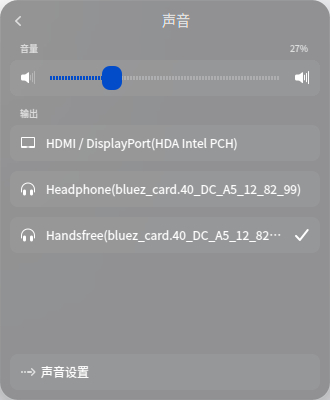
`信源 #2452
状态:SUSPENDED
名称:bluez_input.40:DC:A5:12:82:99
描述:HUAWEI FreeBuds 5
驱动程序:PipeWire
采样规格:float32le 1ch 48000Hz
声道映射:mono
所有者模块:4294967295
静音:否
音量:mono: 30583 / 47% / -11.92 dB
平衡 0.00
基础音量:65536 / 100% / 0.00 dB
信宿的监视器:n/a
延迟:0 微秒,已设置 0 微秒
标记:HW_VOLUME_CTRL DECIBEL_VOLUME LATENCY
属性:
media.class = "Audio/Source"
priority.driver = "2010"
card.profile.device = "0"
filter.smart.target = "{"bluez5.loopback":false, "bluez5.loopback-target":true, "device.id":88}"
device.description = "HUAWEI FreeBuds 5"
bluez5.loopback = "true"
device.id = "88"
node.name = "bluez_input.40:DC:A5:12:82:99"
filter.smart = "true"
priority.session = "2010"
audio.position = "[MONO]"
node.group = "loopback-4341-23"
node.link-group = "loopback-4341-23"
node.virtual = "true"
resample.prefill = "true"
resample.disable = "true"
media.name = "HUAWEI FreeBuds 5 output"
stream.is-live = "true"
node.want-driver = "true"
node.autoconnect = "true"
node.trigger = "true"
port.group = "stream.0"
adapt.follower.spa-node = ""
object.register = "false"
factory.id = "12"
clock.quantum-limit = "8192"
node.loop.name = "data-loop.0"
library.name = "audioconvert/libspa-audioconvert"
client.id = "74"
object.id = "85"
object.serial = "2452"
api.bluez5.address = "40:DC:A5:12:82:99"
api.bluez5.class = "0x240418"
api.bluez5.connection = "connected"
api.bluez5.device = ""
api.bluez5.icon = "audio-headphones"
api.bluez5.id = "0"
api.bluez5.path = "/org/bluez/hci0/dev_40_DC_A5_12_82_99"
bluez5.profile = "off"
device.alias = "HUAWEI FreeBuds 5"
device.api = "bluez5"
device.bus = "bluetooth"
device.form_factor = "headphone"
device.icon_name = "audio-headphones-bluetooth"
device.name = "bluez_card.40_DC_A5_12_82_99"
device.product.id = "0x410a"
device.string = "40:DC:A5:12:82:99"
device.vendor.id = "bluetooth:027d"
端口:
headphone-input: Handsfree (type: 模拟耳机, priority: 0, available)
活动端口:headphone-input
格式:
pcm
信源 #2487
状态:RUNNING
名称:bluez_output.40_DC_A5_12_82_99.1.monitor
描述:Monitor of HUAWEI FreeBuds 5
驱动程序:PipeWire
采样规格:s16le 1ch 16000Hz
声道映射:mono
所有者模块:4294967295
静音:否
音量:mono: 65536 / 100% / 0.00 dB
平衡 0.00
基础音量:65536 / 100% / 0.00 dB
信宿的监视器:bluez_output.40_DC_A5_12_82_99.1
延迟:0 微秒,已设置 0 微秒
标记:HARDWARE DECIBEL_VOLUME LATENCY
属性:
api.bluez5.address = "40:DC:A5:12:82:99"
api.bluez5.codec = "msbc"
api.bluez5.profile = "headset-head-unit"
api.bluez5.transport = ""
bluez5.loopback = "false"
card.profile.device = "1"
device.id = "88"
device.intended_roles = "Communication"
device.routes = "1"
factory.name = "api.bluez5.sco.sink"
device.description = "HUAWEI FreeBuds 5"
node.name = "bluez_output.40_DC_A5_12_82_99.1"
node.pause-on-idle = "false"
priority.driver = "1010"
priority.session = "1010"
factory.id = "12"
clock.quantum-limit = "8192"
device.api = "bluez5"
media.class = "Audio/Sink"
node.driver = "true"
port.group = "stream.0"
node.loop.name = "data-loop.0"
library.name = "audioconvert/libspa-audioconvert"
object.id = "69"
object.serial = "2487"
client.id = "47"
api.bluez5.class = "0x240418"
api.bluez5.connection = "connected"
api.bluez5.device = ""
api.bluez5.icon = "audio-headphones"
api.bluez5.id = "0"
api.bluez5.path = "/org/bluez/hci0/dev_40_DC_A5_12_82_99"
bluez5.profile = "off"
device.alias = "HUAWEI FreeBuds 5"
device.bus = "bluetooth"
device.form_factor = "headphone"
device.icon_name = "audio-headphones-bluetooth"
device.name = "bluez_card.40_DC_A5_12_82_99"
device.product.id = "0x410a"
device.string = "40:DC:A5:12:82:99"
device.vendor.id = "bluetooth:027d"
device.class = "monitor"
端口:
headphone-hf-output: Handsfree (type: 模拟耳机, priority: 0, available)
活动端口:headphone-hf-output
格式:
pcm
`